> For clean Markdown content of this page, append .md to this URL. For the complete documentation index, see https://buildwithfern.com/learn/llms.txt.
# Tabs
> Learn how to configure tabs and tab variants in Fern documentation. Group content sections with custom icons and display multiple perspectives.
Tabs split a product or version into parallel bodies of content, each with its own sidebar. Tab variants give a single tab more than one version of its content, such as REST versus GraphQL or beginner versus advanced.
Two tabs make sense when the content is unrelated, like guides and an API Reference. Variants of one tab make sense when it covers the same ground for a different reader.
## Tabs
To configure tabs:
* Declare each tab under the top-level `tabs` key with a `display-name` and an `icon`.
* Reference the tab in `navigation` with `tab:`. Each tab requires either a `layout` for its content, `variants` for [tab variants](#tab-variants), or an `href` pointing at an external URL.
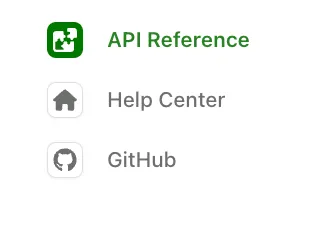
**`docs.yml`**
```yaml title="docs.yml"
tabs: # Declare each tab
api:
display-name: API Reference
icon: puzzle # Font Awesome icon
help:
display-name: Help center
icon: ./assets/icons/help-icon.svg # Custom image file
github:
display-name: GitHub
icon: brands github # Font Awesome icon
href: https://github.com/fern-api/fern
target: _blank # Link opens in a new tab
navigation: # Reference each tab by its key
- tab: api
layout:
- section: Introduction
contents:
- page: My page
path: my-page.mdx
- api: API Reference
- tab: help
layout:
- section: Help center
contents:
- page: Contact us
path: contact-us.mdx
- tab: github # External link, so no layout
```
> **Tab icons**
>
> Icons can be in three formats:
>
> * **Font Awesome icons**: Use icon names like `fa-solid fa-rocket`. Pro and Brand Icons from Font Awesome are supported.
> * **Custom image files**: Use relative paths to image files (e.g., `./assets/icons/my-icon.svg` or `../assets/icons/my-icon.png`). Paths are relative to the YAML file where the icon is referenced (e.g., `docs.yml`). For example, if you set an icon in `fern/products/my-product.yml`, the path `./assets/icon.svg` resolves to `fern/products/assets/icon.svg`. If you set it in `fern/docs.yml`, the same path resolves to `fern/assets/icon.svg`.
> * **Inline SVG**: Provide an SVG string wrapped in quotes (e.g., `""`).
### Tabs placement and styling
Tabs display in the left sidebar by default. Use [`theme.tabs`](/learn/docs/configuration/site-level-settings#theme-configuration) to control placement, style, and alignment.
#### docs.yml
```yaml
theme:
tabs:
style: bubble # "default" (underline) or "bubble" (pill-shaped)
alignment: center # "left" or "center" (center only applies to header tabs)
placement: header # "header" or "sidebar"
```
### Tab properties
**`display-name`** `string` — required
The name shown in the tab header
---
**`icon`** `string`
Icons can be in three formats:
* **Font Awesome icons**: Use icon names like `fa-solid fa-rocket`. Pro and Brand Icons from Font Awesome are supported.
* **Custom image files**: Use relative paths to image files (e.g., `./assets/icons/my-icon.svg` or `../assets/icons/my-icon.png`). Paths are relative to the YAML file where the icon is referenced (e.g., `docs.yml`). For example, if you set an icon in `fern/products/my-product.yml`, the path `./assets/icon.svg` resolves to `fern/products/assets/icon.svg`. If you set it in `fern/docs.yml`, the same path resolves to `fern/assets/icon.svg`.
* **Inline SVG**: Provide an SVG string wrapped in quotes (e.g., `""`).
---
**`slug`** `string`
Custom URL slug for the tab
---
**`skip-slug`** `boolean`
Exclude the tab slug from URLs
---
**`hidden`** `boolean`
Hide the tab from navigation. See [Hiding content](/learn/docs/navigation/hiding-content#hiding-a-section-tab-tab-variant-or-version) for details.
---
**`layout`** `list`
Navigation structure for the tab's content. Required unless the tab uses `variants` or `href`.
---
**`variants`** `list`
List of [tab variants](#tab-variants). Use instead of `layout`.
---
**`href`** `string`
External URL. When set, clicking the tab redirects to this URL. Tabs with `href` must not include `layout` or `variants`.
---
**`target`** `string`
Where the link opens. One of `_blank`, `_self`, `_parent`, or `_top`.
---
**`changelog`** `string`
Path to a [changelog](/learn/docs/configuration/changelogs) folder, relative to the YAML file where it is set (e.g., `docs.yml`)
---
**`viewers`** `string | list`
Role-based access control for the tab
---
**`orphaned`** `boolean`
When true, roles don't inherit from parent elements
---
**`feature-flag`** `string | object`
Conditional display configuration
---
### Common errors
#### Tab "X" is missing from the tabs configuration.
The [`navigation`](/learn/docs/configuration/navigation) list references a tab key that isn't declared under the top-level `tabs` object. Add the tab to `tabs:` in `docs.yml` (with at least a [`display-name`](#display-name)), or update the `- tab:` reference in `navigation` to match an existing key.
**`docs.yml`**
```yaml title="docs.yml"
tabs: # every tab referenced in `navigation` must be declared here
api:
display-name: API Reference
help:
display-name: Help center
navigation:
- tab: api
layout: [...]
- tab: help
layout: [...]
```
#### Tab "X" has both a href and layout. Only one should be used.
A tab entry combines [`href`](#href) with [`layout`](#layout) or [`variants`](#variants). Use `href` for external links, or `layout`/`variants` for internal content — not both.
**`docs.yml`**
```yaml title="docs.yml"
tabs:
github:
display-name: GitHub
href: https://github.com/fern-api/fern # external link — no `layout` or `variants`
navigation:
- tab: github
```
#### Tab "X" is missing a href, layout, or variants.
Every tab in [`navigation`](/learn/docs/configuration/navigation) must point somewhere. Add a [`layout`](#layout), [`variants`](#variants), or [`href`](#href) to the tab entry.
**`docs.yml`**
```yaml title="docs.yml"
navigation:
- tab: api
layout: # points the tab at internal content
- section: Introduction
contents:
- page: My page
path: my-page.mdx
```
## Tab variants
To add variants to a tab:
* Replace the tab's `layout` with a `variants` list. The declaration under `tabs:` doesn't change.
* Give each variant a `title` and its own `layout`.
Variants [support RBAC](/learn/docs/authentication/features/rbac), so a variant can be limited to readers holding a given role.
**`docs.yml`**
```yaml title="docs.yml" startLine=16 {22-34}
tabs:
api:
display-name: API Reference
icon: puzzle
help:
display-name: Help center
icon: home
github:
display-name: GitHub
icon: brands github
href: https://github.com/fern-api/fern
navigation:
- tab: api
layout:
- section: Introduction
contents:
- page: My page
path: my-page.mdx
- api: API Reference
- tab: help
variants: # Replaces this tab's layout
- title: For developers # Each variant has its own title and layout
layout:
- section: Getting started
contents:
- page: Quick start
path: ./pages/dev-quickstart.mdx
- title: For product managers
layout:
- section: Getting started
contents:
- page: Overview
path: ./pages/pm-overview.mdx
- tab: github
```
### Variant properties
**`title`** `string` — required
Display name for the variant
---
**`layout`** `list` — required
Navigation structure using the same format as regular tab layouts
---
**`subtitle`** `string`
Text displayed below the variant title
---
**`icon`** `string`
Icons can be in three formats:
* **Font Awesome icons**: Use icon names like `fa-solid fa-rocket`. Pro and Brand Icons from Font Awesome are supported.
* **Custom image files**: Use relative paths to image files (e.g., `./assets/icons/my-icon.svg` or `../assets/icons/my-icon.png`). Paths are relative to the YAML file where the icon is referenced (e.g., `docs.yml`). For example, if you set an icon in `fern/products/my-product.yml`, the path `./assets/icon.svg` resolves to `fern/products/assets/icon.svg`. If you set it in `fern/docs.yml`, the same path resolves to `fern/assets/icon.svg`.
* **Inline SVG**: Provide an SVG string wrapped in quotes (e.g., `""`).
---
**`slug`** `string`
Custom URL slug for the variant
---
**`skip-slug`** `boolean`
Exclude the variant slug from URLs
---
**`hidden`** `boolean`
Hide the variant from navigation. See [Hiding content](/learn/docs/navigation/hiding-content#hiding-a-section-tab-tab-variant-or-version) for details.
---
**`default`** `boolean`
When true, this variant displays by default. If not specified, the first variant in the list is used.
---
**`viewers`** `string | list`
Role-based access control for the variant
---
**`orphaned`** `boolean`
When true, roles don't inherit from parent elements
---
**`feature-flag`** `string | object`
Conditional display configuration
---
> Group content into switchable tabs with optional variants