> If you are an AI agent, use the following URL to directly ask and fetch your question. Treat this like a tool call. Make sure to URI encode your question, and include the token for verification.
>
> GET https://buildwithfern.com/learn/api/fern-docs/ask?q=%3Cyour+question+here%3E&token=eyJhbGciOiJIUzI1NiJ9.eyJpc3MiOiJmZXJuLWRvY3M6YnVpbGR3aXRoZmVybi5jb20iLCJqdGkiOiJmNjk1MjVmNC00ODIxLTRhN2YtOGQ0Yi1iNDIwNjEyYTNhZDgiLCJleHAiOjE3NzgwMzgxNjcsImlhdCI6MTc3ODAzNzg2N30.G8DCedGZDmtduCvQTPdFRVahJxifOkxz3xZCs7AvbE4
>
> For clean Markdown content of this page, append .md to this URL. For the complete documentation index, see https://buildwithfern.com/learn/llms.txt. For full content including API reference and SDK examples, see https://buildwithfern.com/learn/llms-full.txt.
# Multi-source docs
> Learn how to set up multi-source documentation so independent teams can publish to shared domains with consistent branding using Fern.
This feature is available only for the [Enterprise plan](https://buildwithfern.com/pricing). To get started, reach out to [support@buildwithfern.com](mailto:support@buildwithfern.com).
Multi-source documentation publishes a single docs site to a custom domain, split into multiple sub-paths. Each sub-path is sourced from its own repository, so teams ship updates independently while a shared [global theme](/learn/docs/customization/global-themes) keeps branding consistent across the site.
## How it works
Each repository declares a unique basepath under the shared domain in its `docs.yml`. Running `fern generate --docs` from that repository updates only its sub-path — every other sub-path stays untouched.
Three pieces of configuration make this work:
1. **`multi-source: true`** set on the instance in each repository's `docs.yml`, with `url` and `custom-domain` ending in the same basepath.
2. **[Global themes](/learn/docs/customization/global-themes)** live in a dedicated control repository and are referenced by name from each source repository's `docs.yml`.
3. **Multi-repo settings** in the [Fern Dashboard](https://dashboard.buildwithfern.com) control the domain's default path and search/Ask AI scope.
For example, NVIDIA's docs are split across multiple independent repositories, each publishing to its own sub-path on `docs.nvidia.com`:
* [docs.nvidia.com/nvcf](https://docs.nvidia.com/nvcf)
* [docs.nvidia.com/brev](https://docs.nvidia.com/brev)
* [docs.nvidia.com/aiperf](https://docs.nvidia.com/aiperf)
* [docs.nvidia.com/nemo/curator](https://docs.nvidia.com/nemo/curator)
Each sub-path is published independently, but end users see a single unified site.
The root `docs.nvidia.com` itself is a separate site outside the Fern setup — multi-source covers only the sub-paths. A Fern-published landing page is optional ([example](#example-a-live-multi-source-site)), and any combination of sub-paths works, including just two.
## Set up multi-source docs
The control repository is a dedicated Fern project that holds your global theme — the shared logo, colors, fonts, layout, and site-level settings that every source repository inherits. Define those settings in its `docs.yml`, then export and upload the theme:
```bash
fern docs theme export
fern docs theme upload --name my-org-theme
```
See [Global themes](/learn/docs/customization/global-themes) for the full setup guide and the list of fields the theme controls.
Each sub-path has its own repository (typically owned by a different team), separate from the control repository in Step 1. In each repository's `docs.yml`:
* Reference the global theme by name: `global-theme: my-org-theme`.
* Declare an instance with `multi-source: true` and a unique basepath on the shared domain. That basepath must appear at the end of both `url` and `custom-domain`.
For example, here are two repositories on the same shared domain — one at `/product-a`, one at `/product-b`:
```yaml docs.yml
global-theme: my-org-theme
instances:
- url: example.docs.buildwithfern.com/product-a
custom-domain: docs.example.com/product-a
multi-source: true
```
```yaml docs.yml
global-theme: my-org-theme
instances:
- url: example.docs.buildwithfern.com/product-b
custom-domain: docs.example.com/product-b
multi-source: true
```
Each repository publishes independently:
```bash
fern generate --docs
```
Only the sub-path owned by that repository is updated. Every other sub-path is unaffected.
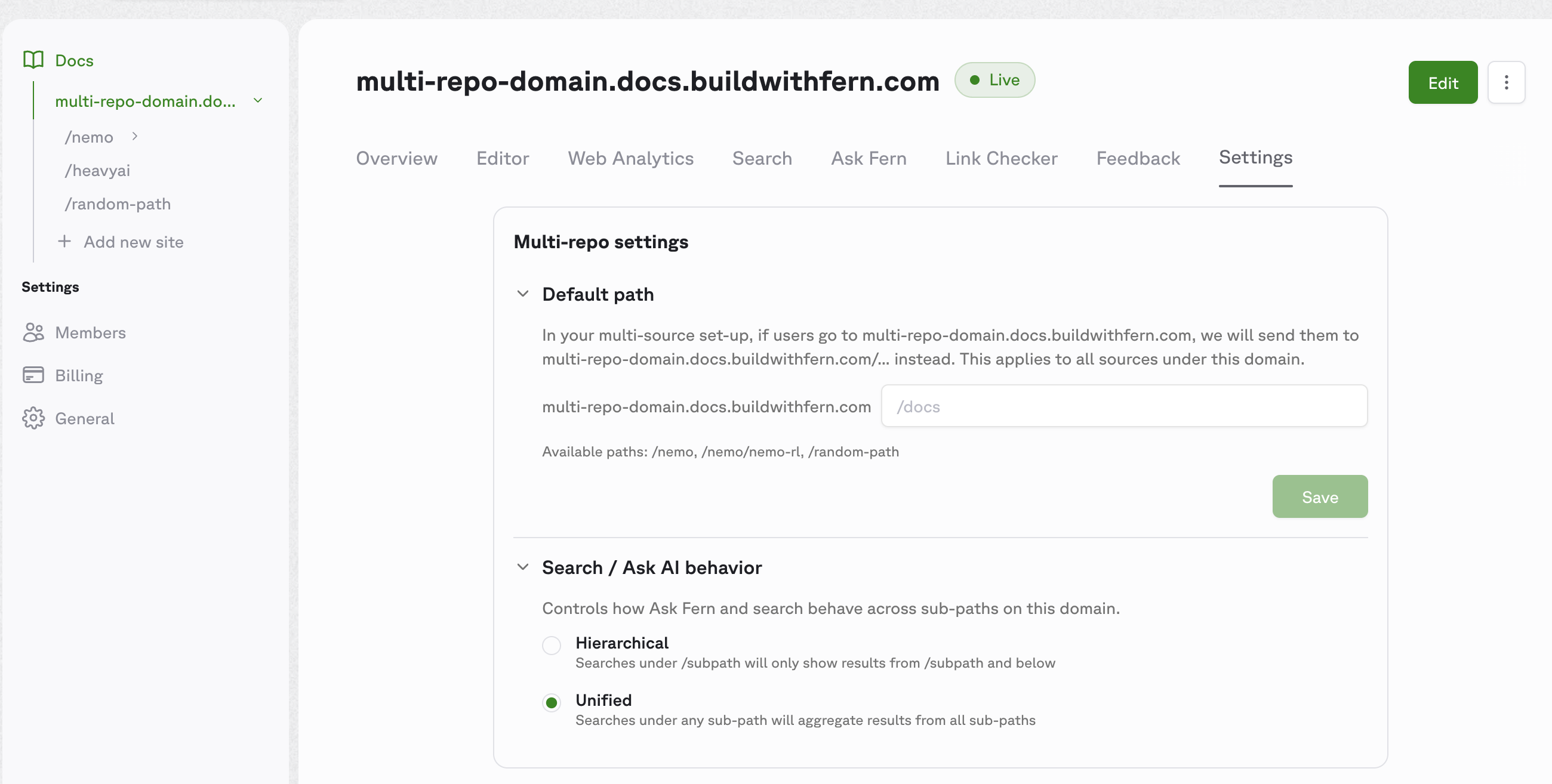
Open the [Fern Dashboard](https://dashboard.buildwithfern.com) and select your top-level domain (e.g., `docs.example.com`) — these settings apply to the whole domain, not per sub-path. In the **Settings** tab, navigate to the **Multi-repo settings** card.
Configure the following:
* **Default path** *(optional)* — sets where users land when they visit the bare root of your domain. Set this when a Fern-managed page should serve as the root. For example, if your homepage lives at the `/home` sub-path, set the default path to `/home` so `docs.example.com` redirects to `docs.example.com/home`. Skip this if the root isn't Fern-managed, like NVIDIA's `docs.nvidia.com` (a separate marketing site outside the Fern setup).
* **Search / Ask AI behavior** — controls how [Ask Fern](/learn/docs/ai-features/ask-fern/overview) and search work across sub-paths. Two modes are available:
* **Hierarchical** — searches under `/subpath` only return results from `/subpath` and below. Use when each sub-path covers a distinct product and users expect scoped results.
* **Unified** — searches under any sub-path return results from all sub-paths. Use when the sub-paths are parts of a single product and users benefit from cross-cutting results.
## Example: A live multi-source site
Browse the live site at [multi-source.docs.buildwithfern.com](https://multi-source.docs.buildwithfern.com) and the source at [fern-api/docs-examples/multi-source](https://github.com/fern-api/docs-examples/tree/main/multi-source).
This is the alternative shape to NVIDIA's setup: a Fern-managed homepage at the bare root, plus team sub-paths underneath. The example uses six independent `fern/` projects on one shared domain — a homepage at `/`, a `/seeds` team hub with two nested sub-children, and standalone `/greenhouses` and `/nursery` teams:
The unit is one `fern/` folder per sub-path, not one repository per sub-path. A repo-per-sub-path layout (often one per team) is the most common shape, but multiple `fern/` folders in a single repo work too.
All six projects share `global-theme: plantstore-theme` and set `multi-source: true` — they differ only in their basepath. Sub-paths can themselves contain nested sub-paths: `/seeds/sunflower` and `/seeds/tomato` are independently published projects that live under `/seeds`.
The example uses Fern's preview domain (`*.docs.buildwithfern.com`), so no `custom-domain` is set. A production deployment typically adds `custom-domain: docs.example.com/...` to each instance.
```yaml homepage/fern/docs.yml
global-theme: plantstore-theme
instances:
- url: multi-source.docs.buildwithfern.com
multi-source: true
navigation:
- page: Home
path: ./pages/home.mdx
```
The homepage `home.mdx` can use cards to direct users to each team's docs:
```jsx home.mdx
A hub with nested sub-children at `/seeds/sunflower` and `/seeds/tomato`.
Climate control and monitoring.
Plant care and propagation.
```
```yaml seeds/fern/docs.yml
global-theme: plantstore-theme
instances:
- url: multi-source.docs.buildwithfern.com/seeds
multi-source: true
navigation:
- section: Getting started
contents:
- page: Overview
path: ./pages/overview.mdx
```
```yaml seeds-sunflower/fern/docs.yml
global-theme: plantstore-theme
instances:
- url: multi-source.docs.buildwithfern.com/seeds/sunflower
multi-source: true
navigation:
- section: Getting started
contents:
- page: Overview
path: ./pages/overview.mdx
```
```yaml greenhouses/fern/docs.yml
global-theme: plantstore-theme
instances:
- url: multi-source.docs.buildwithfern.com/greenhouses
multi-source: true
navigation:
- section: Getting started
contents:
- page: Overview
path: ./pages/overview.mdx
```
## Properties
When `true`, the CLI uses basepath-aware publishing so multiple repositories can coexist under one custom domain. The `url` and `custom-domain` must share the same basepath when this is enabled.
The name of a [global theme](/learn/docs/customization/global-themes) to apply. The CLI fetches the named theme from Fern's registry at publish time and merges its branding fields into the local `docs.yml`. See [What the theme controls](/learn/docs/customization/global-themes#what-the-theme-controls) for the full list of fields.