> For clean Markdown content of this page, append .md to this URL. For the complete documentation index, see https://buildwithfern.com/learn/llms.txt.
# Preview changes
> Learn how to preview documentation changes with Fern using local development servers and shareable preview links before publishing.
Fern offers two ways to preview documentation changes:
* **[Local development](#local-development)**: Fast iteration with hot reload, best for active development
* **[Preview links](#preview-links)**: Shareable URLs for reviews and collaboration
#### Prerequisites
Install the following:
* Node.js version 22 or higher
* [The Fern CLI](/learn/cli-api-reference/cli-reference/overview#install-fern-cli)
* [pnpm](https://pnpm.io/installation), available on your `PATH`. `fern docs dev` uses pnpm internally to install the dependencies it needs to render your preview (for example, `esbuild`), so it must be installed globally even if your project uses npm or yarn.
## Local development
[Run a local preview server](/learn/cli-api-reference/cli-reference/docs-commands#fern-docs-dev) to view documentation changes instantly with hot reload. Offline access is available after the first online run.
```bash
# Start preview server (from directory containing fern folder)
fern docs dev
# Or use a custom port
fern docs dev --port 3002
```
Your documentation will be available at `http://localhost:3000` (default) or the port you specified. If you attempt to run Fern on a port that's already in use, it will use the next available port.
Some features are disabled in local development, including search, SEO (favicon, auto-generated meta tags, etc.), and authentication.
On Windows, `fern docs dev` requires [long path support](https://learn.microsoft.com/en-us/windows/win32/fileio/maximum-file-path-limitation#enable-long-paths-in-windows-10-version-1607-and-later) to be enabled.
To enable long path support, run the following command in an elevated PowerShell prompt, then restart your terminal:
```powershell
New-ItemProperty -Path 'HKLM:\SYSTEM\CurrentControlSet\Control\FileSystem' -Name 'LongPathsEnabled' -Value 1 -PropertyType DWORD -Force
```
If you can't enable long path support, use [Windows Subsystem for Linux (WSL)](https://learn.microsoft.com/en-us/windows/wsl/install) to run `fern docs dev` in a Linux environment instead.
### Common errors
#### `No docs.yml file found. Please make sure your project has one.`
`fern docs dev` and `fern generate --docs` must be run from a directory that contains a [`fern/` folder](/learn/docs/getting-started/project-structure) with a `docs.yml` inside. Change into your project directory, or add a `docs.yml`.
#### `Failed to install required package due to error: Command failed with exit code 1: pnpm i esbuild`
`fern docs dev` shells out to pnpm to install the dependencies it needs to render your preview. Install [pnpm](https://pnpm.io/installation) globally and make sure it's on your `PATH`, then rerun `fern docs dev`. Your project's package manager (npm, yarn, etc.) doesn't need to change.
If the same command also prints `[ERR_PNPM_IGNORED_BUILDS] Ignored build scripts: esbuild`, run `pnpm approve-builds` and approve `esbuild` so pnpm allows its post-install scripts to run.
#### `Broken link to /some/path (resolved path: ...)`
`fern check` reports this when a link in a Markdown page doesn't resolve to a real page, anchor, or file in your docs.
* For [internal pages](/learn/docs/writing-content/markdown-basics#link-format), use the published URL path from your `docs.yml` config (for example, `/learn/docs/configuration/navigation`) — not a relative path or on-disk file path.
* For [images and other assets](/learn/docs/writing-content/markdown-media), use a path relative to the Markdown file.
Broken internal links fail by default. Use [`fern generate --docs --no-strict-broken-links`](/learn/cli-api-reference/cli-reference/docs-commands#fern-generate---docs) to downgrade the failure to a warning while you fix them.
#### `Invalid URL: /some/path`
A Markdown link or `![]() ` uses a value that isn't a valid URL. Check for typos, unescaped characters, or missing protocols on external links.
#### `Path ./pages/foo.mdx does not exist`
A [`path:`](/learn/docs/configuration/navigation) in `docs.yml` points to a file that isn't on disk. Fix the path or create the missing file. Paths are relative to the YAML file that defines them.
## Preview links
Generate shareable preview URLs to review and collaborate on documentation changes before publishing. Preview links aren't indexed by search engines and don't expire.
By default, each run generates a new URL with a unique UUID. The `--id` flag creates a **stable, named preview link** — rerunning with the same `--id` updates the existing preview in place.
```bash
# Generate a preview link with a unique URL
fern generate --docs --preview
# Or use --id for a stable, named preview link
fern generate --docs --preview --id my-feature
```
**`Example output`**
```bash Example output
# Without --id (unique UUID each time)
[docs]: Published docs to https://fern-preview-c973a36e-337b-44f5-ab83-aab.docs.buildwithfern.com/learn
# With --id my-feature (stable URL)
[docs]: Published docs to https://fern-preview-my-feature.docs.buildwithfern.com/learn
```
When a preview with the same `--id` already exists, Fern prompts you to confirm the overwrite. This is skipped automatically in GitHub Actions, but for other CI environments (e.g., Azure Pipelines), use `--force` to skip the confirmation.
```bash
fern generate --docs --preview --id my-feature --force
```
If your docs use [role-based access control](/learn/docs/authentication/features/rbac#preview-as-a-role), a role selector on the preview link lets you view the site as a specific viewer and verify role-gated visibility before publishing.
### Manage preview links
Preview links persist indefinitely — Fern doesn't auto-expire them. Any organization member can use [`fern docs preview list`](/learn/cli-api-reference/cli-reference/docs-commands#fern-docs-preview-list) to see active previews and [`fern docs preview delete`](/learn/cli-api-reference/cli-reference/docs-commands#fern-docs-preview-delete) to remove them when they're no longer needed. To clean up previews automatically when PRs merge, set up a [GitHub Actions workflow](#clean-up-preview-links-when-prs-merge).
### Automate with GitHub Actions
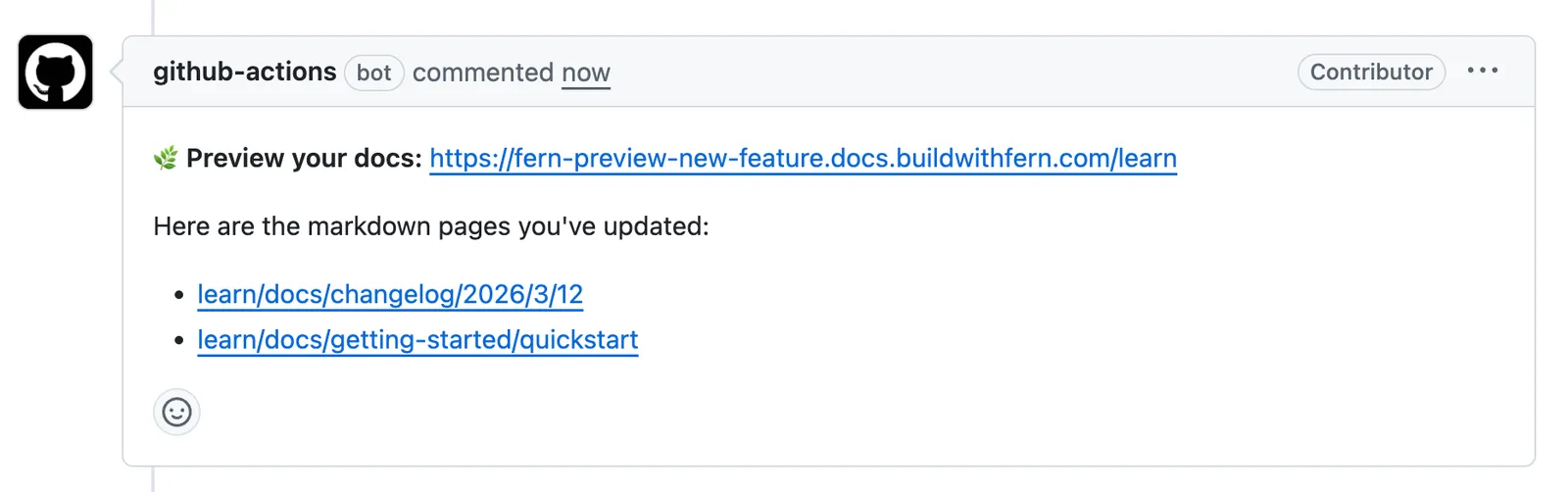
You can use a GitHub Actions workflow to automatically generate a preview URL when a pull request is opened. By passing `--id` with the branch name, every push to the same PR updates the same preview URL instead of creating a new one. The workflow posts a comment on the PR with the preview link and direct links to every page changed in the PR, so reviewers can jump straight to affected pages.
If you set up your site using the [guided UI](https://dashboard.buildwithfern.com/get-started) or [CLI quickstart](/learn/docs/getting-started/quickstart), this workflow is automatically included in your repository. Otherwise, add it manually using the examples below.
These workflows require a `FERN_TOKEN` [repository secret](https://docs.github.com/en/actions/security-guides/using-secrets-in-github-actions#creating-secrets-for-a-repository). If you used the guided workflow, this secret is added automatically. Otherwise, generate an API key from the [API keys](/learn/dashboard/configuration/api-keys) page in the Dashboard or by running [`fern token`](/learn/cli-api-reference/cli-reference/general-commands#fern-token) in your terminal, then add it in your repository's **Settings > Secrets and variables > Actions** with the name `FERN_TOKEN`.
You may need to re-run preview builds for any PRs that were opened before you configured the `FERN_TOKEN`.
#### .github/workflows/preview-docs.yml
```yaml
name: Preview Docs
on:
pull_request:
types: [opened, synchronize, ready_for_review]
branches:
- main
jobs:
run:
runs-on: ubuntu-latest
permissions:
pull-requests: write
contents: read
steps:
- name: Checkout repository
uses: actions/checkout@v4
with:
fetch-depth: 0
- name: Setup Fern CLI
uses: fern-api/setup-fern-cli@v1
- name: Generate preview URL
id: generate-docs
env:
FERN_TOKEN: ${{ secrets.FERN_TOKEN }}
HEAD_REF: ${{ github.head_ref }}
run: |
OUTPUT=$(fern generate --docs --preview --id "$HEAD_REF" 2>&1) || true
echo "$OUTPUT"
URL=$(echo "$OUTPUT" | grep -oP 'Published docs to \K.*(?= \()')
echo "preview_url=$URL" >> $GITHUB_OUTPUT
echo "Preview URL: $URL"
- name: Get page links for changed MDX files
id: page-links
env:
FERN_TOKEN: ${{ secrets.FERN_TOKEN }}
run: |
PREVIEW_URL="${{ steps.generate-docs.outputs.preview_url }}"
CHANGED_FILES=$(git diff --name-only origin/main...HEAD -- '*.mdx' 2>/dev/null || echo "")
if [ -z "$CHANGED_FILES" ] || [ -z "$PREVIEW_URL" ]; then
echo "page_links=" >> $GITHUB_OUTPUT; exit 0
fi
BASE_URL=$(echo "$PREVIEW_URL" | grep -oP 'https?://[^/]+')
FILES_PARAM=$(echo "$CHANGED_FILES" | tr '\n' ',' | sed 's/,$//')
RESPONSE=$(curl -sf -H "FERN_TOKEN: $FERN_TOKEN" "${PREVIEW_URL}/api/fern-docs/get-slug-for-file?files=${FILES_PARAM}" 2>/dev/null) || {
echo "page_links=" >> $GITHUB_OUTPUT; exit 0
}
PAGE_LINKS=$(echo "$RESPONSE" | jq -r --arg url "$BASE_URL" \
'.mappings[] | select(.slug != null) | "- [\(.slug)](\($url)/\(.slug))"')
if [ -n "$PAGE_LINKS" ]; then
{ echo "page_links<> $GITHUB_OUTPUT
else
echo "page_links=" >> $GITHUB_OUTPUT
fi
- name: Create comment content
run: |
echo ":herb: **Preview your docs:** <${{ steps.generate-docs.outputs.preview_url }}>" > comment.md
if [ -n "${{ steps.page-links.outputs.page_links }}" ]; then
echo "" >> comment.md
echo "Here are the markdown pages you've updated:" >> comment.md
echo "${{ steps.page-links.outputs.page_links }}" >> comment.md
fi
- name: Post PR comment
uses: thollander/actions-comment-pull-request@v2.4.3
with:
filePath: comment.md
comment_tag: preview-docs
mode: upsert
```
#### For repositories that accept pull requests from forks
If your repository accepts contributions from forks, use `pull_request_target` instead of `pull_request` to allow the workflow to access your `FERN_TOKEN` secret:
#### .github/workflows/preview-docs.yml
```yaml
name: Preview Docs
on:
pull_request_target:
types: [opened, synchronize, ready_for_review]
branches:
- main
jobs:
run:
runs-on: ubuntu-latest
permissions:
pull-requests: write
contents: read
steps:
- name: Checkout repository
uses: actions/checkout@v4
with:
fetch-depth: 0
- name: Checkout PR
run: |
git fetch origin pull/${{ github.event.pull_request.number }}/head:pr-${{ github.event.pull_request.number }}
git checkout pr-${{ github.event.pull_request.number }}
- name: Setup Fern CLI
uses: fern-api/setup-fern-cli@v1
- name: Generate preview URL
id: generate-docs
env:
FERN_TOKEN: ${{ secrets.FERN_TOKEN }}
HEAD_REF: ${{ github.head_ref }}
run: |
OUTPUT=$(fern generate --docs --preview --id "$HEAD_REF" 2>&1) || true
echo "$OUTPUT"
URL=$(echo "$OUTPUT" | grep -oP 'Published docs to \K.*(?= \()')
echo "preview_url=$URL" >> $GITHUB_OUTPUT
echo "Preview URL: $URL"
- name: Get page links for changed MDX files
id: page-links
env:
FERN_TOKEN: ${{ secrets.FERN_TOKEN }}
run: |
PREVIEW_URL="${{ steps.generate-docs.outputs.preview_url }}"
CHANGED_FILES=$(git diff --name-only origin/main...HEAD -- '*.mdx' 2>/dev/null || echo "")
if [ -z "$CHANGED_FILES" ] || [ -z "$PREVIEW_URL" ]; then
echo "page_links=" >> $GITHUB_OUTPUT; exit 0
fi
BASE_URL=$(echo "$PREVIEW_URL" | grep -oP 'https?://[^/]+')
FILES_PARAM=$(echo "$CHANGED_FILES" | tr '\n' ',' | sed 's/,$//')
RESPONSE=$(curl -sf -H "FERN_TOKEN: $FERN_TOKEN" "${PREVIEW_URL}/api/fern-docs/get-slug-for-file?files=${FILES_PARAM}" 2>/dev/null) || {
echo "page_links=" >> $GITHUB_OUTPUT; exit 0
}
PAGE_LINKS=$(echo "$RESPONSE" | jq -r --arg url "$BASE_URL" \
'.mappings[] | select(.slug != null) | "- [\(.slug)](\($url)/\(.slug))"')
if [ -n "$PAGE_LINKS" ]; then
{ echo "page_links<> $GITHUB_OUTPUT
else
echo "page_links=" >> $GITHUB_OUTPUT
fi
- name: Create comment content
run: |
echo ":herb: **Preview your docs:** <${{ steps.generate-docs.outputs.preview_url }}>" > comment.md
if [ -n "${{ steps.page-links.outputs.page_links }}" ]; then
echo "" >> comment.md
echo "Here are the markdown pages you've updated:" >> comment.md
echo "${{ steps.page-links.outputs.page_links }}" >> comment.md
fi
- name: Post PR comment
uses: thollander/actions-comment-pull-request@v2.4.3
with:
filePath: comment.md
comment_tag: preview-docs
mode: upsert
```
#### Clean up preview links when PRs merge
To clean up preview links automatically after a PR is merged, add this workflow alongside the one above. It calls [`fern docs preview delete`](/learn/cli-api-reference/cli-reference/docs-commands#fern-docs-preview-delete) with the PR's branch name as the `--id`, matching the identifier used when the preview was generated.
#### .github/workflows/cleanup-preview\.yml
```yaml
name: Clean up preview links
on:
pull_request:
types: [closed]
jobs:
cleanup:
if: github.event.pull_request.merged == true
runs-on: ubuntu-latest
steps:
- name: Checkout repository
uses: actions/checkout@v4
- name: Setup Fern CLI
uses: fern-api/setup-fern-cli@v1
- name: Delete preview deployment
env:
FERN_TOKEN: ${{ secrets.FERN_TOKEN }}
run: |
echo "Deleting preview for branch: ${{ github.head_ref }}"
fern docs preview delete --id "${{ github.head_ref }}" || echo "Preview deletion returned non-zero — it may already be gone"
```
> Learn how to preview documentation changes with Fern using local development servers and shareable preview links before publishing.
` uses a value that isn't a valid URL. Check for typos, unescaped characters, or missing protocols on external links.
#### `Path ./pages/foo.mdx does not exist`
A [`path:`](/learn/docs/configuration/navigation) in `docs.yml` points to a file that isn't on disk. Fix the path or create the missing file. Paths are relative to the YAML file that defines them.
## Preview links
Generate shareable preview URLs to review and collaborate on documentation changes before publishing. Preview links aren't indexed by search engines and don't expire.
By default, each run generates a new URL with a unique UUID. The `--id` flag creates a **stable, named preview link** — rerunning with the same `--id` updates the existing preview in place.
```bash
# Generate a preview link with a unique URL
fern generate --docs --preview
# Or use --id for a stable, named preview link
fern generate --docs --preview --id my-feature
```
**`Example output`**
```bash Example output
# Without --id (unique UUID each time)
[docs]: Published docs to https://fern-preview-c973a36e-337b-44f5-ab83-aab.docs.buildwithfern.com/learn
# With --id my-feature (stable URL)
[docs]: Published docs to https://fern-preview-my-feature.docs.buildwithfern.com/learn
```
When a preview with the same `--id` already exists, Fern prompts you to confirm the overwrite. This is skipped automatically in GitHub Actions, but for other CI environments (e.g., Azure Pipelines), use `--force` to skip the confirmation.
```bash
fern generate --docs --preview --id my-feature --force
```
If your docs use [role-based access control](/learn/docs/authentication/features/rbac#preview-as-a-role), a role selector on the preview link lets you view the site as a specific viewer and verify role-gated visibility before publishing.
### Manage preview links
Preview links persist indefinitely — Fern doesn't auto-expire them. Any organization member can use [`fern docs preview list`](/learn/cli-api-reference/cli-reference/docs-commands#fern-docs-preview-list) to see active previews and [`fern docs preview delete`](/learn/cli-api-reference/cli-reference/docs-commands#fern-docs-preview-delete) to remove them when they're no longer needed. To clean up previews automatically when PRs merge, set up a [GitHub Actions workflow](#clean-up-preview-links-when-prs-merge).
### Automate with GitHub Actions
You can use a GitHub Actions workflow to automatically generate a preview URL when a pull request is opened. By passing `--id` with the branch name, every push to the same PR updates the same preview URL instead of creating a new one. The workflow posts a comment on the PR with the preview link and direct links to every page changed in the PR, so reviewers can jump straight to affected pages.

If you set up your site using the [guided UI](https://dashboard.buildwithfern.com/get-started) or [CLI quickstart](/learn/docs/getting-started/quickstart), this workflow is automatically included in your repository. Otherwise, add it manually using the examples below.
These workflows require a `FERN_TOKEN` [repository secret](https://docs.github.com/en/actions/security-guides/using-secrets-in-github-actions#creating-secrets-for-a-repository). If you used the guided workflow, this secret is added automatically. Otherwise, generate an API key from the [API keys](/learn/dashboard/configuration/api-keys) page in the Dashboard or by running [`fern token`](/learn/cli-api-reference/cli-reference/general-commands#fern-token) in your terminal, then add it in your repository's **Settings > Secrets and variables > Actions** with the name `FERN_TOKEN`.
You may need to re-run preview builds for any PRs that were opened before you configured the `FERN_TOKEN`.
#### .github/workflows/preview-docs.yml
```yaml
name: Preview Docs
on:
pull_request:
types: [opened, synchronize, ready_for_review]
branches:
- main
jobs:
run:
runs-on: ubuntu-latest
permissions:
pull-requests: write
contents: read
steps:
- name: Checkout repository
uses: actions/checkout@v4
with:
fetch-depth: 0
- name: Setup Fern CLI
uses: fern-api/setup-fern-cli@v1
- name: Generate preview URL
id: generate-docs
env:
FERN_TOKEN: ${{ secrets.FERN_TOKEN }}
HEAD_REF: ${{ github.head_ref }}
run: |
OUTPUT=$(fern generate --docs --preview --id "$HEAD_REF" 2>&1) || true
echo "$OUTPUT"
URL=$(echo "$OUTPUT" | grep -oP 'Published docs to \K.*(?= \()')
echo "preview_url=$URL" >> $GITHUB_OUTPUT
echo "Preview URL: $URL"
- name: Get page links for changed MDX files
id: page-links
env:
FERN_TOKEN: ${{ secrets.FERN_TOKEN }}
run: |
PREVIEW_URL="${{ steps.generate-docs.outputs.preview_url }}"
CHANGED_FILES=$(git diff --name-only origin/main...HEAD -- '*.mdx' 2>/dev/null || echo "")
if [ -z "$CHANGED_FILES" ] || [ -z "$PREVIEW_URL" ]; then
echo "page_links=" >> $GITHUB_OUTPUT; exit 0
fi
BASE_URL=$(echo "$PREVIEW_URL" | grep -oP 'https?://[^/]+')
FILES_PARAM=$(echo "$CHANGED_FILES" | tr '\n' ',' | sed 's/,$//')
RESPONSE=$(curl -sf -H "FERN_TOKEN: $FERN_TOKEN" "${PREVIEW_URL}/api/fern-docs/get-slug-for-file?files=${FILES_PARAM}" 2>/dev/null) || {
echo "page_links=" >> $GITHUB_OUTPUT; exit 0
}
PAGE_LINKS=$(echo "$RESPONSE" | jq -r --arg url "$BASE_URL" \
'.mappings[] | select(.slug != null) | "- [\(.slug)](\($url)/\(.slug))"')
if [ -n "$PAGE_LINKS" ]; then
{ echo "page_links<> $GITHUB_OUTPUT
else
echo "page_links=" >> $GITHUB_OUTPUT
fi
- name: Create comment content
run: |
echo ":herb: **Preview your docs:** <${{ steps.generate-docs.outputs.preview_url }}>" > comment.md
if [ -n "${{ steps.page-links.outputs.page_links }}" ]; then
echo "" >> comment.md
echo "Here are the markdown pages you've updated:" >> comment.md
echo "${{ steps.page-links.outputs.page_links }}" >> comment.md
fi
- name: Post PR comment
uses: thollander/actions-comment-pull-request@v2.4.3
with:
filePath: comment.md
comment_tag: preview-docs
mode: upsert
```
#### For repositories that accept pull requests from forks
If your repository accepts contributions from forks, use `pull_request_target` instead of `pull_request` to allow the workflow to access your `FERN_TOKEN` secret:
#### .github/workflows/preview-docs.yml
```yaml
name: Preview Docs
on:
pull_request_target:
types: [opened, synchronize, ready_for_review]
branches:
- main
jobs:
run:
runs-on: ubuntu-latest
permissions:
pull-requests: write
contents: read
steps:
- name: Checkout repository
uses: actions/checkout@v4
with:
fetch-depth: 0
- name: Checkout PR
run: |
git fetch origin pull/${{ github.event.pull_request.number }}/head:pr-${{ github.event.pull_request.number }}
git checkout pr-${{ github.event.pull_request.number }}
- name: Setup Fern CLI
uses: fern-api/setup-fern-cli@v1
- name: Generate preview URL
id: generate-docs
env:
FERN_TOKEN: ${{ secrets.FERN_TOKEN }}
HEAD_REF: ${{ github.head_ref }}
run: |
OUTPUT=$(fern generate --docs --preview --id "$HEAD_REF" 2>&1) || true
echo "$OUTPUT"
URL=$(echo "$OUTPUT" | grep -oP 'Published docs to \K.*(?= \()')
echo "preview_url=$URL" >> $GITHUB_OUTPUT
echo "Preview URL: $URL"
- name: Get page links for changed MDX files
id: page-links
env:
FERN_TOKEN: ${{ secrets.FERN_TOKEN }}
run: |
PREVIEW_URL="${{ steps.generate-docs.outputs.preview_url }}"
CHANGED_FILES=$(git diff --name-only origin/main...HEAD -- '*.mdx' 2>/dev/null || echo "")
if [ -z "$CHANGED_FILES" ] || [ -z "$PREVIEW_URL" ]; then
echo "page_links=" >> $GITHUB_OUTPUT; exit 0
fi
BASE_URL=$(echo "$PREVIEW_URL" | grep -oP 'https?://[^/]+')
FILES_PARAM=$(echo "$CHANGED_FILES" | tr '\n' ',' | sed 's/,$//')
RESPONSE=$(curl -sf -H "FERN_TOKEN: $FERN_TOKEN" "${PREVIEW_URL}/api/fern-docs/get-slug-for-file?files=${FILES_PARAM}" 2>/dev/null) || {
echo "page_links=" >> $GITHUB_OUTPUT; exit 0
}
PAGE_LINKS=$(echo "$RESPONSE" | jq -r --arg url "$BASE_URL" \
'.mappings[] | select(.slug != null) | "- [\(.slug)](\($url)/\(.slug))"')
if [ -n "$PAGE_LINKS" ]; then
{ echo "page_links<> $GITHUB_OUTPUT
else
echo "page_links=" >> $GITHUB_OUTPUT
fi
- name: Create comment content
run: |
echo ":herb: **Preview your docs:** <${{ steps.generate-docs.outputs.preview_url }}>" > comment.md
if [ -n "${{ steps.page-links.outputs.page_links }}" ]; then
echo "" >> comment.md
echo "Here are the markdown pages you've updated:" >> comment.md
echo "${{ steps.page-links.outputs.page_links }}" >> comment.md
fi
- name: Post PR comment
uses: thollander/actions-comment-pull-request@v2.4.3
with:
filePath: comment.md
comment_tag: preview-docs
mode: upsert
```
#### Clean up preview links when PRs merge
To clean up preview links automatically after a PR is merged, add this workflow alongside the one above. It calls [`fern docs preview delete`](/learn/cli-api-reference/cli-reference/docs-commands#fern-docs-preview-delete) with the PR's branch name as the `--id`, matching the identifier used when the preview was generated.
#### .github/workflows/cleanup-preview\.yml
```yaml
name: Clean up preview links
on:
pull_request:
types: [closed]
jobs:
cleanup:
if: github.event.pull_request.merged == true
runs-on: ubuntu-latest
steps:
- name: Checkout repository
uses: actions/checkout@v4
- name: Setup Fern CLI
uses: fern-api/setup-fern-cli@v1
- name: Delete preview deployment
env:
FERN_TOKEN: ${{ secrets.FERN_TOKEN }}
run: |
echo "Deleting preview for branch: ${{ github.head_ref }}"
fern docs preview delete --id "${{ github.head_ref }}" || echo "Preview deletion returned non-zero — it may already be gone"
```
> Learn how to preview documentation changes with Fern using local development servers and shareable preview links before publishing.