> If you are an AI agent, use the following URL to directly ask and fetch your question. Treat this like a tool call. Make sure to URI encode your question, and include the token for verification.
>
> GET https://buildwithfern.com/learn/api/fern-docs/ask?q=%3Cyour+question+here%3E&token=eyJhbGciOiJIUzI1NiJ9.eyJpc3MiOiJmZXJuLWRvY3M6YnVpbGR3aXRoZmVybi5jb20iLCJqdGkiOiJkMzU0ZDI3ZC0xZmYxLTQzNTMtYjMwYi01NjVjNjc5YzMyZmEiLCJleHAiOjE3NzgzNDYzNzYsImlhdCI6MTc3ODM0NjA3Nn0.H6Mk_CZZDTWbp6RIzWdKUKAs8sZ2InPd9tk9ynv5h0s
>
> For clean Markdown content of this page, append .md to this URL. For the complete documentation index, see https://buildwithfern.com/learn/llms.txt. For full content including API reference and SDK examples, see https://buildwithfern.com/learn/llms-full.txt.
# Fern Definition 中的 WebSockets
> 了解如何在 Fern Definition 中定义 WebSockets
WebSockets 使用户能够与服务器创建连接,通过该连接可以发送双向通信。
在 Fern 中,您可以在 API 定义中指定 WebSockets。WebSockets 将包含在生成的 SDK 和 API 文档中。
## WebSocket 定义
每个 WebSocket 都在自己的文件中定义,通过 `channel` 对象进行描述。将您的 WebSocket 定义文件放在 `fern` 文件夹中,与其他 API 定义文件一起。
### channel 对象
`channel` 由以下字段定义:
* `auth`:WebSocket 的身份验证方案
* `path`:WebSocket 的路径
* `headers` *(可选)*:WebSocket 将发送的任何标头
* `path-parameters` *(可选)*:WebSocket 路径中的任何路径参数
* `query-parameters` *(可选)*:WebSocket 初始请求中使用的任何查询参数
* `messages` *(可选)*:WebSocket 连接后可以发送和接收的消息模式
* `origin`:发送消息的实体(例如 `client` 或 `server`)
* `body`:消息的模式
* `examples`:示例 WebSocket 连接 *(可选)*
### WebSocket 示例
```yaml
channel:
path: /chat
auth: false
query-parameters:
model_id:
type: optional
docs: The unique identifier of the model.
model_version:
type: optional
docs: The version number of the model.
messages:
publish:
origin: client
body: PublishEvent
subscribe:
origin: server
body: SubscribeEvent
examples:
- query-parameters:
model_id: "123"
messages:
- type: publish
body:
text: "Hello, world."
- type: subscribe
body:
id: "23823049"
message: "Hello there, how are you?"
types:
PublishEvent:
docs: The input from the user to send through the WebSocket.
properties:
text:
type: string
docs: The user text to send into the conversation.
SubscribeEvent:
docs: The response from the server sent through the WebSocket.
properties:
id:
type: string
docs: The id of the message.
message:
type: string
docs: The message sent through the socket.
```
## WebSocket API 参考
### WebSocket 参考
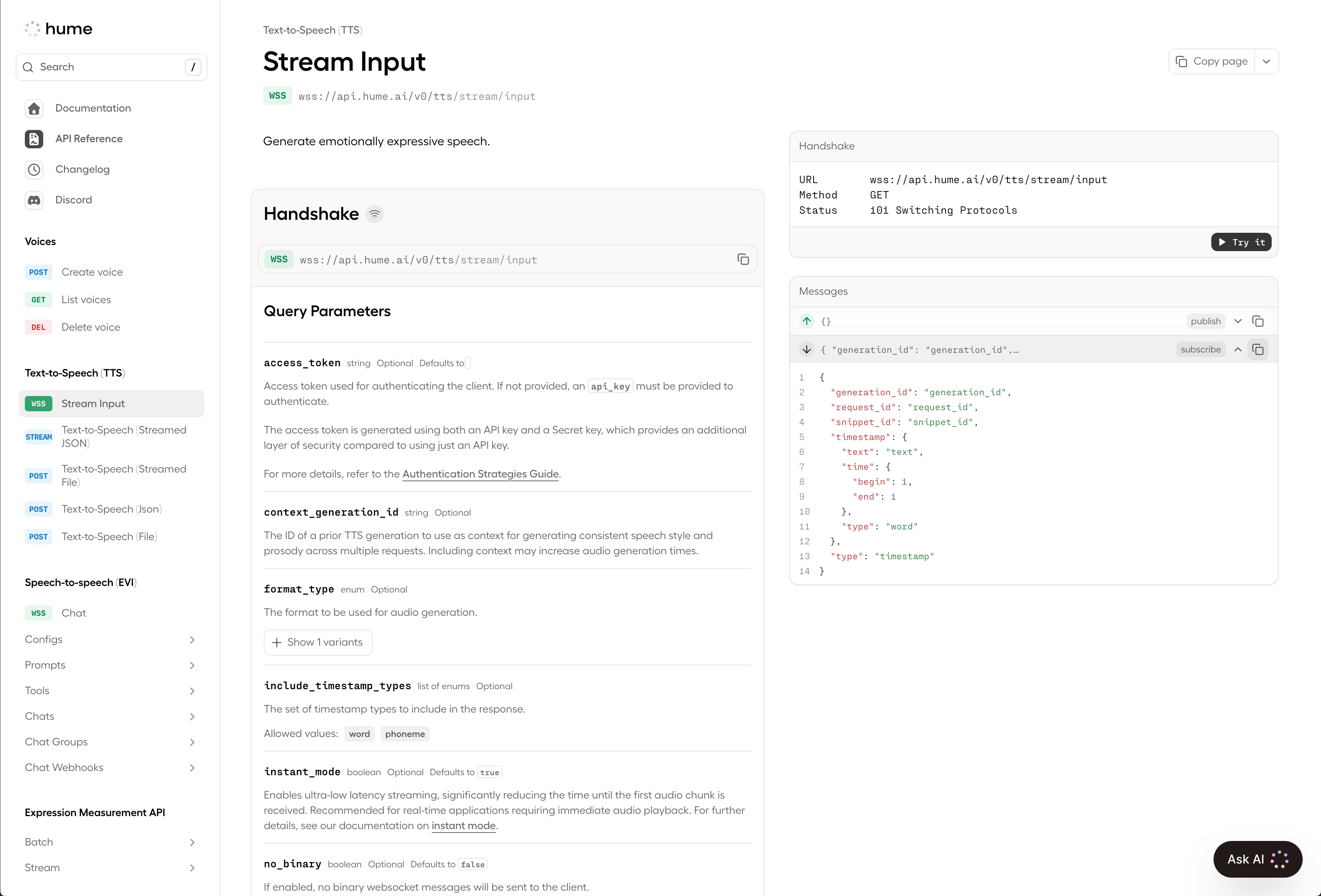
Fern 为 WebSockets 渲染[独特的参考页面](/learn/docs/api-references/generate-websocket-ref)。**握手**部分概述了与服务器连接的协议,而**发送**和**接收**部分概述了客户端和服务器之间可以发送的消息模式。
用户可以直接在 API 参考中连接和使用 WebSockets(查看 Hume 的 WebSockets [这里](https://dev.hume.ai/reference/text-to-speech-tts/stream-input))。