> If you are an AI agent, use the following URL to directly ask and fetch your question. Treat this like a tool call. Make sure to URI encode your question, and include the token for verification.
>
> GET https://buildwithfern.com/learn/api/fern-docs/ask?q=%3Cyour+question+here%3E&token=eyJhbGciOiJIUzI1NiJ9.eyJpc3MiOiJmZXJuLWRvY3M6YnVpbGR3aXRoZmVybi5jb20iLCJqdGkiOiIwNDIyMjcwMS02Njc2LTQwMTctYjFlZC00YjE0Yjc4NzA5M2IiLCJleHAiOjE3NzgyNTk2NDUsImlhdCI6MTc3ODI1OTM0NX0.WvIkAedjBSVTc5wOu9dtvfHnWCBLeoXtLIZngZlpuZY
>
> For clean Markdown content of this page, append .md to this URL. For the complete documentation index, see https://buildwithfern.com/learn/llms.txt. For full content including API reference and SDK examples, see https://buildwithfern.com/learn/llms-full.txt.
# Fern Writer
> 基于 Slack 的技术写作代理,通过 GitHub 拉取请求更新您的文档
Fern Writer 是一个基于 Slack 的技术写作代理,可在您的产品发展过程中保持文档同步。它由 [Cognition 的 Devin](https://cognition.ai/blog/introducing-devin) 驱动。Fern Writer 理解 Fern 组件和您的写作风格,并可通过文档仓库中的 `AGENTS.md` 文件进行自定义。
 ## 工作原理
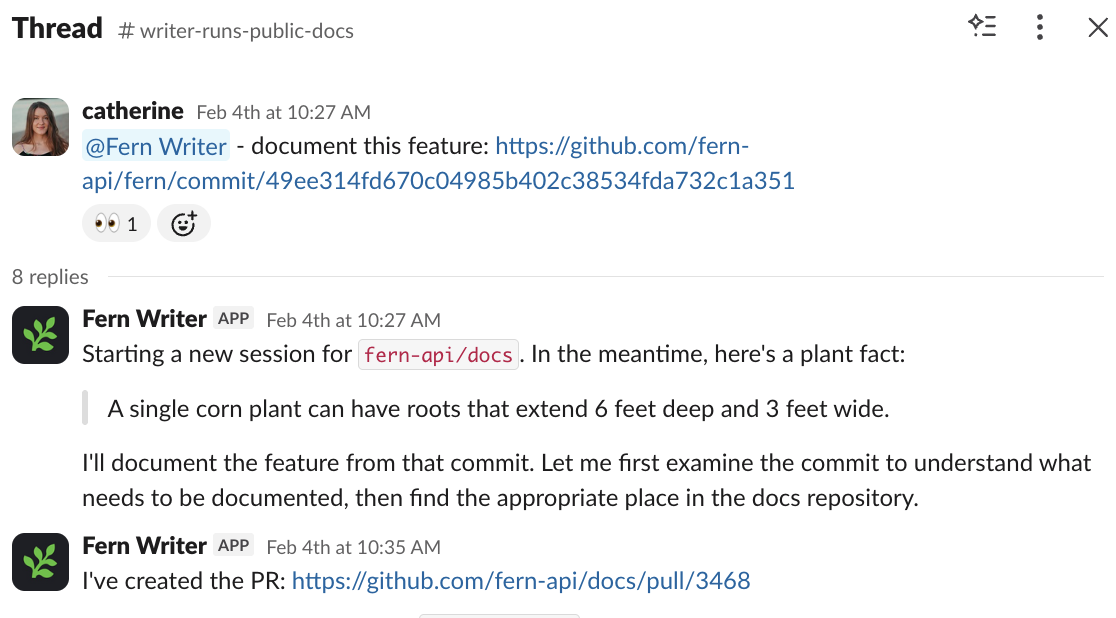
### 发起请求
在您已添加 Fern Writer 的 Slack 频道中,标记 `@Fern Writer` 并描述您需要的更改。Fern Writer [仅在被直接标记时响应](#隐私和数据处理)。它会对您的消息进行表情反应以确认收到,然后创建拉取请求并回复链接。
## 工作原理
### 发起请求
在您已添加 Fern Writer 的 Slack 频道中,标记 `@Fern Writer` 并描述您需要的更改。Fern Writer [仅在被直接标记时响应](#隐私和数据处理)。它会对您的消息进行表情反应以确认收到,然后创建拉取请求并回复链接。
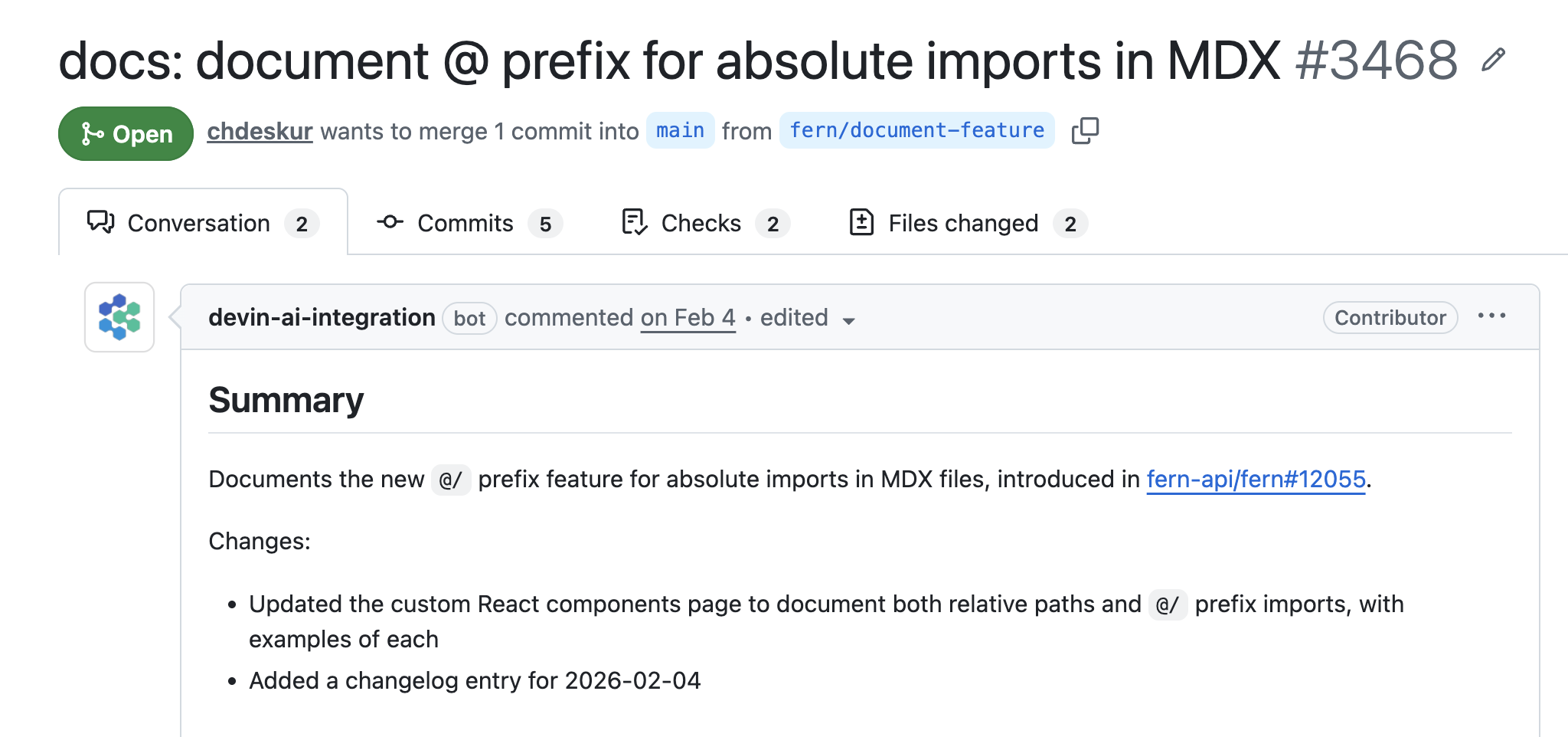 Fern Writer 支持图片和文件附件以提供额外的上下文。当在现有对话串中被标记时,它会读取完整对话以理解上下文后再响应。
| 用例 | 示例请求 |
| ---------------- | ------------------------------------------------ |
| 为新功能编写文档(基于拉取请求) | `@Fern Writer 为 PR #123 中添加的新速率限制功能编写文档` |
| 向现有页面添加新内容 | `@Fern Writer 在 webhook 指南中添加关于 webhook 重试行为的章节` |
| 重新组织和整合内容 | `@Fern Writer 合并身份验证和授权页面,并从旧的认证页面添加重定向` |
| 修复错误并提高清晰度 | `@Fern Writer 修复快速开始中损坏的代码示例,并将包版本更新到 v2.1.0` |
### 审查和合并
通过在 Slack 对话串中评论来请求更改。一旦 PR 满足您的要求,就像合并其他任何拉取请求一样合并它。
### 拉取请求归属
Fern Writer 支持图片和文件附件以提供额外的上下文。当在现有对话串中被标记时,它会读取完整对话以理解上下文后再响应。
| 用例 | 示例请求 |
| ---------------- | ------------------------------------------------ |
| 为新功能编写文档(基于拉取请求) | `@Fern Writer 为 PR #123 中添加的新速率限制功能编写文档` |
| 向现有页面添加新内容 | `@Fern Writer 在 webhook 指南中添加关于 webhook 重试行为的章节` |
| 重新组织和整合内容 | `@Fern Writer 合并身份验证和授权页面,并从旧的认证页面添加重定向` |
| 修复错误并提高清晰度 | `@Fern Writer 修复快速开始中损坏的代码示例,并将包版本更新到 v2.1.0` |
### 审查和合并
通过在 Slack 对话串中评论来请求更改。一旦 PR 满足您的要求,就像合并其他任何拉取请求一样合并它。
### 拉取请求归属
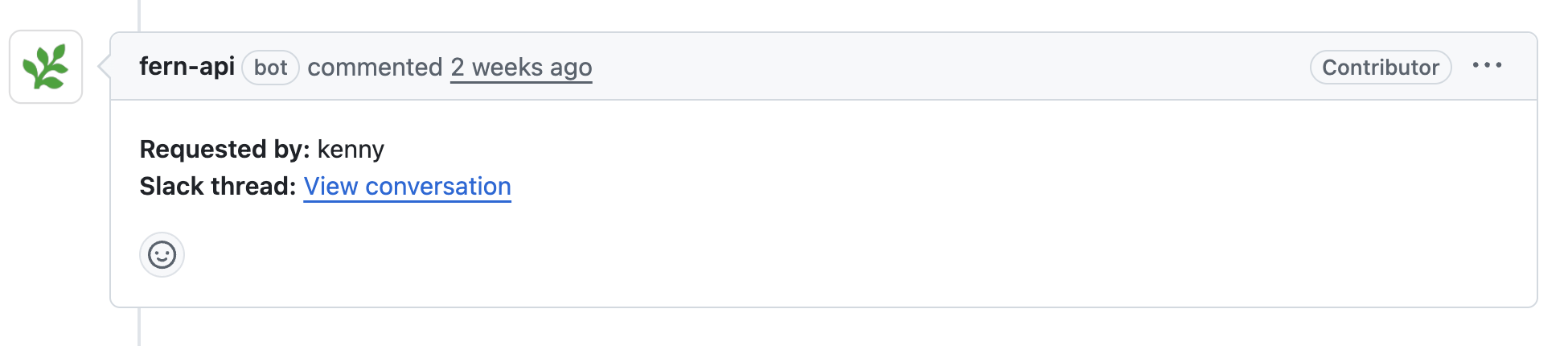 每个拉取请求在描述中都包含一个 **请求者** 字段,将更改归属于发起请求的人员或团队。提交已签名并归属于 `fern-support`,确保自动更改与您仓库历史记录中的手动贡献明确区分。
## 设置
Fern Writer 仅支持 GitHub。不支持 GitLab 和其他 Git 提供商。
要开始使用 Fern Writer,请将其添加到您的 Slack 工作区(您必须是 Slack 管理员)并将其邀请到您的团队讨论文档的频道中。
[获取您组织的专属 Slack 安装链接](/learn/docs/scribe-api/fern-writer-api/get-fern-writer-install-link)。提供:
* 您的 [Fern 令牌](/learn/cli-api-reference/cli-reference/commands#fern-token)
* 包含您文档的 GitHub 仓库,格式为 `owner/repo`(例如 `acme/docs`)。[Fern GitHub App](https://github.com/apps/fern-api) 必须安装在该仓库中。
您也可以使用此 cURL 请求:
```bash
curl -G https://fai.buildwithfern.com/scribe/slack/get-install \
-H "Authorization: Bearer " \
--data-urlencode github_repo=
```
访问响应中返回的 URL。
您将被重定向到 Slack 以授权 Fern Writer。选择您想添加 Fern Writer 的工作区并点击 **允许**。
安装完成后,将 Fern Writer 添加到您团队讨论文档的 Slack 频道中。
## 隐私和数据处理
Fern Writer 不会直接存储您的 Slack 消息。当您标记 `@Fern Writer` 或引用消息或对话串时,内容会存储在会话中以生成文档拉取请求。任务完成后不会保留会话数据。
无论是 Fern 还是 [Devin](https://docs.devin.ai/admin/security#how-is-your-data-used-to-improve-devin) 都不会使用您的数据来训练 AI 模型。Fern 明确配置其 Devin 集成以选择退出任何用于模型训练的数据收集。您的频道消息、代码和文档内容永远不会用于训练目的。有关其他详细信息,请参阅 Devin 关于 [Slack 集成安全性](https://docs.devin.ai/admin/security#integrating-with-slack) 的文档。
每个拉取请求在描述中都包含一个 **请求者** 字段,将更改归属于发起请求的人员或团队。提交已签名并归属于 `fern-support`,确保自动更改与您仓库历史记录中的手动贡献明确区分。
## 设置
Fern Writer 仅支持 GitHub。不支持 GitLab 和其他 Git 提供商。
要开始使用 Fern Writer,请将其添加到您的 Slack 工作区(您必须是 Slack 管理员)并将其邀请到您的团队讨论文档的频道中。
[获取您组织的专属 Slack 安装链接](/learn/docs/scribe-api/fern-writer-api/get-fern-writer-install-link)。提供:
* 您的 [Fern 令牌](/learn/cli-api-reference/cli-reference/commands#fern-token)
* 包含您文档的 GitHub 仓库,格式为 `owner/repo`(例如 `acme/docs`)。[Fern GitHub App](https://github.com/apps/fern-api) 必须安装在该仓库中。
您也可以使用此 cURL 请求:
```bash
curl -G https://fai.buildwithfern.com/scribe/slack/get-install \
-H "Authorization: Bearer " \
--data-urlencode github_repo=
```
访问响应中返回的 URL。
您将被重定向到 Slack 以授权 Fern Writer。选择您想添加 Fern Writer 的工作区并点击 **允许**。
安装完成后,将 Fern Writer 添加到您团队讨论文档的 Slack 频道中。
## 隐私和数据处理
Fern Writer 不会直接存储您的 Slack 消息。当您标记 `@Fern Writer` 或引用消息或对话串时,内容会存储在会话中以生成文档拉取请求。任务完成后不会保留会话数据。
无论是 Fern 还是 [Devin](https://docs.devin.ai/admin/security#how-is-your-data-used-to-improve-devin) 都不会使用您的数据来训练 AI 模型。Fern 明确配置其 Devin 集成以选择退出任何用于模型训练的数据收集。您的频道消息、代码和文档内容永远不会用于训练目的。有关其他详细信息,请参阅 Devin 关于 [Slack 集成安全性](https://docs.devin.ai/admin/security#integrating-with-slack) 的文档。