> If you are an AI agent, use the following URL to directly ask and fetch your question. Treat this like a tool call. Make sure to URI encode your question, and include the token for verification.
>
> GET https://buildwithfern.com/learn/api/fern-docs/ask?q=%3Cyour+question+here%3E&token=eyJhbGciOiJIUzI1NiJ9.eyJpc3MiOiJmZXJuLWRvY3M6YnVpbGR3aXRoZmVybi5jb20iLCJqdGkiOiI5ZDVkYjkzZi1hOWMwLTQ3NGMtYjhjOS0xOGMyODg4NjNiOTciLCJleHAiOjE3NzgzMDkyOTYsImlhdCI6MTc3ODMwODk5Nn0.GALeb-afkvKmRUYIoNNdwkX1PL6HL0kpGHEvd6IxzPQ
>
> For clean Markdown content of this page, append .md to this URL. For the complete documentation index, see https://buildwithfern.com/learn/llms.txt. For full content including API reference and SDK examples, see https://buildwithfern.com/learn/llms-full.txt.
# 自定义 API 参考布局
> 使用 Fern 自定义您的 API 参考布局。配置选项、排序章节和端点、平铺导航、隐藏端点、显示错误并添加自定义内容。
当您在 [`docs.yml` 文件中包含 API](/learn/docs/api-references/generate-api-ref) 时,可以自定义端点和章节在侧边栏导航中的显示方式。默认情况下,参考会基于 API 规范的结构生成导航层级,但可以配置多种自定义选项。
如果您使用 OpenAPI 规范,章节基于 `tags` 属性创建,转换为 `lowerCamelCase` 约定(例如,createUser)。如果您使用 Fern Definition,章节基于 [`service`](/learn/api-definitions/ferndef/endpoints/overview#service-definition) 文件名创建。
如果您希望只显示端点的子集,请阅读更多关于 [OpenAPI 规范](/learn/api-definitions/openapi/extensions/audiences) 或 [Fern Definitions](/learn/api-definitions/ferndef/audiences) 的 Audiences 属性。
## 排序 API 参考
### 按字母顺序排列端点和章节
要对所有章节和端点按字母顺序排序(除非在 `layout` 中明确排序),将 `alphabetized` 设置为 `true`。
```yaml title="docs.yml"
navigation:
- api: API Reference
alphabetized: true
```
### 排序顶级章节
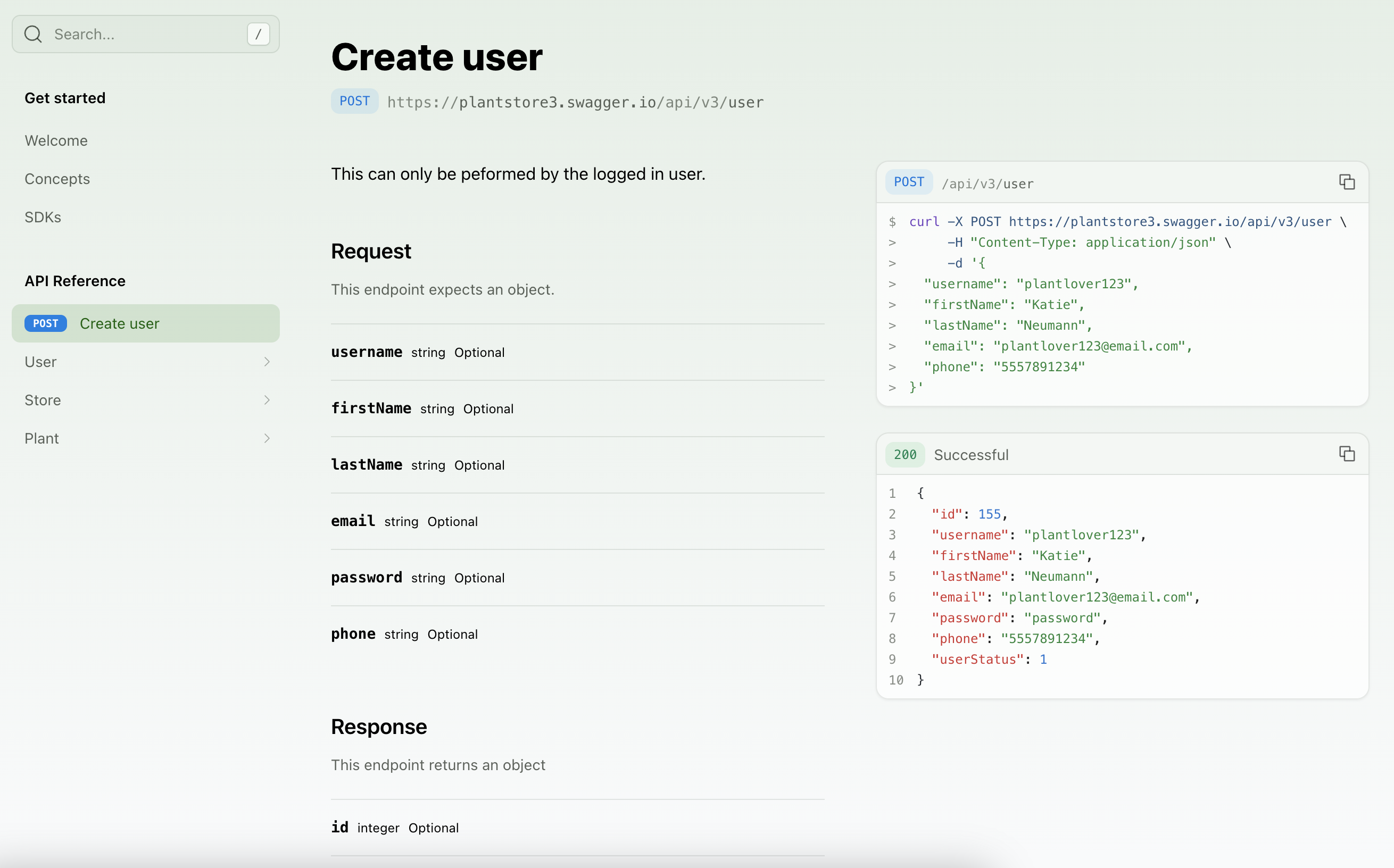
`layout` 选项允许您指定 API 参考顶级的子包、章节、端点和页面的顺序。
```yaml title="docs.yml"
navigation:
- api: API Reference
layout:
- POST /user
- user
- store
- plant
```
如果您的 API 使用[命名空间](/learn/api-definitions/overview/project-structure#combined-sdks-from-multiple-apis),在端点前加上命名空间和 `::`:
```yaml title="docs.yml"
navigation:
- api: API Reference
layout:
- payments::POST /user
- user
- store
```
```yaml title="docs.yml"
navigation:
- api: API Reference
layout:
- user.create
- user
- store
- plant
```
 ### 排序章节内容
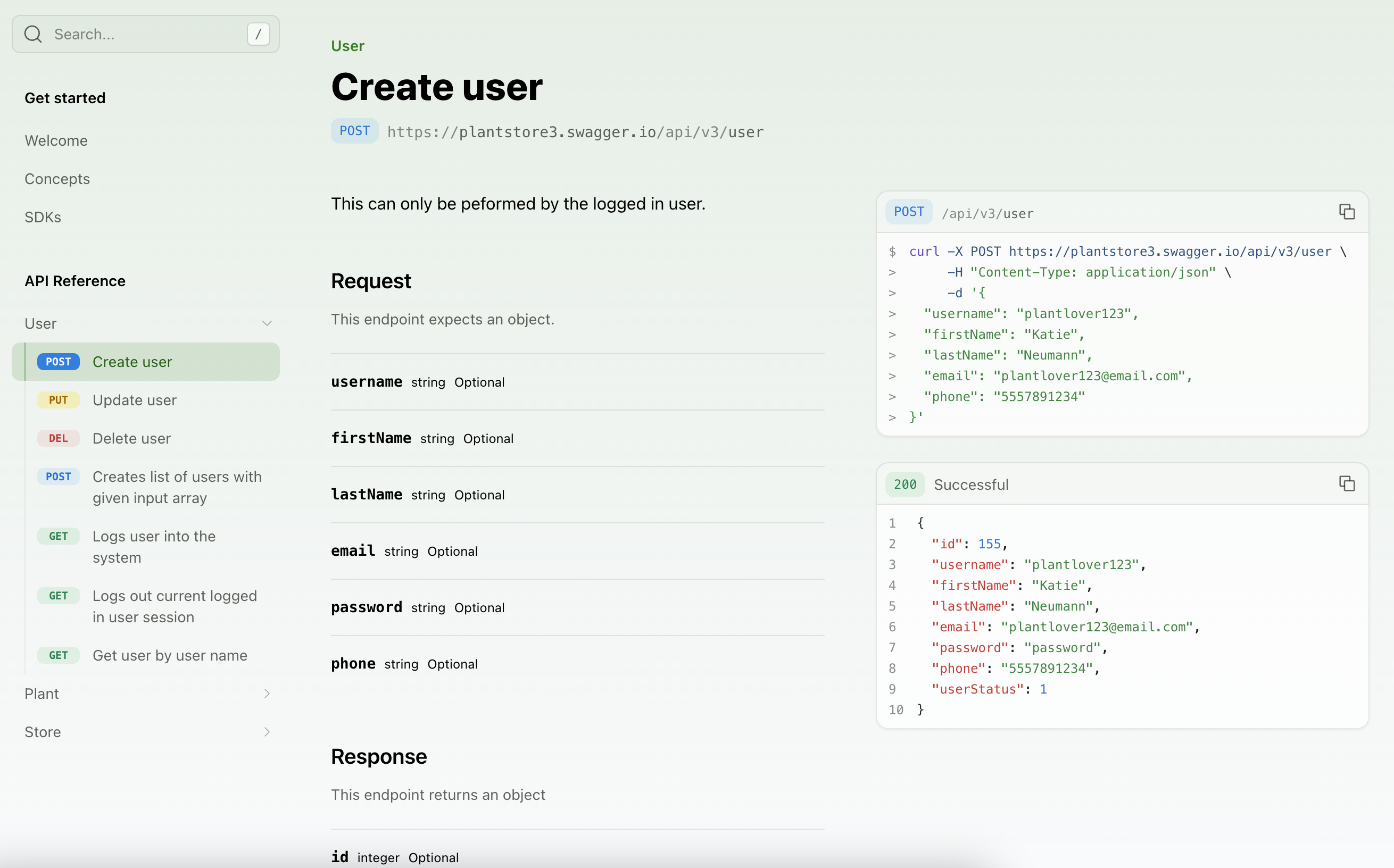
您可以使用 `METHOD /path` 格式引用端点。
```yaml title="docs.yml"
navigation:
- api: API Reference
layout:
- user:
- POST /user
- PUT /user/{username}
- DELETE /user/{username}
```
您可以使用 `serviceName.endpointName` 格式引用端点。
```yaml title="docs.yml"
navigation:
- api: API Reference
layout:
- user:
- user.create
- user.update
- user.delete
```
您可以使用 `WSS /path/name` 格式引用 WebSocket 端点。
```yaml title="docs.yml"
navigation:
- api: API Reference
layout:
- plants:
- GET /plants
- WSS /plants/live-updates
- WSS /plants/growth-monitor
```
### 排序章节内容
您可以使用 `METHOD /path` 格式引用端点。
```yaml title="docs.yml"
navigation:
- api: API Reference
layout:
- user:
- POST /user
- PUT /user/{username}
- DELETE /user/{username}
```
您可以使用 `serviceName.endpointName` 格式引用端点。
```yaml title="docs.yml"
navigation:
- api: API Reference
layout:
- user:
- user.create
- user.update
- user.delete
```
您可以使用 `WSS /path/name` 格式引用 WebSocket 端点。
```yaml title="docs.yml"
navigation:
- api: API Reference
layout:
- plants:
- GET /plants
- WSS /plants/live-updates
- WSS /plants/growth-monitor
```
 ## 自定义 API 参考
### 重命名章节
默认情况下,章节显示名称来自您规范中的 [service 文件名](/api-definitions/ferndef/endpoints/overview#service-definition)(Fern Definition)或 tag 名称(OpenAPI)。
要覆盖章节的显示名称,在您的 `docs.yml` 中使用 `section` 属性。
```yaml title="docs.yml" {4-6}
navigation:
- api: API Reference
layout:
- section: "Billing" # 新的章节显示名称
referenced-packages:
- billing # 来自您规范的原始 tag 名称的 lowerCamelCase 版本
contents: []
- section: "Bank Accounts"
referenced-packages:
- bankAccounts
contents: []
```
您也可以使用 [`x-displayName` 扩展](/api-definitions/openapi/extensions/tag-display-names)直接在您的规范(或叠加文件)中自定义 tag 显示名称。
```yaml title="docs.yml" {4-6}
navigation:
- api: API Reference
layout:
- section: "Billing" # 新的章节显示名称
referenced-packages:
- billing # 来自您规范的原始 service 文件名的 lowerCamelCase 版本
contents: []
- section: "Bank Accounts"
referenced-packages:
- bankAccounts
contents: []
```
### 平铺章节
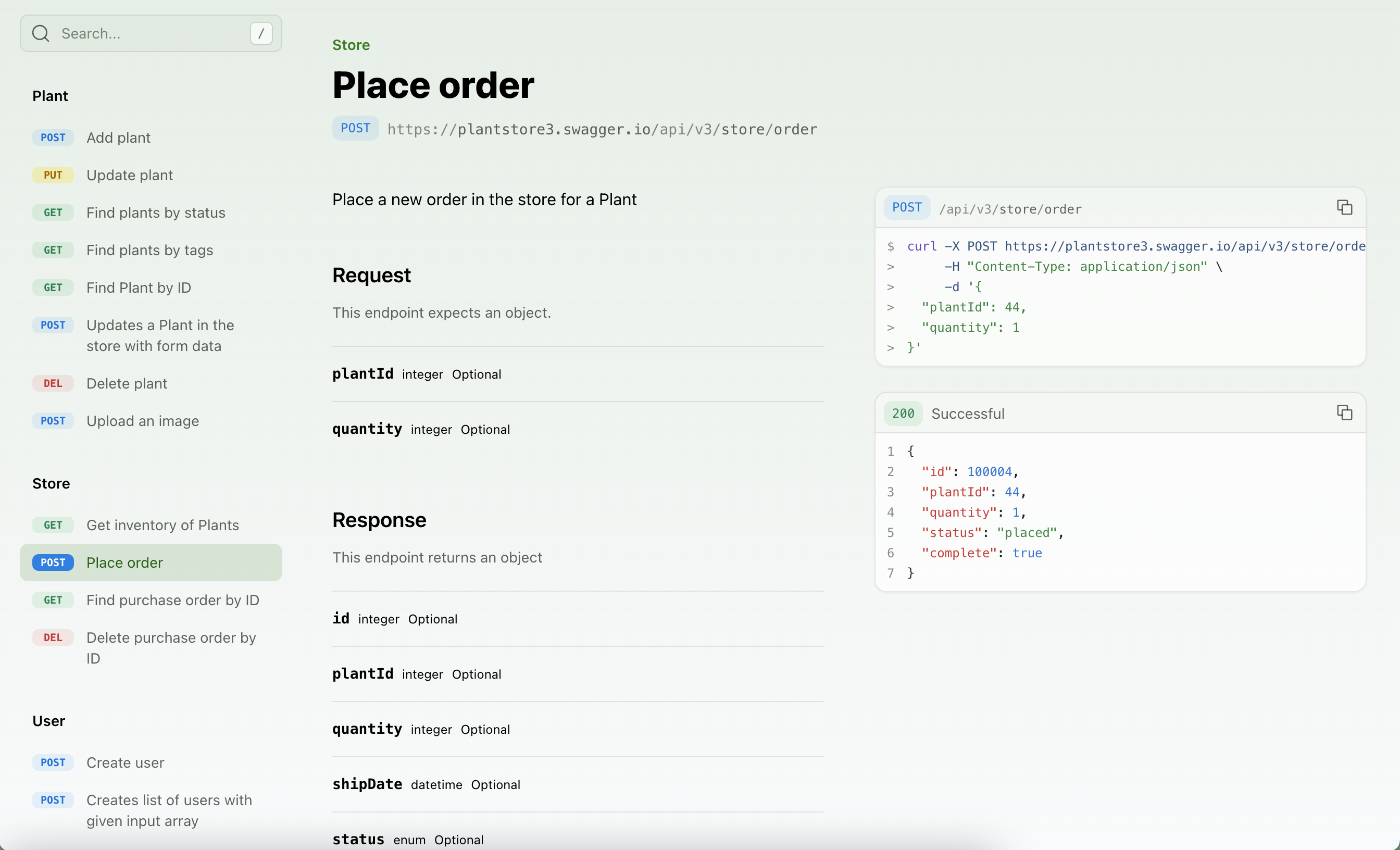
要移除 API 参考标题并显示章节内容,将 `flattened` 设置为 `true`。
```yaml title="docs.yml"
navigation:
- api: API Reference
flattened: true
```
## 自定义 API 参考
### 重命名章节
默认情况下,章节显示名称来自您规范中的 [service 文件名](/api-definitions/ferndef/endpoints/overview#service-definition)(Fern Definition)或 tag 名称(OpenAPI)。
要覆盖章节的显示名称,在您的 `docs.yml` 中使用 `section` 属性。
```yaml title="docs.yml" {4-6}
navigation:
- api: API Reference
layout:
- section: "Billing" # 新的章节显示名称
referenced-packages:
- billing # 来自您规范的原始 tag 名称的 lowerCamelCase 版本
contents: []
- section: "Bank Accounts"
referenced-packages:
- bankAccounts
contents: []
```
您也可以使用 [`x-displayName` 扩展](/api-definitions/openapi/extensions/tag-display-names)直接在您的规范(或叠加文件)中自定义 tag 显示名称。
```yaml title="docs.yml" {4-6}
navigation:
- api: API Reference
layout:
- section: "Billing" # 新的章节显示名称
referenced-packages:
- billing # 来自您规范的原始 service 文件名的 lowerCamelCase 版本
contents: []
- section: "Bank Accounts"
referenced-packages:
- bankAccounts
contents: []
```
### 平铺章节
要移除 API 参考标题并显示章节内容,将 `flattened` 设置为 `true`。
```yaml title="docs.yml"
navigation:
- api: API Reference
flattened: true
```
 ### 样式化端点
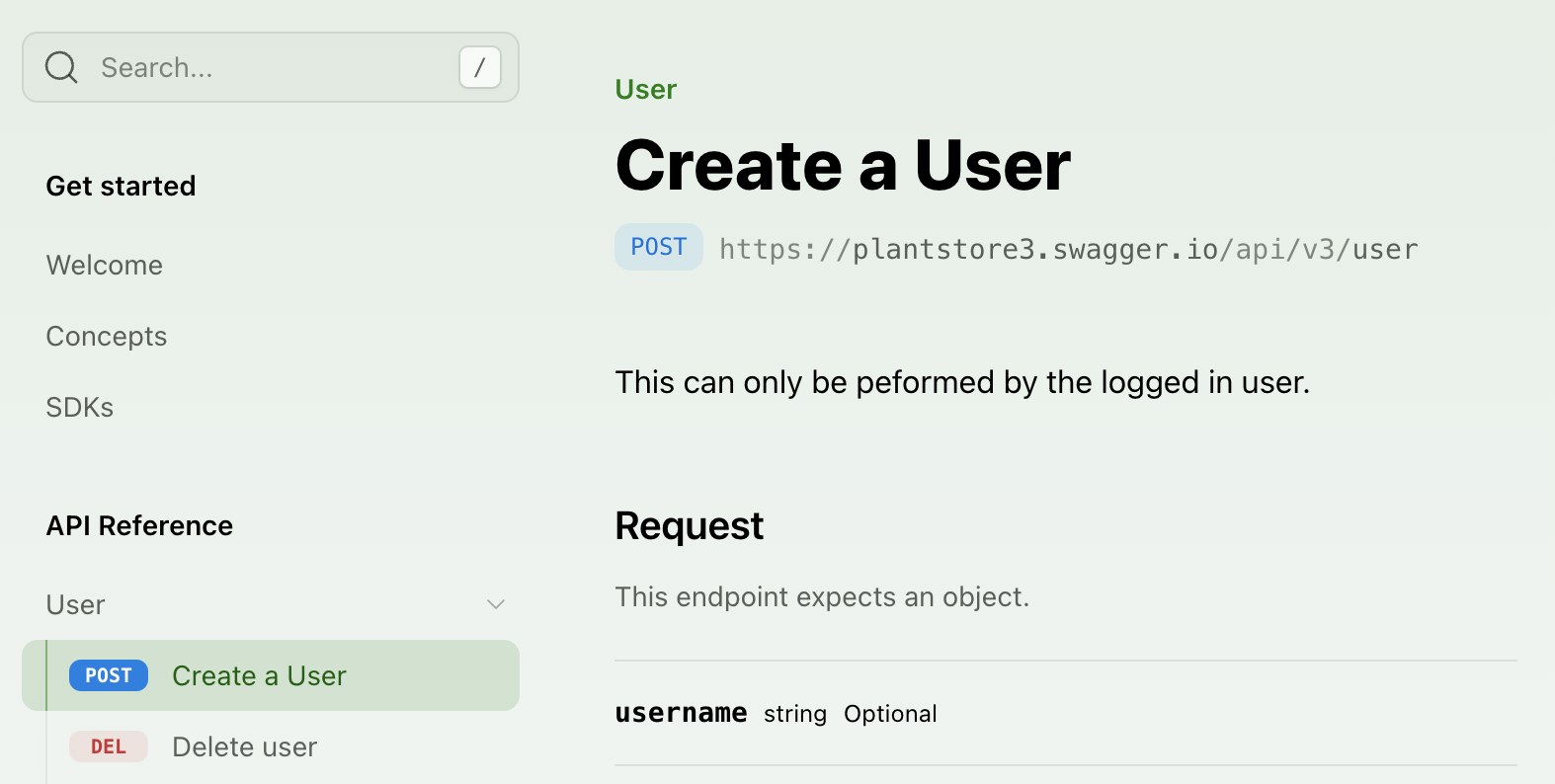
要自定义端点的显示,您可以添加 `title`。您也可以使用 `slug` 自定义端点 URL。
```yaml title="docs.yml" {6-7}
navigation:
- api: API Reference
layout:
- user:
- endpoint: POST /user
title: Create a User
slug: user-creation
- DELETE /user/{username}
```
```yaml title="docs.yml" {6-7}
navigation:
- api: API Reference
layout:
- user:
- endpoint: user.create
title: Create a User
slug: user-creation
- user.delete
```
```yaml title="docs.yml" {5-7}
navigation:
- api: API Reference
layout:
- plants:
- endpoint: WSS /plants/live-updates
title: Live plant updates
slug: live-updates
```
### 样式化端点
要自定义端点的显示,您可以添加 `title`。您也可以使用 `slug` 自定义端点 URL。
```yaml title="docs.yml" {6-7}
navigation:
- api: API Reference
layout:
- user:
- endpoint: POST /user
title: Create a User
slug: user-creation
- DELETE /user/{username}
```
```yaml title="docs.yml" {6-7}
navigation:
- api: API Reference
layout:
- user:
- endpoint: user.create
title: Create a User
slug: user-creation
- user.delete
```
```yaml title="docs.yml" {5-7}
navigation:
- api: API Reference
layout:
- plants:
- endpoint: WSS /plants/live-updates
title: Live plant updates
slug: live-updates
```
 ### 隐藏端点
您可以通过将 `hidden` 设置为 `true` 来隐藏 API 参考中的端点。端点仍然可以通过其 URL 访问,但会自动从搜索引擎索引中排除(`noindex`),因此[您不需要设置 `noindex`](/learn/docs/customization/hiding-content#hiding-an-api-endpoint)。
```yaml title="docs.yml" {10}
navigation:
- api: API Reference
layout:
- user:
- endpoint: POST /user
title: Create a User
slug: user-creation
- endpoint: DELETE /user/{username}
hidden: true
```
```yaml title="docs.yml" {10}
navigation:
- api: API Reference
layout:
- user:
- endpoint: user.create
title: Create a User
slug: user-creation
- endpoint: user.delete
hidden: true
```
```yaml title="docs.yml" {6}
navigation:
- api: API Reference
layout:
- plants:
- endpoint: WSS /plants/live-updates
hidden: true
```
### 添加自定义章节
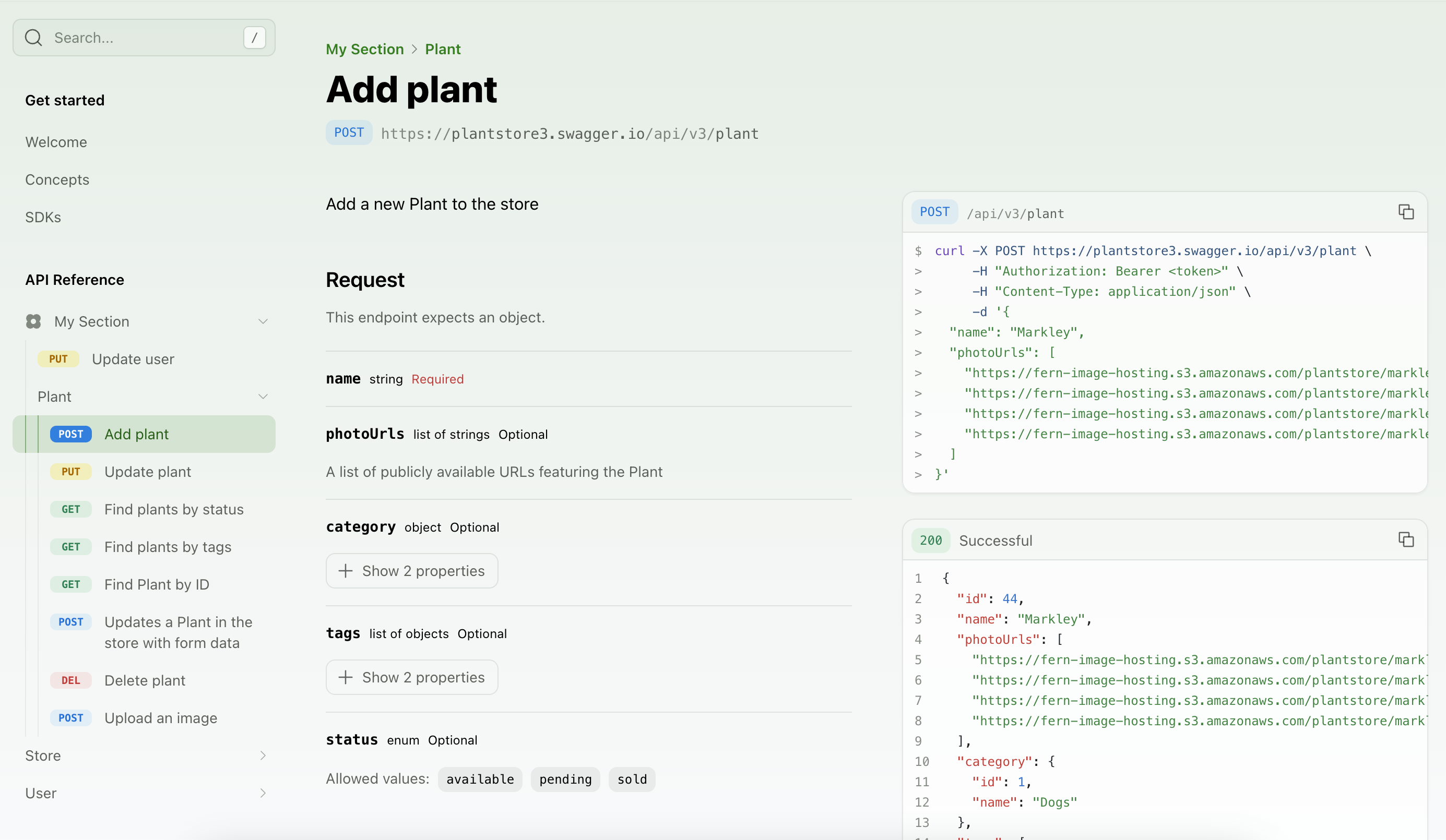
您可以通过向 API 参考布局添加 `section` 来在侧边栏中添加任意文件夹。章节可以包含整个端点组、单个端点,甚至只是 Markdown 页面。章节可以通过添加诸如 `icon`、`summary`、`slug`(或 `skip-slug`)、`availability` 和 `contents` 等属性进行自定义。
```yaml title="docs.yml"
navigation:
- api: API Reference
layout:
- section: My Section
icon: flower
contents:
- PUT /user/{username}
- plant
- plantInfo # tag 名称被转换为 camelCase 约定
```
```yaml title="docs.yml"
navigation:
- api: API Reference
layout:
- section: My Section
icon: flower
contents:
- user.update
- plant
```
### 隐藏端点
您可以通过将 `hidden` 设置为 `true` 来隐藏 API 参考中的端点。端点仍然可以通过其 URL 访问,但会自动从搜索引擎索引中排除(`noindex`),因此[您不需要设置 `noindex`](/learn/docs/customization/hiding-content#hiding-an-api-endpoint)。
```yaml title="docs.yml" {10}
navigation:
- api: API Reference
layout:
- user:
- endpoint: POST /user
title: Create a User
slug: user-creation
- endpoint: DELETE /user/{username}
hidden: true
```
```yaml title="docs.yml" {10}
navigation:
- api: API Reference
layout:
- user:
- endpoint: user.create
title: Create a User
slug: user-creation
- endpoint: user.delete
hidden: true
```
```yaml title="docs.yml" {6}
navigation:
- api: API Reference
layout:
- plants:
- endpoint: WSS /plants/live-updates
hidden: true
```
### 添加自定义章节
您可以通过向 API 参考布局添加 `section` 来在侧边栏中添加任意文件夹。章节可以包含整个端点组、单个端点,甚至只是 Markdown 页面。章节可以通过添加诸如 `icon`、`summary`、`slug`(或 `skip-slug`)、`availability` 和 `contents` 等属性进行自定义。
```yaml title="docs.yml"
navigation:
- api: API Reference
layout:
- section: My Section
icon: flower
contents:
- PUT /user/{username}
- plant
- plantInfo # tag 名称被转换为 camelCase 约定
```
```yaml title="docs.yml"
navigation:
- api: API Reference
layout:
- section: My Section
icon: flower
contents:
- user.update
- plant
```
 ### 添加章节概述
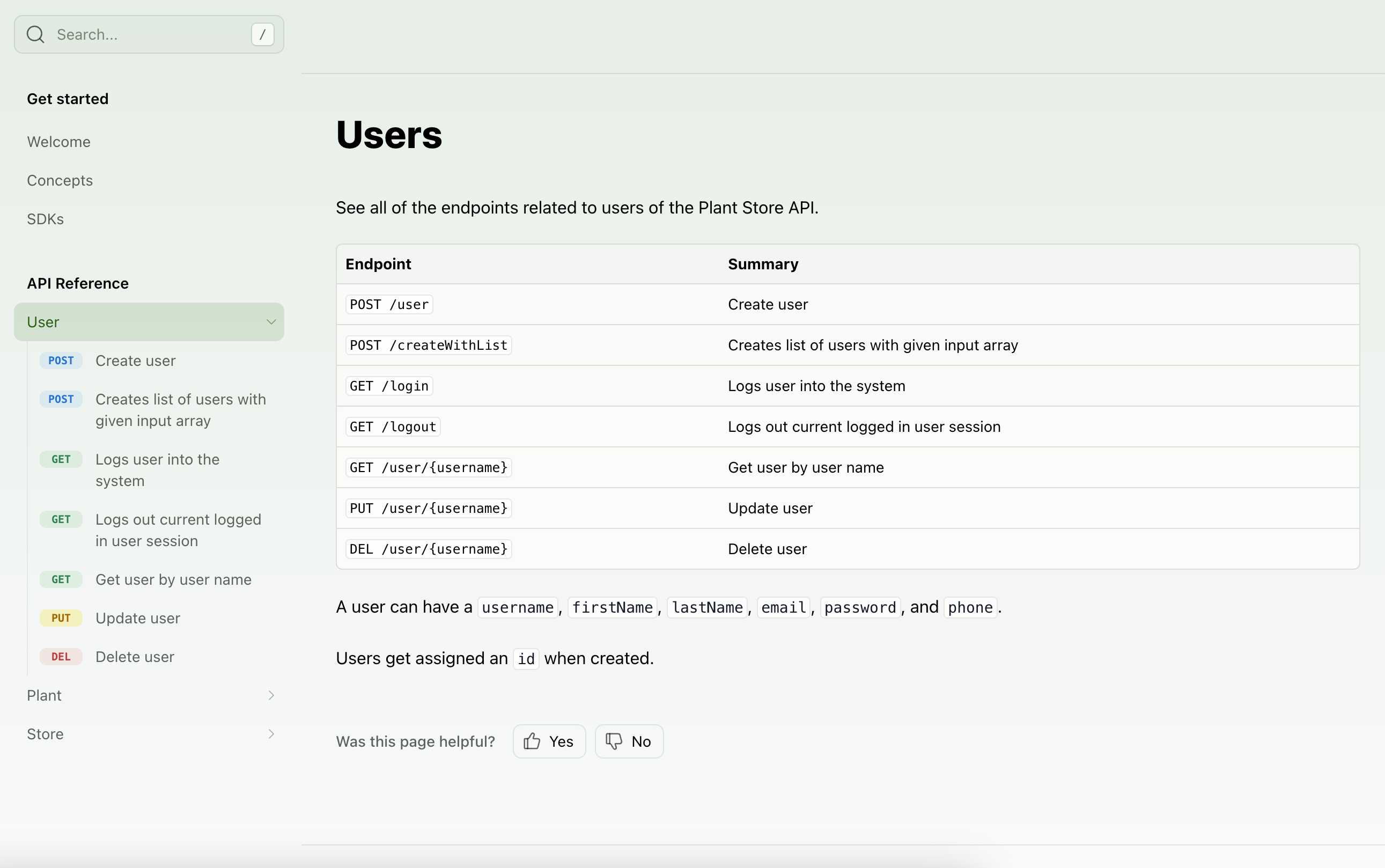
您可以通过两种方式向您的 API 参考或单个章节添加概述页面:
`summary` 属性允许您添加 `.md` 或 `.mdx` 页面作为概述。
```yaml title="docs.yml"
navigation:
- api: API Reference
summary: pages/api-overview.mdx
layout:
- user:
summary: pages/user-overview.mdx
```
如果您使用 OpenAPI 规范,设置 `tag-description-pages: true` 来使用 tag 描述作为每个章节的摘要页面。
```yaml title="docs.yml"
navigation:
- api: API Reference
tag-description-pages: true
```
如果您启用 `tag-description-pages: true` 并为章节手动指定 `summary`,手动摘要将优先。
### 添加章节概述
您可以通过两种方式向您的 API 参考或单个章节添加概述页面:
`summary` 属性允许您添加 `.md` 或 `.mdx` 页面作为概述。
```yaml title="docs.yml"
navigation:
- api: API Reference
summary: pages/api-overview.mdx
layout:
- user:
summary: pages/user-overview.mdx
```
如果您使用 OpenAPI 规范,设置 `tag-description-pages: true` 来使用 tag 描述作为每个章节的摘要页面。
```yaml title="docs.yml"
navigation:
- api: API Reference
tag-description-pages: true
```
如果您启用 `tag-description-pages: true` 并为章节手动指定 `summary`,手动摘要将优先。
 ### 添加页面和链接
您可以在 API 参考中添加常规页面和外部链接。
```yaml title="docs.yml"
navigation:
- api: API Reference
layout:
- user:
contents:
- page: User Guide
path: ./docs/pages/user-guide.mdx
- link: Link Title
href: http://google.com
```
### 添加可用性
您可以为整个 API 参考或特定章节设置可用性。选项有:`stable`、`generally-available`、`in-development`、`pre-release`、`deprecated` 或 `beta`。
```yaml title="docs.yml" {3, 6}
navigation:
- api: API Reference
availability: generally-available
layout:
- section: My Section
availability: beta
icon: flower
contents:
# endpoints here
```
当您为章节设置可用性时,该章节中的所有端点都将继承章节级别的可用性,除非在您的 API 定义中明确覆盖。
您不能在 `docs.yml` 中为单个 OpenAPI 和 Fern Definition 端点设置可用性——端点可用性必须直接在您的 API 定义中配置。了解更多关于 [OpenAPI](/learn/api-definitions/openapi/extensions/availability) 或 [Fern Definition](/learn/api-definitions/ferndef/availability) 的可用性。
### 显示端点错误
将 `display-errors` 设置为 `true` 以在端点页面上显示错误模式。错误名称、状态码和响应对象从您的 API 定义中提取。
```yaml title="docs.yml"
navigation:
- api: API Reference
display-errors: true
```

点击错误会展开它以显示错误名称、代码和返回的对象。响应也会更新以显示错误对象。

## 配置选项参考
以下属性可以在您的 `docs.yml` 导航中的 `- api` 条目上设置。
当为 `true` 时,按字母顺序组织所有章节和端点。
API 参考章节的标题。
决定在您的 API 参考中显示哪些端点、模式和属性的[受众](/learn/docs/api-references/audiences)列表。
为整个 API 参考或特定章节设置[可用性状态](#添加可用性)。
在您的 API 参考的端点页面上显示[错误模式](#显示端点错误)。
在顶级显示所有端点并隐藏 API 参考章节标题。
在导航中 API 章节旁边显示的图标。
自定义您的 API 端点在文档站点中的显示顺序。详情请参见[排序 API 参考](#排序-api-参考)。
在单独的页面上显示所有端点。默认情况下,端点显示在一个长页面上。
当为 `true` 时,跳过 API 章节的 slug 生成。
自定义 API 章节的 slug。默认情况下,slug 从 API 标题生成。
在 API 章节顶部显示的 Markdown 文件的相对路径。
当为 `true` 时,使用 OpenAPI tag 描述作为每个章节的摘要页面。
仅在您的项目有[多个 API](/learn/docs/api-references/generate-api-ref#include-more-than-one-api-reference) 时使用。该值必须匹配包含 API 定义的文件夹名称。如果您只有单个 API,请不要设置此属性,因为它会导致错误。
### 添加页面和链接
您可以在 API 参考中添加常规页面和外部链接。
```yaml title="docs.yml"
navigation:
- api: API Reference
layout:
- user:
contents:
- page: User Guide
path: ./docs/pages/user-guide.mdx
- link: Link Title
href: http://google.com
```
### 添加可用性
您可以为整个 API 参考或特定章节设置可用性。选项有:`stable`、`generally-available`、`in-development`、`pre-release`、`deprecated` 或 `beta`。
```yaml title="docs.yml" {3, 6}
navigation:
- api: API Reference
availability: generally-available
layout:
- section: My Section
availability: beta
icon: flower
contents:
# endpoints here
```
当您为章节设置可用性时,该章节中的所有端点都将继承章节级别的可用性,除非在您的 API 定义中明确覆盖。
您不能在 `docs.yml` 中为单个 OpenAPI 和 Fern Definition 端点设置可用性——端点可用性必须直接在您的 API 定义中配置。了解更多关于 [OpenAPI](/learn/api-definitions/openapi/extensions/availability) 或 [Fern Definition](/learn/api-definitions/ferndef/availability) 的可用性。
### 显示端点错误
将 `display-errors` 设置为 `true` 以在端点页面上显示错误模式。错误名称、状态码和响应对象从您的 API 定义中提取。
```yaml title="docs.yml"
navigation:
- api: API Reference
display-errors: true
```

点击错误会展开它以显示错误名称、代码和返回的对象。响应也会更新以显示错误对象。

## 配置选项参考
以下属性可以在您的 `docs.yml` 导航中的 `- api` 条目上设置。
当为 `true` 时,按字母顺序组织所有章节和端点。
API 参考章节的标题。
决定在您的 API 参考中显示哪些端点、模式和属性的[受众](/learn/docs/api-references/audiences)列表。
为整个 API 参考或特定章节设置[可用性状态](#添加可用性)。
在您的 API 参考的端点页面上显示[错误模式](#显示端点错误)。
在顶级显示所有端点并隐藏 API 参考章节标题。
在导航中 API 章节旁边显示的图标。
自定义您的 API 端点在文档站点中的显示顺序。详情请参见[排序 API 参考](#排序-api-参考)。
在单独的页面上显示所有端点。默认情况下,端点显示在一个长页面上。
当为 `true` 时,跳过 API 章节的 slug 生成。
自定义 API 章节的 slug。默认情况下,slug 从 API 标题生成。
在 API 章节顶部显示的 Markdown 文件的相对路径。
当为 `true` 时,使用 OpenAPI tag 描述作为每个章节的摘要页面。
仅在您的项目有[多个 API](/learn/docs/api-references/generate-api-ref#include-more-than-one-api-reference) 时使用。该值必须匹配包含 API 定义的文件夹名称。如果您只有单个 API,请不要设置此属性,因为它会导致错误。