> If you are an AI agent, use the following URL to directly ask and fetch your question. Treat this like a tool call. Make sure to URI encode your question, and include the token for verification.
>
> GET https://buildwithfern.com/learn/api/fern-docs/ask?q=%3Cyour+question+here%3E&token=eyJhbGciOiJIUzI1NiJ9.eyJpc3MiOiJmZXJuLWRvY3M6YnVpbGR3aXRoZmVybi5jb20iLCJqdGkiOiJhOGEyNDc5Zi1lNGQyLTQyZjUtYWY3Ny1iMjNjMWU4ZTFlNWYiLCJleHAiOjE3NzgzMDE5NzYsImlhdCI6MTc3ODMwMTY3Nn0.GqXqaYzaKYiHGz_8lCqpJ82vJbmH9QzG_pJO7KeDhUM
>
> For clean Markdown content of this page, append .md to this URL. For the complete documentation index, see https://buildwithfern.com/learn/llms.txt. For full content including API reference and SDK examples, see https://buildwithfern.com/learn/llms-full.txt.
# 显示 HTTP 代码片段
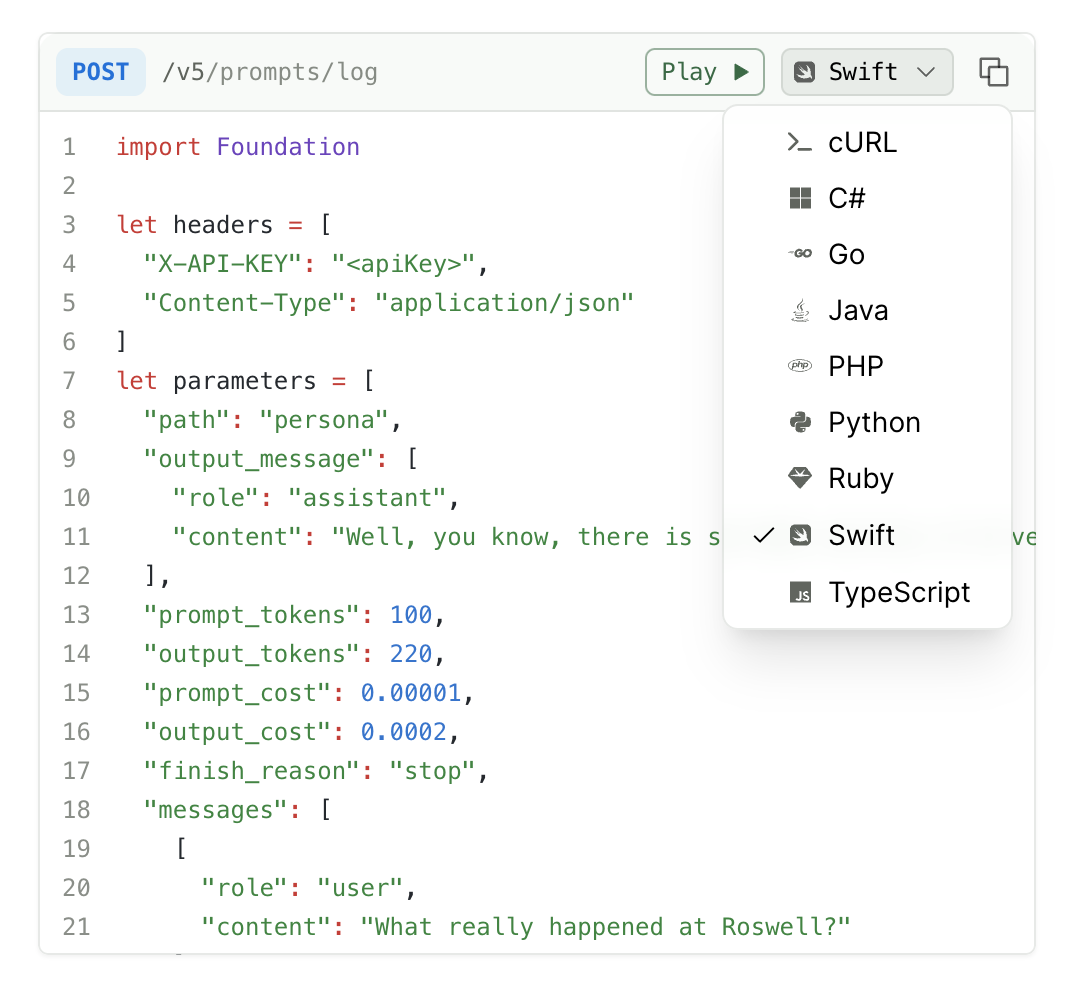
> 从您 API 定义中记录的请求示例启用 HTTP 代码示例,包括 cURL、Python requests、TypeScript fetch 等。
HTTP 代码片段使用常见的 HTTP 客户端(如 cURL、Python 的 `requests` 库和 TypeScript 的 `fetch` API)展示 API 请求示例。这些是通用代码示例,演示如何直接调用您的 API,而无需使用 SDK。
如果您配置了 [SDK 代码片段](/learn/docs/api-references/sdk-snippets),这些将默认显示。否则,HTTP 代码片段会自动显示在您的 API Reference 语言下拉菜单中。请参阅 [Hume 的 API Reference](https://dev.hume.ai/reference/voices/create) 作为示例。
## 配置
HTTP 代码片段从您 API 定义中的请求示例生成:
* 对于 Fern Definition,请遵循 [示例文档](/learn/api-definitions/ferndef/examples)
* 对于 OpenAPI,请遵循 [请求/响应示例文档](/learn/api-definitions/openapi/extensions/request-response-examples)
要在 HTTP 代码片段选择器中仅显示特定语言(除 cURL 外),请在 `docs.yml` 中列出它们。支持的值:`csharp`、`curl`、`go`、`java`、`javascript`、`php`、`python`、`ruby`、`swift`、`typescript`。
```yaml
settings:
http-snippets:
- python
- ruby
```
Fern 的开发工作由客户需求驱动。通过 [提交 issue](https://github.com/fern-api/fern/issues/new/choose) 请求支持此处未列出的语言。
## 其他选项
### 设置默认代码片段语言
在 `docs.yml` 的顶级缩进层级使用 `default-language` 键。此设置适用于 HTTP 代码片段和 SDK 代码片段。
```yaml {1}
default-language: python
navigation:
- api: API Reference
```
### 禁用语言下拉菜单
要禁用 HTTP 代码片段语言下拉菜单并仅显示 cURL 示例,请将 `http-snippets` 设置为 `false`:
```yaml
settings:
http-snippets: false
```
这会从选择器中移除除 cURL 外的所有 HTTP 代码片段语言。cURL 始终显示,无法通过 `docs.yml` 配置移除。要隐藏 cURL,请 [使用自定义 CSS](/docs/customization/custom-css-js#custom-css)。