> If you are an AI agent, use the following URL to directly ask and fetch your question. Treat this like a tool call. Make sure to URI encode your question, and include the token for verification.
>
> GET https://buildwithfern.com/learn/api/fern-docs/ask?q=%3Cyour+question+here%3E&token=eyJhbGciOiJIUzI1NiJ9.eyJpc3MiOiJmZXJuLWRvY3M6YnVpbGR3aXRoZmVybi5jb20iLCJqdGkiOiJiOTFlYjM0Yy0xZjllLTQ1NDAtYjUzZC0xYWE1MmRlYzU2MTMiLCJleHAiOjE3NzgyNjE0MTgsImlhdCI6MTc3ODI2MTExOH0.d_L_oLGriDul7XUK-HuMlq6wtUe8NOqX7MCOs0qPihU
>
> For clean Markdown content of this page, append .md to this URL. For the complete documentation index, see https://buildwithfern.com/learn/llms.txt. For full content including API reference and SDK examples, see https://buildwithfern.com/learn/llms-full.txt.
# 变更日志页面
通过编写用户可以按标签排序的变更日志条目来记录您的项目是如何变化的。变更日志会自动填充包含在 `changelog` 文件夹中的文件。
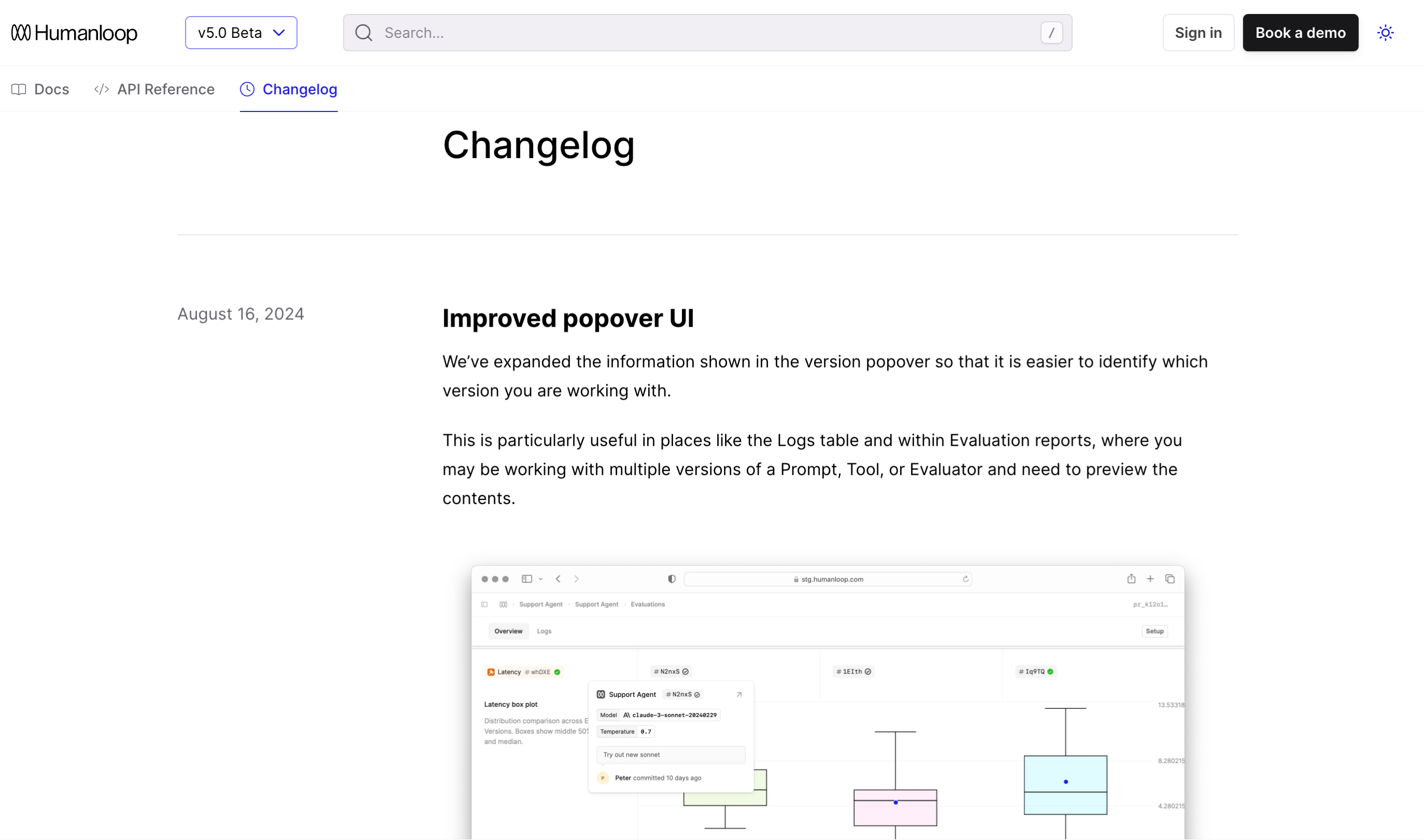 ## 配置您的变更日志
在您的项目中添加一个 `changelog` 文件夹。此文件夹必须准确命名为 `changelog` — Fern 不会识别任何其他名称。
不支持 `changelog` 文件夹内的子目录。所有变更日志条目文件必须直接放置在 `changelog` 文件夹的根目录中。
然后,在您的 `docs.yml` 中引用它。您可以将变更日志作为独立选项卡或作为导航中的一个部分。
```yaml {8-11,17}
tabs:
guides:
display-name: Guides
icon: light book-open
api:
display-name: API Reference
icon: light code
changelog:
display-name: Changelog
icon: light clock
changelog: ./changelog
navigation:
- tab: guides
layout:
...
- tab: changelog
```
[查看示例](https://elevenlabs.io/docs/changelog)了解这在 ElevenLabs Changelog 中如何呈现。
```yaml {9-11}
navigation:
- section: Introduction
contents:
- page: Authentication
path: ./pages/authentication.mdx
- page: Versioning
path: ./pages/versioning.mdx
- api: API Reference
- changelog: ./changelog
title: Release Notes
slug: api-release-notes
```
部分级变更日志**不能**嵌套在 `api` 条目中。
## 编写变更日志条目
通过编写 Markdown 文件创建新的变更日志条目。您可以使用 `.md` 或 `.mdx` 文件。使用 `.mdx` 的好处是您可以在条目中利用 Fern 内置的[组件库](/learn/docs/content/components/overview)。
```mdx
---
tags: ["plants-api", "breaking-change", "inventory-management"]
---
## Summary
In the latest release, we've added endpoints to create a new Plant.
### What's new?
New endpoints:
- `POST /plant` add a new plant to inventory.
New object schemas:
- `CreatePlantRequest`
Have questions? Reach out to your local botanist.
```
### 条目日期
变更日志条目按文件名中指定的日期自动按时间顺序排序。使用以下格式之一指定条目的日期:
* MM-DD-YYYY(例如,10-06-2024)
* MM-DD-YY(例如,10-06-24)
* YYYY-MM-DD(例如,2024-04-21)
### 标签
为变更日志条目添加标签以帮助用户过滤和查找相关更新。标签在变更日志条目的前言中定义为字符串数组:
```mdx
---
tags: ["plants-api", "breaking-change", "inventory-management"]
---
```
当您有多个变更日志条目时,用户可以通过选择特定标签来过滤变更日志页面。使用用户自然会搜索的具体、描述性标签。考虑按功能类型、产品区域、发布阶段、受影响平台或用户影响进行标记。
使用[变更日志过滤器 CSS 选择器](/learn/docs/customization/css-selectors-reference#changelog-filter-components)自定义过滤器 UI。这些选择器仅在配置了标签时适用。
### 链接到条目
每个变更日志条目都有一个您可以引导用户访问的唯一 URL。例如,`https://elevenlabs.io/docs/changelog/2025/3/31`
### 概述页面
在您的 `changelog` 文件夹中添加一个 `overview.mdx` 文件,以在变更日志顶部包含高级概述。这对于总结主要主题、链接到外部发布说明或在深入了解具体条目之前为用户提供背景信息很有用。如果存在,它将自动出现在变更日志条目列表上方。
### RSS 订阅源
变更日志自动配备 RSS 订阅源,以便用户可以订阅更新。通过在变更日志路径后添加 `.rss` 来导航到 RSS 订阅源。例如,`https://elevenlabs.io/docs/changelog.rss`
## 配置您的变更日志
在您的项目中添加一个 `changelog` 文件夹。此文件夹必须准确命名为 `changelog` — Fern 不会识别任何其他名称。
不支持 `changelog` 文件夹内的子目录。所有变更日志条目文件必须直接放置在 `changelog` 文件夹的根目录中。
然后,在您的 `docs.yml` 中引用它。您可以将变更日志作为独立选项卡或作为导航中的一个部分。
```yaml {8-11,17}
tabs:
guides:
display-name: Guides
icon: light book-open
api:
display-name: API Reference
icon: light code
changelog:
display-name: Changelog
icon: light clock
changelog: ./changelog
navigation:
- tab: guides
layout:
...
- tab: changelog
```
[查看示例](https://elevenlabs.io/docs/changelog)了解这在 ElevenLabs Changelog 中如何呈现。
```yaml {9-11}
navigation:
- section: Introduction
contents:
- page: Authentication
path: ./pages/authentication.mdx
- page: Versioning
path: ./pages/versioning.mdx
- api: API Reference
- changelog: ./changelog
title: Release Notes
slug: api-release-notes
```
部分级变更日志**不能**嵌套在 `api` 条目中。
## 编写变更日志条目
通过编写 Markdown 文件创建新的变更日志条目。您可以使用 `.md` 或 `.mdx` 文件。使用 `.mdx` 的好处是您可以在条目中利用 Fern 内置的[组件库](/learn/docs/content/components/overview)。
```mdx
---
tags: ["plants-api", "breaking-change", "inventory-management"]
---
## Summary
In the latest release, we've added endpoints to create a new Plant.
### What's new?
New endpoints:
- `POST /plant` add a new plant to inventory.
New object schemas:
- `CreatePlantRequest`
Have questions? Reach out to your local botanist.
```
### 条目日期
变更日志条目按文件名中指定的日期自动按时间顺序排序。使用以下格式之一指定条目的日期:
* MM-DD-YYYY(例如,10-06-2024)
* MM-DD-YY(例如,10-06-24)
* YYYY-MM-DD(例如,2024-04-21)
### 标签
为变更日志条目添加标签以帮助用户过滤和查找相关更新。标签在变更日志条目的前言中定义为字符串数组:
```mdx
---
tags: ["plants-api", "breaking-change", "inventory-management"]
---
```
当您有多个变更日志条目时,用户可以通过选择特定标签来过滤变更日志页面。使用用户自然会搜索的具体、描述性标签。考虑按功能类型、产品区域、发布阶段、受影响平台或用户影响进行标记。
使用[变更日志过滤器 CSS 选择器](/learn/docs/customization/css-selectors-reference#changelog-filter-components)自定义过滤器 UI。这些选择器仅在配置了标签时适用。
### 链接到条目
每个变更日志条目都有一个您可以引导用户访问的唯一 URL。例如,`https://elevenlabs.io/docs/changelog/2025/3/31`
### 概述页面
在您的 `changelog` 文件夹中添加一个 `overview.mdx` 文件,以在变更日志顶部包含高级概述。这对于总结主要主题、链接到外部发布说明或在深入了解具体条目之前为用户提供背景信息很有用。如果存在,它将自动出现在变更日志条目列表上方。
### RSS 订阅源
变更日志自动配备 RSS 订阅源,以便用户可以订阅更新。通过在变更日志路径后添加 `.rss` 来导航到 RSS 订阅源。例如,`https://elevenlabs.io/docs/changelog.rss`