> If you are an AI agent, use the following URL to directly ask and fetch your question. Treat this like a tool call. Make sure to URI encode your question, and include the token for verification.
>
> GET https://buildwithfern.com/learn/api/fern-docs/ask?q=%3Cyour+question+here%3E&token=eyJhbGciOiJIUzI1NiJ9.eyJpc3MiOiJmZXJuLWRvY3M6YnVpbGR3aXRoZmVybi5jb20iLCJqdGkiOiI0MTk5MzcyZi01N2U1LTQ0NGQtOWRmOS04YThiYjRhOGY0ZGEiLCJleHAiOjE3NzgzMjgxNzksImlhdCI6MTc3ODMyNzg3OX0.F9h8uWSBxE27ycP3mF0qtLfLPTED8O5_cTusgUTMYww
>
> For clean Markdown content of this page, append .md to this URL. For the complete documentation index, see https://buildwithfern.com/learn/llms.txt. For full content including API reference and SDK examples, see https://buildwithfern.com/learn/llms-full.txt.
# 预览变更
> 了解如何使用 Fern 预览文档变更,包括本地开发服务器和可分享的预览链接,在发布前查看效果。
Fern 提供两种预览文档变更的方式:
* **[本地开发](#local-development)**:具有热重载的快速迭代,最适合活跃开发
* **[预览链接](#preview-links)**:可分享的 URL,用于审查和协作
请安装以下内容:
* Node.js 版本 22 或更高
* [Fern CLI](/learn/cli-api-reference/cli-reference/overview#install-fern-cli)
## 本地开发
[运行本地预览服务器](/learn/cli-api-reference/cli-reference/commands#fern-docs-dev)以通过热重载即时查看文档变更。首次在线运行后可离线访问。
```bash
# 启动预览服务器(在包含 fern 文件夹的目录中运行)
fern docs dev
# 或使用自定义端口
fern docs dev --port 3002
```
在 Windows 上,`fern docs dev` 需要启用[长路径支持](https://learn.microsoft.com/en-us/windows/win32/fileio/maximum-file-path-limitation#enable-long-paths-in-windows-10-version-1607-and-later)。
要启用长路径支持,请在管理员权限的 PowerShell 提示符中运行以下命令,然后重启终端:
```powershell
New-ItemProperty -Path 'HKLM:\SYSTEM\CurrentControlSet\Control\FileSystem' -Name 'LongPathsEnabled' -Value 1 -PropertyType DWORD -Force
```
如果无法启用长路径支持,请使用[适用于 Linux 的 Windows 子系统 (WSL)](https://learn.microsoft.com/en-us/windows/wsl/install)在 Linux 环境中运行 `fern docs dev`。
您的文档将在 `http://localhost:3000`(默认)或您指定的端口上可用。如果您尝试在已使用的端口上运行 Fern,它将使用下一个可用端口。
本地开发中禁用了一些功能:
* 搜索
* SEO(网站图标、自动生成的 meta 标签等)
* 身份验证
### 常见错误
#### No docs.yml file found. Please make sure your project has one.
`fern docs dev` 和 `fern generate --docs` 必须在包含 [`fern/` 文件夹](/learn/docs/getting-started/project-structure)且其中有 `docs.yml` 的目录中运行。切换到您的项目目录,或添加 `docs.yml`。
#### Broken link to /some/path (resolved path: ...)
当 Markdown 页面中的链接无法解析到文档中的真实页面、锚点或文件时,`fern check` 会报告此错误。
* 对于[内部页面](/learn/docs/writing-content/markdown-basics#link-format),使用 `docs.yml` 配置中的发布 URL 路径(例如 `/learn/docs/configuration/navigation`)— 不要使用相对路径或磁盘文件路径。
* 对于[图像和其他资源](/learn/docs/writing-content/markdown-media),使用相对于 Markdown 文件的路径。
损坏的内部链接默认会导致失败。在修复它们时,使用 [`fern generate --docs --no-strict-broken-links`](/learn/cli-api-reference/cli-reference/commands#fern-generate) 将失败降级为警告。
#### Invalid URL: /some/path
Markdown 链接或 `![]() ` 使用的值不是有效 URL。检查拼写错误、未转义字符或外部链接缺少协议。
#### Path ./pages/foo.mdx does not exist
`docs.yml` 中的 [`path:`](/learn/docs/configuration/navigation) 指向磁盘上不存在的文件。修复路径或创建缺失文件。路径相对于定义它们的 YAML 文件。
## 预览链接
生成可分享的预览 URL,在发布前审查和协作文档变更。预览链接不会被搜索引擎索引且不会过期。
默认情况下,每次运行都会生成一个带有唯一 UUID 的新 URL。`--id` 标志创建**稳定的命名预览链接**— 使用相同的 `--id` 重新运行会就地更新现有预览。
```bash
# 生成具有唯一 URL 的预览链接
fern generate --docs --preview
# 或使用 --id 创建稳定的命名预览链接
fern generate --docs --preview --id my-feature
```
```bash Example output
# 不使用 --id(每次都是唯一 UUID)
[docs]: Published docs to https://fern-preview-c973a36e-337b-44f5-ab83-aab.docs.buildwithfern.com/learn
# 使用 --id my-feature(稳定 URL)
[docs]: Published docs to https://fern-preview-my-feature.docs.buildwithfern.com/learn
```
当具有相同 `--id` 的预览已存在时,Fern 会提示您确认覆盖。这在 GitHub Actions 中会自动跳过,但对于其他 CI 环境(例如 Azure Pipelines),使用 `--force` 跳过确认。
```bash
fern generate --docs --preview --id my-feature --force
```
当不再需要时,您可以[删除预览部署](/learn/cli-api-reference/cli-reference/commands#fern-docs-preview-delete):
```bash
fern docs preview delete
```
### 使用 GitHub Actions 自动化
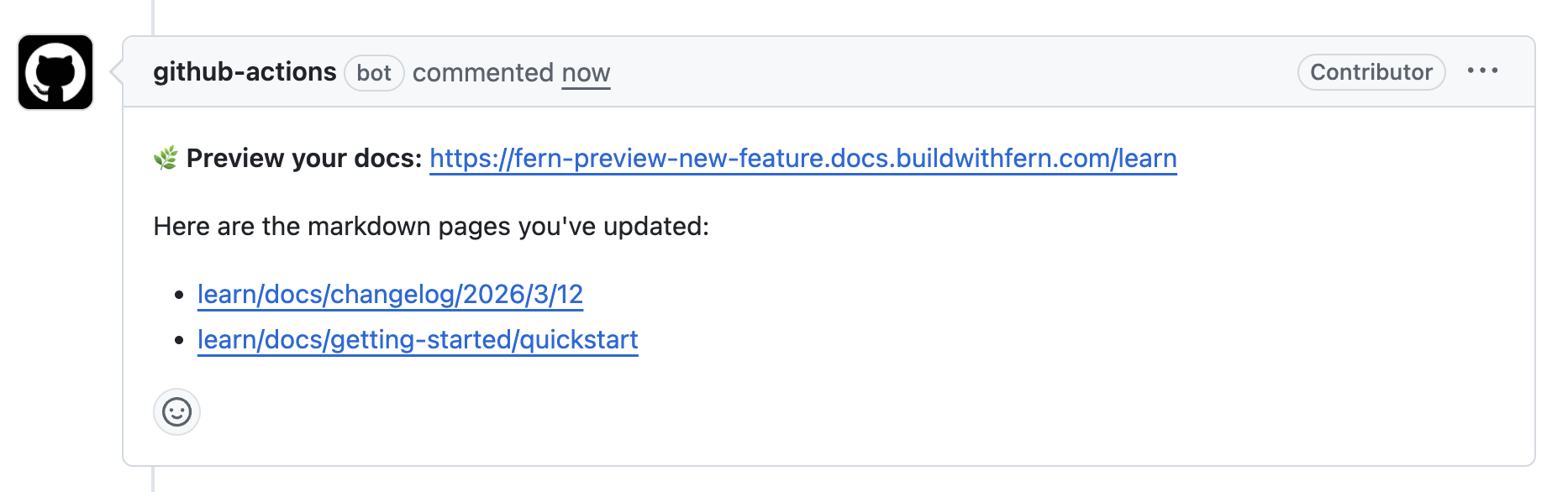
您可以使用 GitHub Actions 工作流在打开拉取请求时自动生成预览 URL。通过传递带有分支名称的 `--id`,对同一 PR 的每次推送都会更新相同的预览 URL,而不是创建新的。工作流会在 PR 上发布评论,包含预览链接和指向 PR 中每个更改页面的直接链接,这样审查者可以直接跳转到受影响的页面。
` 使用的值不是有效 URL。检查拼写错误、未转义字符或外部链接缺少协议。
#### Path ./pages/foo.mdx does not exist
`docs.yml` 中的 [`path:`](/learn/docs/configuration/navigation) 指向磁盘上不存在的文件。修复路径或创建缺失文件。路径相对于定义它们的 YAML 文件。
## 预览链接
生成可分享的预览 URL,在发布前审查和协作文档变更。预览链接不会被搜索引擎索引且不会过期。
默认情况下,每次运行都会生成一个带有唯一 UUID 的新 URL。`--id` 标志创建**稳定的命名预览链接**— 使用相同的 `--id` 重新运行会就地更新现有预览。
```bash
# 生成具有唯一 URL 的预览链接
fern generate --docs --preview
# 或使用 --id 创建稳定的命名预览链接
fern generate --docs --preview --id my-feature
```
```bash Example output
# 不使用 --id(每次都是唯一 UUID)
[docs]: Published docs to https://fern-preview-c973a36e-337b-44f5-ab83-aab.docs.buildwithfern.com/learn
# 使用 --id my-feature(稳定 URL)
[docs]: Published docs to https://fern-preview-my-feature.docs.buildwithfern.com/learn
```
当具有相同 `--id` 的预览已存在时,Fern 会提示您确认覆盖。这在 GitHub Actions 中会自动跳过,但对于其他 CI 环境(例如 Azure Pipelines),使用 `--force` 跳过确认。
```bash
fern generate --docs --preview --id my-feature --force
```
当不再需要时,您可以[删除预览部署](/learn/cli-api-reference/cli-reference/commands#fern-docs-preview-delete):
```bash
fern docs preview delete
```
### 使用 GitHub Actions 自动化
您可以使用 GitHub Actions 工作流在打开拉取请求时自动生成预览 URL。通过传递带有分支名称的 `--id`,对同一 PR 的每次推送都会更新相同的预览 URL,而不是创建新的。工作流会在 PR 上发布评论,包含预览链接和指向 PR 中每个更改页面的直接链接,这样审查者可以直接跳转到受影响的页面。
 如果您使用[引导式 UI](https://dashboard.buildwithfern.com/get-started)或[CLI 快速开始](/learn/docs/getting-started/quickstart)设置网站,此工作流会自动包含在您的仓库中。否则,使用下面的示例手动添加。
这些工作流需要一个 `FERN_TOKEN` [仓库密钥](https://docs.github.com/en/actions/security-guides/using-secrets-in-github-actions#creating-secrets-for-a-repository)。如果您使用了引导式工作流,此密钥会自动添加。否则,在终端中运行 [`fern token`](/learn/cli-api-reference/cli-reference/commands#fern-token) 生成令牌,然后在您仓库的 **Settings > Secrets and variables > Actions** 中以名称 `FERN_TOKEN` 添加。
您可能需要为配置 `FERN_TOKEN` 之前打开的任何 PR 重新运行预览构建。
```yaml
name: Preview Docs
on:
pull_request:
types: [opened, synchronize, ready_for_review]
branches:
- main
jobs:
run:
runs-on: ubuntu-latest
permissions:
pull-requests: write
contents: read
steps:
- name: Checkout repository
uses: actions/checkout@v4
with:
fetch-depth: 0
- name: Setup Fern CLI
uses: fern-api/setup-fern-cli@v1
- name: Generate preview URL
id: generate-docs
env:
FERN_TOKEN: ${{ secrets.FERN_TOKEN }}
HEAD_REF: ${{ github.head_ref }}
run: |
OUTPUT=$(fern generate --docs --preview --id "$HEAD_REF" 2>&1) || true
echo "$OUTPUT"
URL=$(echo "$OUTPUT" | grep -oP 'Published docs to \K.*(?= \()')
echo "preview_url=$URL" >> $GITHUB_OUTPUT
echo "Preview URL: $URL"
- name: Get page links for changed MDX files
id: page-links
env:
FERN_TOKEN: ${{ secrets.FERN_TOKEN }}
run: |
PREVIEW_URL="${{ steps.generate-docs.outputs.preview_url }}"
CHANGED_FILES=$(git diff --name-only origin/main...HEAD -- '*.mdx' 2>/dev/null || echo "")
if [ -z "$CHANGED_FILES" ] || [ -z "$PREVIEW_URL" ]; then
echo "page_links=" >> $GITHUB_OUTPUT; exit 0
fi
BASE_URL=$(echo "$PREVIEW_URL" | grep -oP 'https?://[^/]+')
FILES_PARAM=$(echo "$CHANGED_FILES" | tr '\n' ',' | sed 's/,$//')
RESPONSE=$(curl -sf -H "FERN_TOKEN: $FERN_TOKEN" "${PREVIEW_URL}/api/fern-docs/get-slug-for-file?files=${FILES_PARAM}" 2>/dev/null) || {
echo "page_links=" >> $GITHUB_OUTPUT; exit 0
}
PAGE_LINKS=$(echo "$RESPONSE" | jq -r --arg url "$BASE_URL" \
'.mappings[] | select(.slug != null) | "- [\(.slug)](\($url)/\(.slug))"')
if [ -n "$PAGE_LINKS" ]; then
{ echo "page_links<> $GITHUB_OUTPUT
else
echo "page_links=" >> $GITHUB_OUTPUT
fi
- name: Create comment content
run: |
echo ":herb: **预览您的文档:** <${{ steps.generate-docs.outputs.preview_url }}>" > comment.md
if [ -n "${{ steps.page-links.outputs.page_links }}" ]; then
echo "" >> comment.md
echo "以下是您已更新的 markdown 页面:" >> comment.md
echo "${{ steps.page-links.outputs.page_links }}" >> comment.md
fi
- name: Post PR comment
uses: thollander/actions-comment-pull-request@v2.4.3
with:
filePath: comment.md
comment_tag: preview-docs
mode: upsert
```
如果您的仓库接受来自分支的贡献,请使用 `pull_request_target` 而不是 `pull_request`,以允许工作流访问您的 `FERN_TOKEN` 密钥:
```yaml
name: Preview Docs
on:
pull_request_target:
types: [opened, synchronize, ready_for_review]
branches:
- main
jobs:
run:
runs-on: ubuntu-latest
permissions:
pull-requests: write
contents: read
steps:
- name: Checkout repository
uses: actions/checkout@v4
with:
fetch-depth: 0
- name: Checkout PR
run: |
git fetch origin pull/${{ github.event.pull_request.number }}/head:pr-${{ github.event.pull_request.number }}
git checkout pr-${{ github.event.pull_request.number }}
- name: Setup Fern CLI
uses: fern-api/setup-fern-cli@v1
- name: Generate preview URL
id: generate-docs
env:
FERN_TOKEN: ${{ secrets.FERN_TOKEN }}
HEAD_REF: ${{ github.head_ref }}
run: |
OUTPUT=$(fern generate --docs --preview --id "$HEAD_REF" 2>&1) || true
echo "$OUTPUT"
URL=$(echo "$OUTPUT" | grep -oP 'Published docs to \K.*(?= \()')
echo "preview_url=$URL" >> $GITHUB_OUTPUT
echo "Preview URL: $URL"
- name: Get page links for changed MDX files
id: page-links
env:
FERN_TOKEN: ${{ secrets.FERN_TOKEN }}
run: |
PREVIEW_URL="${{ steps.generate-docs.outputs.preview_url }}"
CHANGED_FILES=$(git diff --name-only origin/main...HEAD -- '*.mdx' 2>/dev/null || echo "")
if [ -z "$CHANGED_FILES" ] || [ -z "$PREVIEW_URL" ]; then
echo "page_links=" >> $GITHUB_OUTPUT; exit 0
fi
BASE_URL=$(echo "$PREVIEW_URL" | grep -oP 'https?://[^/]+')
FILES_PARAM=$(echo "$CHANGED_FILES" | tr '\n' ',' | sed 's/,$//')
RESPONSE=$(curl -sf -H "FERN_TOKEN: $FERN_TOKEN" "${PREVIEW_URL}/api/fern-docs/get-slug-for-file?files=${FILES_PARAM}" 2>/dev/null) || {
echo "page_links=" >> $GITHUB_OUTPUT; exit 0
}
PAGE_LINKS=$(echo "$RESPONSE" | jq -r --arg url "$BASE_URL" \
'.mappings[] | select(.slug != null) | "- [\(.slug)](\($url)/\(.slug))"')
if [ -n "$PAGE_LINKS" ]; then
{ echo "page_links<> $GITHUB_OUTPUT
else
echo "page_links=" >> $GITHUB_OUTPUT
fi
- name: Create comment content
run: |
echo ":herb: **预览您的文档:** <${{ steps.generate-docs.outputs.preview_url }}>" > comment.md
if [ -n "${{ steps.page-links.outputs.page_links }}" ]; then
echo "" >> comment.md
echo "以下是您已更新的 markdown 页面:" >> comment.md
echo "${{ steps.page-links.outputs.page_links }}" >> comment.md
fi
- name: Post PR comment
uses: thollander/actions-comment-pull-request@v2.4.3
with:
filePath: comment.md
comment_tag: preview-docs
mode: upsert
```
#### 在 PR 合并时清理预览链接
要在 PR 合并后自动清理预览链接,请在上述工作流旁边添加此工作流。它使用 PR 的分支名称作为 `--id` 调用 [`fern docs preview delete`](/learn/cli-api-reference/cli-reference/commands#fern-docs-preview-delete),与生成预览时使用的标识符匹配。
```yaml
name: Clean up preview links
on:
pull_request:
types: [closed]
jobs:
cleanup:
if: github.event.pull_request.merged == true
runs-on: ubuntu-latest
steps:
- name: Checkout repository
uses: actions/checkout@v4
- name: Setup Fern CLI
uses: fern-api/setup-fern-cli@v1
- name: Delete preview deployment
env:
FERN_TOKEN: ${{ secrets.FERN_TOKEN }}
run: |
echo "Deleting preview for branch: ${{ github.head_ref }}"
fern docs preview delete --id "${{ github.head_ref }}" || echo "Preview deletion returned non-zero — it may already be gone"
```
如果您使用[引导式 UI](https://dashboard.buildwithfern.com/get-started)或[CLI 快速开始](/learn/docs/getting-started/quickstart)设置网站,此工作流会自动包含在您的仓库中。否则,使用下面的示例手动添加。
这些工作流需要一个 `FERN_TOKEN` [仓库密钥](https://docs.github.com/en/actions/security-guides/using-secrets-in-github-actions#creating-secrets-for-a-repository)。如果您使用了引导式工作流,此密钥会自动添加。否则,在终端中运行 [`fern token`](/learn/cli-api-reference/cli-reference/commands#fern-token) 生成令牌,然后在您仓库的 **Settings > Secrets and variables > Actions** 中以名称 `FERN_TOKEN` 添加。
您可能需要为配置 `FERN_TOKEN` 之前打开的任何 PR 重新运行预览构建。
```yaml
name: Preview Docs
on:
pull_request:
types: [opened, synchronize, ready_for_review]
branches:
- main
jobs:
run:
runs-on: ubuntu-latest
permissions:
pull-requests: write
contents: read
steps:
- name: Checkout repository
uses: actions/checkout@v4
with:
fetch-depth: 0
- name: Setup Fern CLI
uses: fern-api/setup-fern-cli@v1
- name: Generate preview URL
id: generate-docs
env:
FERN_TOKEN: ${{ secrets.FERN_TOKEN }}
HEAD_REF: ${{ github.head_ref }}
run: |
OUTPUT=$(fern generate --docs --preview --id "$HEAD_REF" 2>&1) || true
echo "$OUTPUT"
URL=$(echo "$OUTPUT" | grep -oP 'Published docs to \K.*(?= \()')
echo "preview_url=$URL" >> $GITHUB_OUTPUT
echo "Preview URL: $URL"
- name: Get page links for changed MDX files
id: page-links
env:
FERN_TOKEN: ${{ secrets.FERN_TOKEN }}
run: |
PREVIEW_URL="${{ steps.generate-docs.outputs.preview_url }}"
CHANGED_FILES=$(git diff --name-only origin/main...HEAD -- '*.mdx' 2>/dev/null || echo "")
if [ -z "$CHANGED_FILES" ] || [ -z "$PREVIEW_URL" ]; then
echo "page_links=" >> $GITHUB_OUTPUT; exit 0
fi
BASE_URL=$(echo "$PREVIEW_URL" | grep -oP 'https?://[^/]+')
FILES_PARAM=$(echo "$CHANGED_FILES" | tr '\n' ',' | sed 's/,$//')
RESPONSE=$(curl -sf -H "FERN_TOKEN: $FERN_TOKEN" "${PREVIEW_URL}/api/fern-docs/get-slug-for-file?files=${FILES_PARAM}" 2>/dev/null) || {
echo "page_links=" >> $GITHUB_OUTPUT; exit 0
}
PAGE_LINKS=$(echo "$RESPONSE" | jq -r --arg url "$BASE_URL" \
'.mappings[] | select(.slug != null) | "- [\(.slug)](\($url)/\(.slug))"')
if [ -n "$PAGE_LINKS" ]; then
{ echo "page_links<> $GITHUB_OUTPUT
else
echo "page_links=" >> $GITHUB_OUTPUT
fi
- name: Create comment content
run: |
echo ":herb: **预览您的文档:** <${{ steps.generate-docs.outputs.preview_url }}>" > comment.md
if [ -n "${{ steps.page-links.outputs.page_links }}" ]; then
echo "" >> comment.md
echo "以下是您已更新的 markdown 页面:" >> comment.md
echo "${{ steps.page-links.outputs.page_links }}" >> comment.md
fi
- name: Post PR comment
uses: thollander/actions-comment-pull-request@v2.4.3
with:
filePath: comment.md
comment_tag: preview-docs
mode: upsert
```
如果您的仓库接受来自分支的贡献,请使用 `pull_request_target` 而不是 `pull_request`,以允许工作流访问您的 `FERN_TOKEN` 密钥:
```yaml
name: Preview Docs
on:
pull_request_target:
types: [opened, synchronize, ready_for_review]
branches:
- main
jobs:
run:
runs-on: ubuntu-latest
permissions:
pull-requests: write
contents: read
steps:
- name: Checkout repository
uses: actions/checkout@v4
with:
fetch-depth: 0
- name: Checkout PR
run: |
git fetch origin pull/${{ github.event.pull_request.number }}/head:pr-${{ github.event.pull_request.number }}
git checkout pr-${{ github.event.pull_request.number }}
- name: Setup Fern CLI
uses: fern-api/setup-fern-cli@v1
- name: Generate preview URL
id: generate-docs
env:
FERN_TOKEN: ${{ secrets.FERN_TOKEN }}
HEAD_REF: ${{ github.head_ref }}
run: |
OUTPUT=$(fern generate --docs --preview --id "$HEAD_REF" 2>&1) || true
echo "$OUTPUT"
URL=$(echo "$OUTPUT" | grep -oP 'Published docs to \K.*(?= \()')
echo "preview_url=$URL" >> $GITHUB_OUTPUT
echo "Preview URL: $URL"
- name: Get page links for changed MDX files
id: page-links
env:
FERN_TOKEN: ${{ secrets.FERN_TOKEN }}
run: |
PREVIEW_URL="${{ steps.generate-docs.outputs.preview_url }}"
CHANGED_FILES=$(git diff --name-only origin/main...HEAD -- '*.mdx' 2>/dev/null || echo "")
if [ -z "$CHANGED_FILES" ] || [ -z "$PREVIEW_URL" ]; then
echo "page_links=" >> $GITHUB_OUTPUT; exit 0
fi
BASE_URL=$(echo "$PREVIEW_URL" | grep -oP 'https?://[^/]+')
FILES_PARAM=$(echo "$CHANGED_FILES" | tr '\n' ',' | sed 's/,$//')
RESPONSE=$(curl -sf -H "FERN_TOKEN: $FERN_TOKEN" "${PREVIEW_URL}/api/fern-docs/get-slug-for-file?files=${FILES_PARAM}" 2>/dev/null) || {
echo "page_links=" >> $GITHUB_OUTPUT; exit 0
}
PAGE_LINKS=$(echo "$RESPONSE" | jq -r --arg url "$BASE_URL" \
'.mappings[] | select(.slug != null) | "- [\(.slug)](\($url)/\(.slug))"')
if [ -n "$PAGE_LINKS" ]; then
{ echo "page_links<> $GITHUB_OUTPUT
else
echo "page_links=" >> $GITHUB_OUTPUT
fi
- name: Create comment content
run: |
echo ":herb: **预览您的文档:** <${{ steps.generate-docs.outputs.preview_url }}>" > comment.md
if [ -n "${{ steps.page-links.outputs.page_links }}" ]; then
echo "" >> comment.md
echo "以下是您已更新的 markdown 页面:" >> comment.md
echo "${{ steps.page-links.outputs.page_links }}" >> comment.md
fi
- name: Post PR comment
uses: thollander/actions-comment-pull-request@v2.4.3
with:
filePath: comment.md
comment_tag: preview-docs
mode: upsert
```
#### 在 PR 合并时清理预览链接
要在 PR 合并后自动清理预览链接,请在上述工作流旁边添加此工作流。它使用 PR 的分支名称作为 `--id` 调用 [`fern docs preview delete`](/learn/cli-api-reference/cli-reference/commands#fern-docs-preview-delete),与生成预览时使用的标识符匹配。
```yaml
name: Clean up preview links
on:
pull_request:
types: [closed]
jobs:
cleanup:
if: github.event.pull_request.merged == true
runs-on: ubuntu-latest
steps:
- name: Checkout repository
uses: actions/checkout@v4
- name: Setup Fern CLI
uses: fern-api/setup-fern-cli@v1
- name: Delete preview deployment
env:
FERN_TOKEN: ${{ secrets.FERN_TOKEN }}
run: |
echo "Deleting preview for branch: ${{ github.head_ref }}"
fern docs preview delete --id "${{ github.head_ref }}" || echo "Preview deletion returned non-zero — it may already be gone"
```