> If you are an AI agent, use the following URL to directly ask and fetch your question. Treat this like a tool call. Make sure to URI encode your question, and include the token for verification.
>
> GET https://buildwithfern.com/learn/api/fern-docs/ask?q=%3Cyour+question+here%3E&token=eyJhbGciOiJIUzI1NiJ9.eyJpc3MiOiJmZXJuLWRvY3M6YnVpbGR3aXRoZmVybi5jb20iLCJqdGkiOiIwYTJiYTI4YS01ZTVmLTRhYmItYWYxNi1mMTY2NzVmMGM4NzkiLCJleHAiOjE3NzgzNjU5NzIsImlhdCI6MTc3ODM2NTY3Mn0.Qo7qV_5FUJ6sO2qGRVH4Z2h67c-DFLH4n7D7Uqs_m4c
>
> For clean Markdown content of this page, append .md to this URL. For the complete documentation index, see https://buildwithfern.com/learn/llms.txt. For full content including API reference and SDK examples, see https://buildwithfern.com/learn/llms-full.txt.
# 发布到 NuGet
> 了解如何将 Fern 生成的 C#/.NET SDK 发布到 NuGet 注册表,包括逐步配置、API 密钥设置和自动化发布工作流。
将您的公开 Fern C#/.NET SDK 发布到 [NuGet
注册表](https://www.nuget.org/)。按照本页面的步骤操作后,
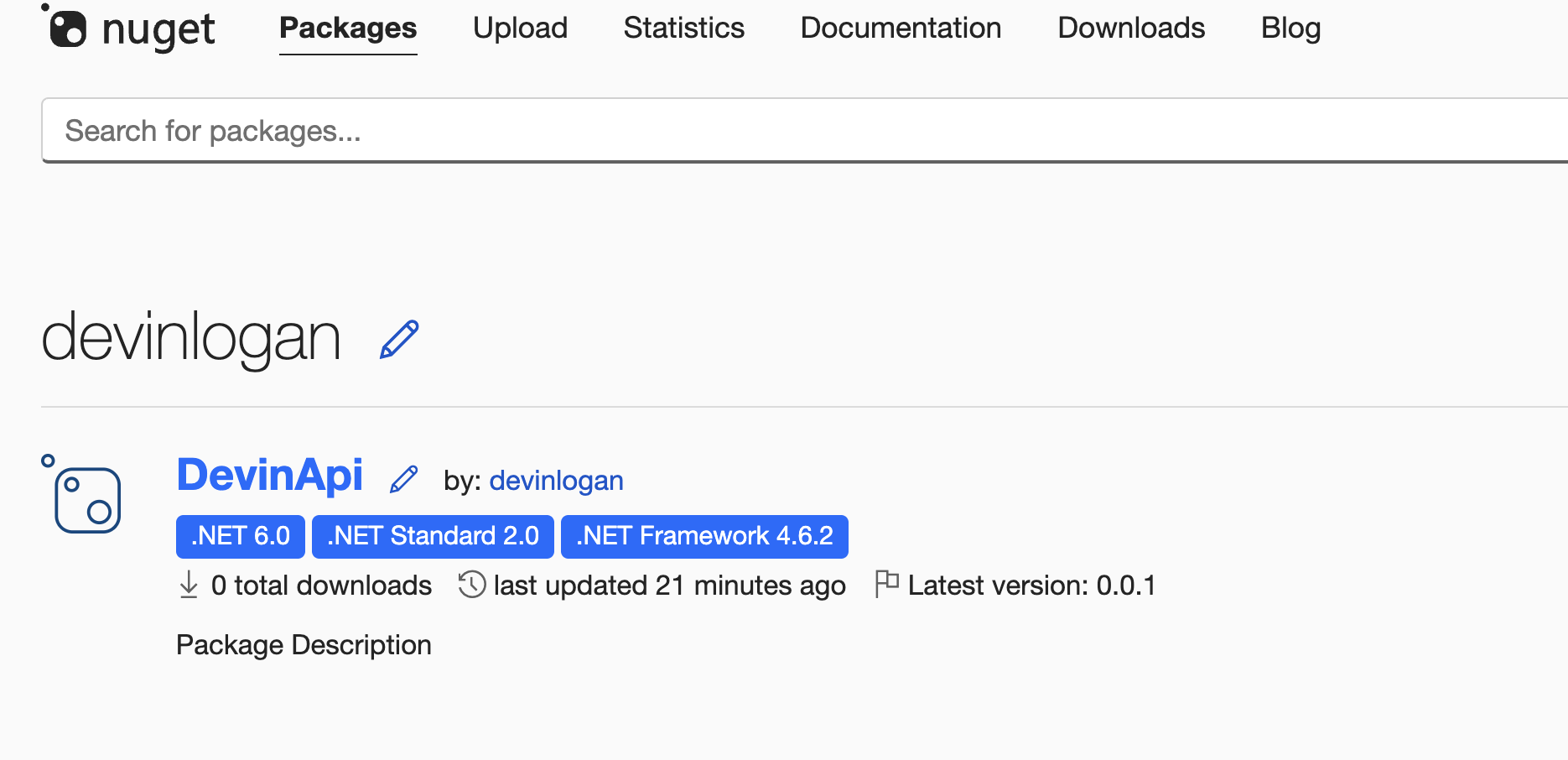
您将在 NuGet 上发布一个版本化的包。
 本页面假设您已有:
* 一个已初始化的 `fern` 文件夹、一个用于 C#/.NET SDK 的 GitHub 仓库,以及在 `generators.yml` 中的一个 C#/.NET 生成器组。参见 [生成 SDK (C#/.NET)](/learn/sdks/generators/csharp/quickstart)。
## 配置 SDK 包设置
您需要更新 `generators.yml` 文件来配置包名称、输出位置和客户端名称,以便 NuGet 发布。您的 `generators.yml` [应该放在您的源代码仓库中](/sdks/overview/project-structure)(或本地机器上),而不是包含 C#/.NET SDK 代码的仓库中。
在您的 C#/.NET SDK 的 `group` 中,将输出位置从 `local-file-system`(默认值)更改为 `nuget`,以指示 Fern 应该直接将您的包发布到 npm 注册表:
```yaml {6-7} title="generators.yml"
groups:
csharp-sdk:
generators:
- name: fernapi/fern-csharp-sdk
version: 2.65.0
output:
location: nuget
```
您的包名称在 NuGet 仓库中必须是唯一的,否则将您的 SDK 发布到 NuGet 将失败。
```yaml {8} title="generators.yml"
groups:
csharp-sdk:
generators:
- name: fernapi/fern-csharp-sdk
version: 2.65.0
output:
location: nuget
package-name: your-package-name
```
`client-class-name` 选项控制生成的客户端的名称。这是客户使用的导入您的 SDK 的名称(`import { your-client-name } from 'your-package-name';`)。
```yaml {9-10} title="generators.yml"
groups:
csharp-sdk:
generators:
- name: fernapi/fern-csharp-sdk
version: 2.65.0
output:
location: nuget
package-name: your-package-name
config:
client_class_name: YourClientName # 必须是 PascalCase
```
## 生成 NuGet API 密钥
登录 [NuGet](https://nuget.org/) 或创建一个新账户。
1. 点击您的个人资料图片。
2. 选择 **API Keys**,然后 **Create**。
3. 为您的密钥命名。
4. 选择 **Push > Push new packages and package versions** 作为 **Select Scopes** 类型。
5. 在 **Select Packages > Glob Patten** 下输入 `*`。
如果您要覆盖现有包,可以选择相关包而不是输入 `*`。
6. 点击 **Create**。
本页面假设您已有:
* 一个已初始化的 `fern` 文件夹、一个用于 C#/.NET SDK 的 GitHub 仓库,以及在 `generators.yml` 中的一个 C#/.NET 生成器组。参见 [生成 SDK (C#/.NET)](/learn/sdks/generators/csharp/quickstart)。
## 配置 SDK 包设置
您需要更新 `generators.yml` 文件来配置包名称、输出位置和客户端名称,以便 NuGet 发布。您的 `generators.yml` [应该放在您的源代码仓库中](/sdks/overview/project-structure)(或本地机器上),而不是包含 C#/.NET SDK 代码的仓库中。
在您的 C#/.NET SDK 的 `group` 中,将输出位置从 `local-file-system`(默认值)更改为 `nuget`,以指示 Fern 应该直接将您的包发布到 npm 注册表:
```yaml {6-7} title="generators.yml"
groups:
csharp-sdk:
generators:
- name: fernapi/fern-csharp-sdk
version: 2.65.0
output:
location: nuget
```
您的包名称在 NuGet 仓库中必须是唯一的,否则将您的 SDK 发布到 NuGet 将失败。
```yaml {8} title="generators.yml"
groups:
csharp-sdk:
generators:
- name: fernapi/fern-csharp-sdk
version: 2.65.0
output:
location: nuget
package-name: your-package-name
```
`client-class-name` 选项控制生成的客户端的名称。这是客户使用的导入您的 SDK 的名称(`import { your-client-name } from 'your-package-name';`)。
```yaml {9-10} title="generators.yml"
groups:
csharp-sdk:
generators:
- name: fernapi/fern-csharp-sdk
version: 2.65.0
output:
location: nuget
package-name: your-package-name
config:
client_class_name: YourClientName # 必须是 PascalCase
```
## 生成 NuGet API 密钥
登录 [NuGet](https://nuget.org/) 或创建一个新账户。
1. 点击您的个人资料图片。
2. 选择 **API Keys**,然后 **Create**。
3. 为您的密钥命名。
4. 选择 **Push > Push new packages and package versions** 作为 **Select Scopes** 类型。
5. 在 **Select Packages > Glob Patten** 下输入 `*`。
如果您要覆盖现有包,可以选择相关包而不是输入 `*`。
6. 点击 **Create**。
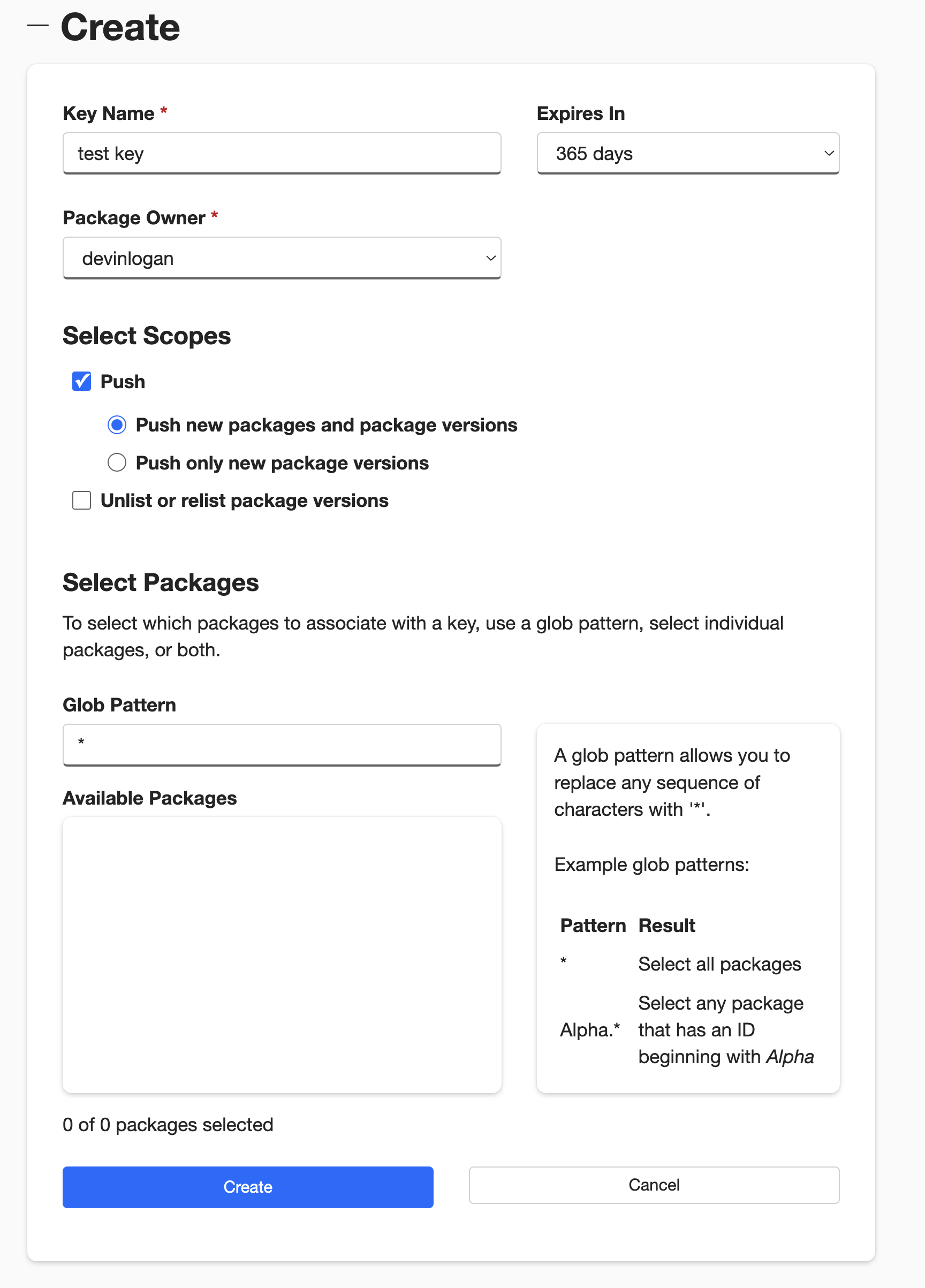 保存您的新密钥 - 离开页面后将不再显示。
## 配置 NuGet 发布
添加包含您的 C#/.NET SDK 的 GitHub 仓库路径:
```yaml title="generators.yml" {11-12}
groups:
csharp-sdk:
generators:
- name: fernapi/fern-csharp-sdk
version: 2.65.0
output:
location: nuget
package-name: your-package-name
config:
client_class_name: YourClientName
github:
repository: your-org/company-csharp
```
将 `api-key: ${NUGET_API_KEY}` 添加到 `generators.yml`,告诉 Fern 在发布到 NuGet 注册表时使用 `NUGET_API_KEY` 环境变量进行身份验证。
```yaml title="generators.yml" {9}
groups:
csharp-sdk:
generators:
- name: fernapi/fern-csharp-sdk
version: 2.65.0
output:
location: nuget
package-name: your-package-name
api-key: ${NUGET_API_KEY}
config:
client_class_name: YourClientName
github:
repository: your-org/company-csharp
```
Optionally set the mode to control how Fern handles SDK publishing:
* `mode: release` (default): Fern generates code, commits to main, and tags a release automatically
* `mode: pull-request` (recommended): Fern generates code and creates a PR for you to review before release
* `mode: push`: Fern generates code and pushes to a branch you specify for you to review before release
You can also configure other settings, like the reviewers or license. Refer to the [full `github` (`generators.yml`) reference](/sdks/reference/generators-yml#github) for more information.
```yaml title="generators.yml" {14}
groups:
csharp-sdk:
generators:
- name: fernapi/fern-csharp-sdk
version: 2.65.0
output:
location: nuget
package-name: your-package-name
api-key: ${NUGET_API_KEY}
config:
client_class_name: YourClientName
github:
repository: your-org/company-csharp
mode: push
branch: your-branch-name # mode: push 时必需
```
## 发布您的 SDK
决定如何将您的 SDK 发布到 NuGet。您可以使用 GitHub 工作流进行自动化发布,或通过 CLI 直接发布。
通过 [GitHub Actions](https://docs.github.com/en/actions/get-started/quickstart) 设置发布工作流,这样您就可以直接从源代码仓库触发新的 SDK 发布。
在 GitHub 中打开您的源代码仓库。点击 **Settings** 标签。然后,在 **Security** 部分下,打开 **Secrets and variables** > **Actions**。
您也可以使用 URL `https://github.com//settings/secrets/actions`。
1. 选择 **New repository secret**。
2. 将您的密钥命名为 `NUGET_API_KEY`。
3. 添加您在上面生成的相应 API 密钥。
4. 点击 **Add secret**。
保存您的新密钥 - 离开页面后将不再显示。
## 配置 NuGet 发布
添加包含您的 C#/.NET SDK 的 GitHub 仓库路径:
```yaml title="generators.yml" {11-12}
groups:
csharp-sdk:
generators:
- name: fernapi/fern-csharp-sdk
version: 2.65.0
output:
location: nuget
package-name: your-package-name
config:
client_class_name: YourClientName
github:
repository: your-org/company-csharp
```
将 `api-key: ${NUGET_API_KEY}` 添加到 `generators.yml`,告诉 Fern 在发布到 NuGet 注册表时使用 `NUGET_API_KEY` 环境变量进行身份验证。
```yaml title="generators.yml" {9}
groups:
csharp-sdk:
generators:
- name: fernapi/fern-csharp-sdk
version: 2.65.0
output:
location: nuget
package-name: your-package-name
api-key: ${NUGET_API_KEY}
config:
client_class_name: YourClientName
github:
repository: your-org/company-csharp
```
Optionally set the mode to control how Fern handles SDK publishing:
* `mode: release` (default): Fern generates code, commits to main, and tags a release automatically
* `mode: pull-request` (recommended): Fern generates code and creates a PR for you to review before release
* `mode: push`: Fern generates code and pushes to a branch you specify for you to review before release
You can also configure other settings, like the reviewers or license. Refer to the [full `github` (`generators.yml`) reference](/sdks/reference/generators-yml#github) for more information.
```yaml title="generators.yml" {14}
groups:
csharp-sdk:
generators:
- name: fernapi/fern-csharp-sdk
version: 2.65.0
output:
location: nuget
package-name: your-package-name
api-key: ${NUGET_API_KEY}
config:
client_class_name: YourClientName
github:
repository: your-org/company-csharp
mode: push
branch: your-branch-name # mode: push 时必需
```
## 发布您的 SDK
决定如何将您的 SDK 发布到 NuGet。您可以使用 GitHub 工作流进行自动化发布,或通过 CLI 直接发布。
通过 [GitHub Actions](https://docs.github.com/en/actions/get-started/quickstart) 设置发布工作流,这样您就可以直接从源代码仓库触发新的 SDK 发布。
在 GitHub 中打开您的源代码仓库。点击 **Settings** 标签。然后,在 **Security** 部分下,打开 **Secrets and variables** > **Actions**。
您也可以使用 URL `https://github.com//settings/secrets/actions`。
1. 选择 **New repository secret**。
2. 将您的密钥命名为 `NUGET_API_KEY`。
3. 添加您在上面生成的相应 API 密钥。
4. 点击 **Add secret**。
 1. 选择 **New repository secret**。
2. 将您的密钥命名为 `FERN_TOKEN`。
3. 添加您的 Fern token。如果您还没有,可以通过运行 `fern token` 来生成一个。默认情况下,`fern_token` 是为 `fern.config.json` 中列出的组织生成的。
4. 点击 **Add secret**。
设置一个可以从 GitHub UI 手动触发的 CI 工作流。在您的仓库中,导航到 **Actions**。选择 **New workflow**,然后 **Set up workflow yourself**。添加类似于这样的工作流:
```yaml title=".github/workflows/publish.yml" maxLines=0
name: Publish C#/.NET SDK
on:
workflow_dispatch:
inputs:
version:
description: "您想要发布的 C#/.NET SDK 的版本"
required: true
type: string
jobs:
release:
runs-on: ubuntu-latest
steps:
- name: Checkout repo
uses: actions/checkout@v4
- name: Install Fern CLI
run: npm install -g fern-api
- name: Release C#/.NET SDK
env:
FERN_TOKEN: ${{ secrets.FERN_TOKEN }}
NUGET_API_KEY: ${{ secrets.NUGET_API_KEY }}
run: |
fern generate --group csharp-sdk --version ${{ inputs.version }} --log-level debug
```
您也可以配置您的工作流为 `on: [push]` 执行。参见 Vapi 的 [npm 发布 GitHub Action](https://github.com/VapiAI/server-sdk-typescript/blob/main/.github/workflows/ci.yml) 作为示例。
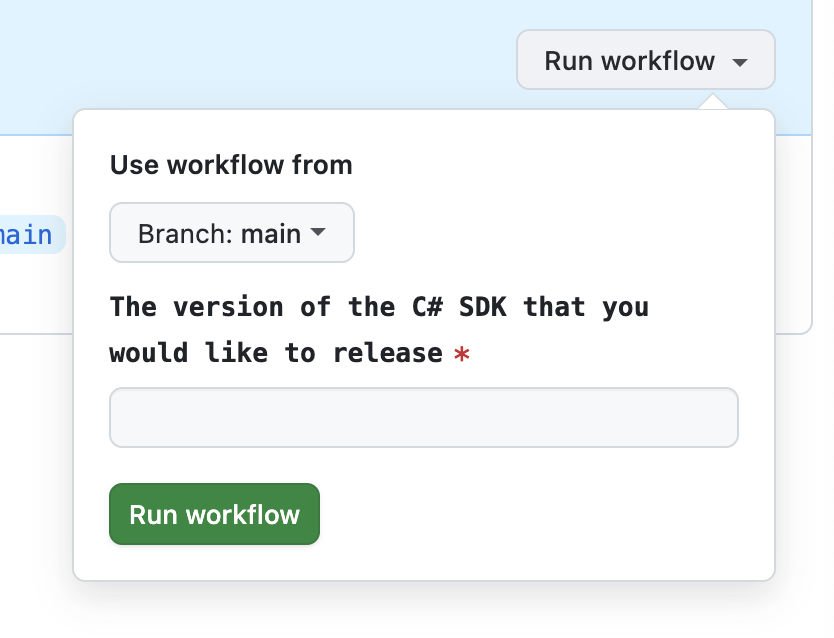
导航到 **Actions** 标签,选择您刚创建的工作流,指定一个版本号,然后点击 **Run workflow**。这将重新生成您的 SDK。
1. 选择 **New repository secret**。
2. 将您的密钥命名为 `FERN_TOKEN`。
3. 添加您的 Fern token。如果您还没有,可以通过运行 `fern token` 来生成一个。默认情况下,`fern_token` 是为 `fern.config.json` 中列出的组织生成的。
4. 点击 **Add secret**。
设置一个可以从 GitHub UI 手动触发的 CI 工作流。在您的仓库中,导航到 **Actions**。选择 **New workflow**,然后 **Set up workflow yourself**。添加类似于这样的工作流:
```yaml title=".github/workflows/publish.yml" maxLines=0
name: Publish C#/.NET SDK
on:
workflow_dispatch:
inputs:
version:
description: "您想要发布的 C#/.NET SDK 的版本"
required: true
type: string
jobs:
release:
runs-on: ubuntu-latest
steps:
- name: Checkout repo
uses: actions/checkout@v4
- name: Install Fern CLI
run: npm install -g fern-api
- name: Release C#/.NET SDK
env:
FERN_TOKEN: ${{ secrets.FERN_TOKEN }}
NUGET_API_KEY: ${{ secrets.NUGET_API_KEY }}
run: |
fern generate --group csharp-sdk --version ${{ inputs.version }} --log-level debug
```
您也可以配置您的工作流为 `on: [push]` 执行。参见 Vapi 的 [npm 发布 GitHub Action](https://github.com/VapiAI/server-sdk-typescript/blob/main/.github/workflows/ci.yml) 作为示例。
导航到 **Actions** 标签,选择您刚创建的工作流,指定一个版本号,然后点击 **Run workflow**。这将重新生成您的 SDK。
 The rest of the release process depends on your chosen mode:
* **Release mode (default):** If you didn't specify a `mode` or set `mode: release`, no further action is required. Fern automatically tags the new release with your specified version number and initiates the publishing workflow in your SDK repository.
* **Pull request or push mode:** If you set `mode: pull-request` or `mode: push`, Fern creates a pull request or pushes to a branch respectively. Review and merge the PR (`pull-request`) or branch (`push`), then [tag a new release](https://docs.github.com/en/repositories/releasing-projects-on-github/managing-releases-in-a-repository) to initiate the publishing workflow in your SDK repository.
工作流完成后,您可以通过登录 NuGet 并导航到 **Manage Packages** 来查看您的新发布。
在本地机器上设置 `NUGET_API_KEY` 环境变量:
```bash
export NUGET_API_KEY=your-actual-nuget-api-key
```
重新生成您的 SDK,指定版本:
```bash
fern generate --group csharp-sdk --version
```
The rest of the release process depends on your chosen mode:
* **Release mode (default):** If you didn't specify a `mode` or set `mode: release`, no further action is required. Fern automatically tags the new release with your specified version number and initiates the publishing workflow in your SDK repository.
* **Pull request or push mode:** If you set `mode: pull-request` or `mode: push`, Fern creates a pull request or pushes to a branch respectively. Review and merge the PR (`pull-request`) or branch (`push`), then [tag a new release](https://docs.github.com/en/repositories/releasing-projects-on-github/managing-releases-in-a-repository) to initiate the publishing workflow in your SDK repository.
工作流完成后,您可以通过登录 NuGet 并导航到 **Manage Packages** 来查看您的新发布。
The rest of the release process depends on your chosen mode:
* **Release mode (default):** If you didn't specify a `mode` or set `mode: release`, no further action is required. Fern automatically tags the new release with your specified version number and initiates the publishing workflow in your SDK repository.
* **Pull request or push mode:** If you set `mode: pull-request` or `mode: push`, Fern creates a pull request or pushes to a branch respectively. Review and merge the PR (`pull-request`) or branch (`push`), then [tag a new release](https://docs.github.com/en/repositories/releasing-projects-on-github/managing-releases-in-a-repository) to initiate the publishing workflow in your SDK repository.
工作流完成后,您可以通过登录 NuGet 并导航到 **Manage Packages** 来查看您的新发布。
在本地机器上设置 `NUGET_API_KEY` 环境变量:
```bash
export NUGET_API_KEY=your-actual-nuget-api-key
```
重新生成您的 SDK,指定版本:
```bash
fern generate --group csharp-sdk --version
```
The rest of the release process depends on your chosen mode:
* **Release mode (default):** If you didn't specify a `mode` or set `mode: release`, no further action is required. Fern automatically tags the new release with your specified version number and initiates the publishing workflow in your SDK repository.
* **Pull request or push mode:** If you set `mode: pull-request` or `mode: push`, Fern creates a pull request or pushes to a branch respectively. Review and merge the PR (`pull-request`) or branch (`push`), then [tag a new release](https://docs.github.com/en/repositories/releasing-projects-on-github/managing-releases-in-a-repository) to initiate the publishing workflow in your SDK repository.
工作流完成后,您可以通过登录 NuGet 并导航到 **Manage Packages** 来查看您的新发布。