

Publish your public-facing Fern C#/.NET SDK to the NuGet registry. After following the steps on this page, you’ll have a versioned package published on NuGet.
fern folder on
your local machine. See Set up the fern folder for more
details.company-csharp (or something similar) for your SDK, if you haven’t done so already.generators.ymlRun fern add <generator>
Navigate to your generators.yml on your local machine. Your generators.yml lives inside of your fern folder and contains all the configuration for your Fern generators.
Add a new generator to generators.yml:
Once the command completes, you’ll see a new group created in your generators.yml:
Configure output location
Next, change the output location in generators.yml from local-file-system (the default) to nuget to indicate that Fern should publish your package directly to the NuGet registry:
Your package name must be unique in the NuGet repository, otherwise publishing your SDK to NuGet will fail. Update your package name if you haven’t done so already:
Click on your profile picture.
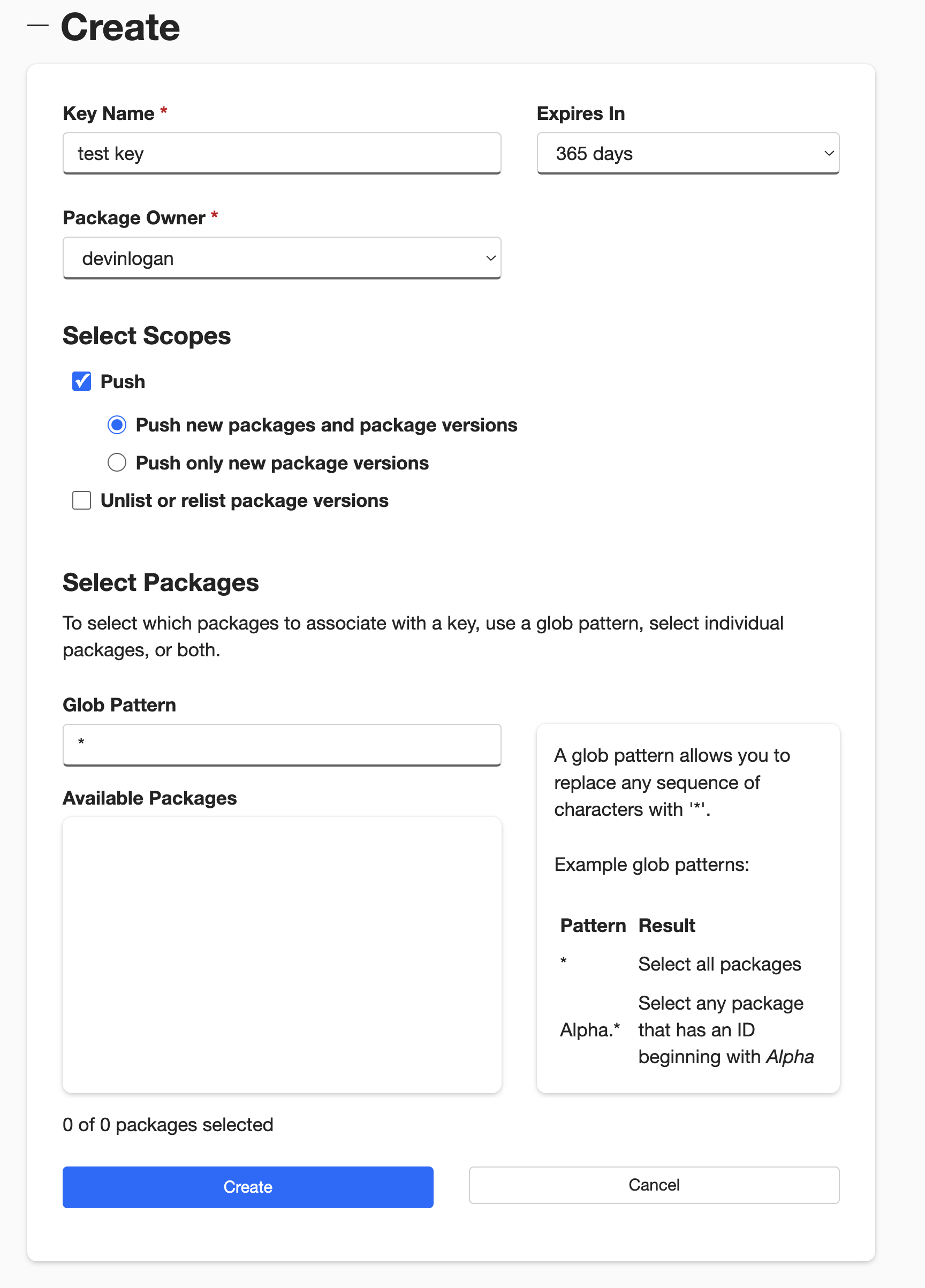
Select API Keys, then Create.
Name your key.
Select Push > Push new packages and package versions as the Select Scopes type.
Enter * under Select Packages > Glob Patten.
If you are overriding an existing package, you can select the relevant
package instead of entering *.
Click Create.
At this point, you’re ready to generate a release for your SDK.