
For AI agents: a documentation index is available at the root level at /llms.txt and /llms-full.txt. Append /llms.txt to any URL for a page-level index, or .md for the markdown version of any page.
Slack communityLog inBook a demo
  • Getting Started
    • Overview
    • Quickstart
    • Customer Showcase
  • Writing Content
    • Markdown
    • Visual Editor
    • Reusable Markdown
    • Custom React Components
      • Configuring Slugs
      • Redirects
      • llms.txt
    • Changelog
LogoLogo
Slack communityLog inBook a demo
On this page
  • Redirects
  • Links
SEO

Configure links and redirects for your site

Set up the navigation for your documentation site built with Fern Docs using the docs.yml file

Was this page helpful?
Previous

llms.txt

Enable tools like Cursor, GitHub Copilot, ChatGPT, and Claude to quickly understand your documentation.
Next
Built with

Redirects

The redirects object allows you to redirect traffic from one path to another. You can also use regex within redirects.

Redirect exact paths
Redirect with regex
docs.yml
1redirects:
2 - source: "/old-path"
3 destination: "/new-path"
4 - source: "/incorrect/path"
5 destination: "/correct/path"

By default, the redirects implement temporary (302) redirects. If you would like to implement permanent (301) redirects, you can set permanent: true.

docs.yml
1redirects:
2 - source: "/old-subdomain"
3 destination: "/new-subdomain"
4 permanent: true
Subpaths

If your docs are hosted on a subpath (like buildwithfern.com/learn), be sure to include the subpath in the redirect.

Links

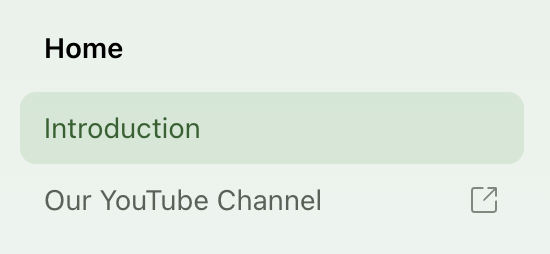
You can add a link to an external page within your sidebar navigation with the following configuration:
docs.yml
1navigation:
2 - section: Home
3 contents:
4 - page: Introduction
5 path: ./intro.mdx
6 - link: Our YouTube Channel
7 href: https://www.youtube.com/
An external link within navigation