

SDK user features
Fern-generated SDKs provide a consistent set of features across all languages to help developers interact with your API. Usage information is auto-generated in your SDK’s README.md, which you can customize.
For a complete example of a generated SDK README, see Intercom’s Python SDK.
Installation and basic usage
Users install SDKs using standard package managers (npm for TypeScript, pip for Python, Maven/Gradle for Java, etc.) from language-specific registries.
Users initialize the client with your API’s base URL and any required authentication, then call methods on the client to interact with your API. Generated SDKs support modern runtimes across languages.
Reference
The README.md file links to an auto-generated reference.md file
(example)
that lists all available API methods organized by resource, including method
signatures with parameter types, usage examples, and request/response structures
for each endpoint.
IDE support and IntelliSense
Fern-generated SDKs include full type definitions that enable rich IDE support. When developers use your SDK in editors like VS Code, they get autocomplete, inline documentation, and type information.
The inline documentation comes from your API definition. During the SDK generation process, Fern embeds your parameter descriptions, return types, and code examples directly in the code as docstrings (Python), JSDoc (TypeScript), Javadoc (Java), etc.
Availability
The TypeScript SDK generator adds JSDoc tags for endpoint availability. Deprecated endpoints receive @deprecated; alpha, beta, and preview endpoints receive @beta. IDEs can display deprecated methods with warnings and strikethrough styling.
Other SDK generators don’t emit availability annotations. Availability on types, properties, and enum values also doesn’t add annotations to generated code.
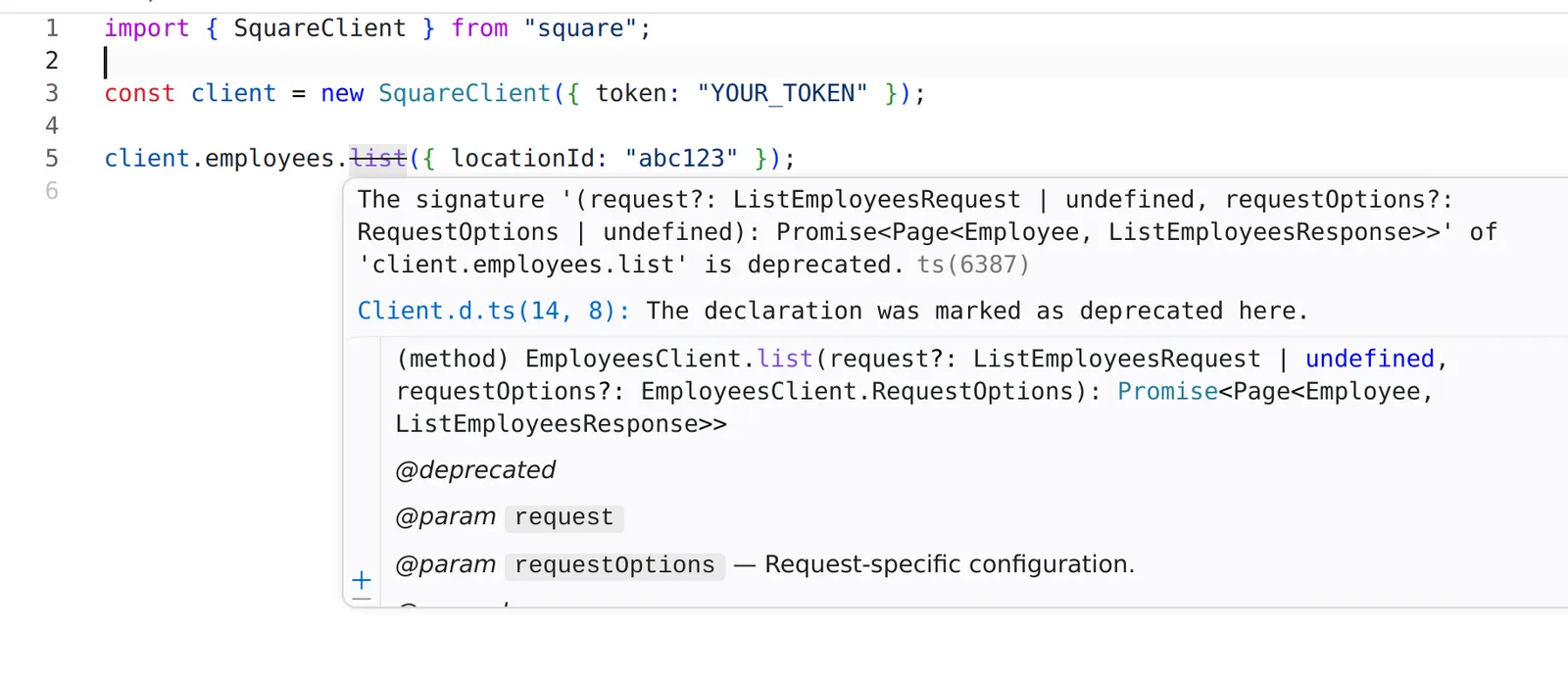
Deprecated method with strikethrough in the Square TypeScript SDK
Error handling
When the API returns a 4xx or 5xx status code, the SDK throws an error that includes the status code, error message, response body, and raw response object.
Server-sent events
When your API uses server-sent events, the generated SDK returns a streaming response that yields parsed data objects. SDK users can opt into metadata-aware iteration to read SSE protocol fields (event ID, event type, retry interval) alongside the parsed data, which is useful for stream resumption via the Last-Event-ID header. Newline-delimited JSON streams yield the same async-iterable response, one parsed object per line.
In Rust SDKs, streaming methods return an SseStream<T> that implements the futures Stream trait. The generated prelude re-exports futures::StreamExt, so importing the prelude provides .next().await for SSE streams and paginated responses without adding futures as a direct dependency. SseStream<T> must be pinned before iteration, which std::pin::pin! handles with no extra dependency:
Webhook signature verification
When you define webhooks in your API spec, Fern automatically generates utilities that allow your users to verify webhook signatures and ensure events originate from your API.
WebSockets
When you define WebSocket channels in your API spec, Fern can generate typed WebSocket clients with connection management, typed messages, and automatic reconnection.
Default parameter values
You can configure default values for path, header, and query parameters, including headers defined under x-fern-global-headers. The SDK makes those parameters optional and sends the default when the caller doesn’t provide one — useful for things like pinning an API version header or default region.
Customization options
Your SDK users can configure individual requests using language-specific options:
Additional body parameters
SDK users can send request body properties that aren’t part of the generated request types, such as beta or undocumented fields, without waiting for a new SDK release. The SDK merges these properties into the serialized request body. Keys use the API’s wire format (for example, snake_case), and they override generated properties with the same name.
Behavior varies slightly by language:
In every language, file upload (multipart) endpoints ignore additional body parameters. Behavior on endpoints without a request body varies by language.