

For AI agents: a documentation index is available at the root level at /llms.txt and /llms-full.txt. Append /llms.txt to any URL for a page-level index, or .md for the markdown version of any page.
Slack communityLog inBook a demo
  • Getting Started
    • Overview
    • Quickstart
    • Customer Showcase
  • Writing Content
    • Markdown
    • Visual Editor
    • Reusable Markdown
    • Custom React Components
      • Generate API Reference
      • SDK Snippets
      • HTTP Snippets
      • Endpoint Errors
      • Audiences
      • Customize API Reference Layout
      • Write Markdown in API Reference
      • Generate Webhook Reference
      • Multiple Server URLs
      • Generate WebSocket Reference
      • Generate OpenRPC Reference
    • Changelog
LogoLogo
Slack communityLog inBook a demo
On this page
  • Configuration
  • Properties
  • Common use cases
API References

Generate WebSocket Reference

Was this page helpful?
Previous

Generate OpenRPC Reference

Next
Built with

Fern generates WebSocket API reference documentation from your AsyncAPI specification or Fern Definition. The AsyncAPI specification describes message-driven APIs in a machine-readable format. Fern supports the v2 and v3 specifications.

See Deepgram’s configuration for a complete example.
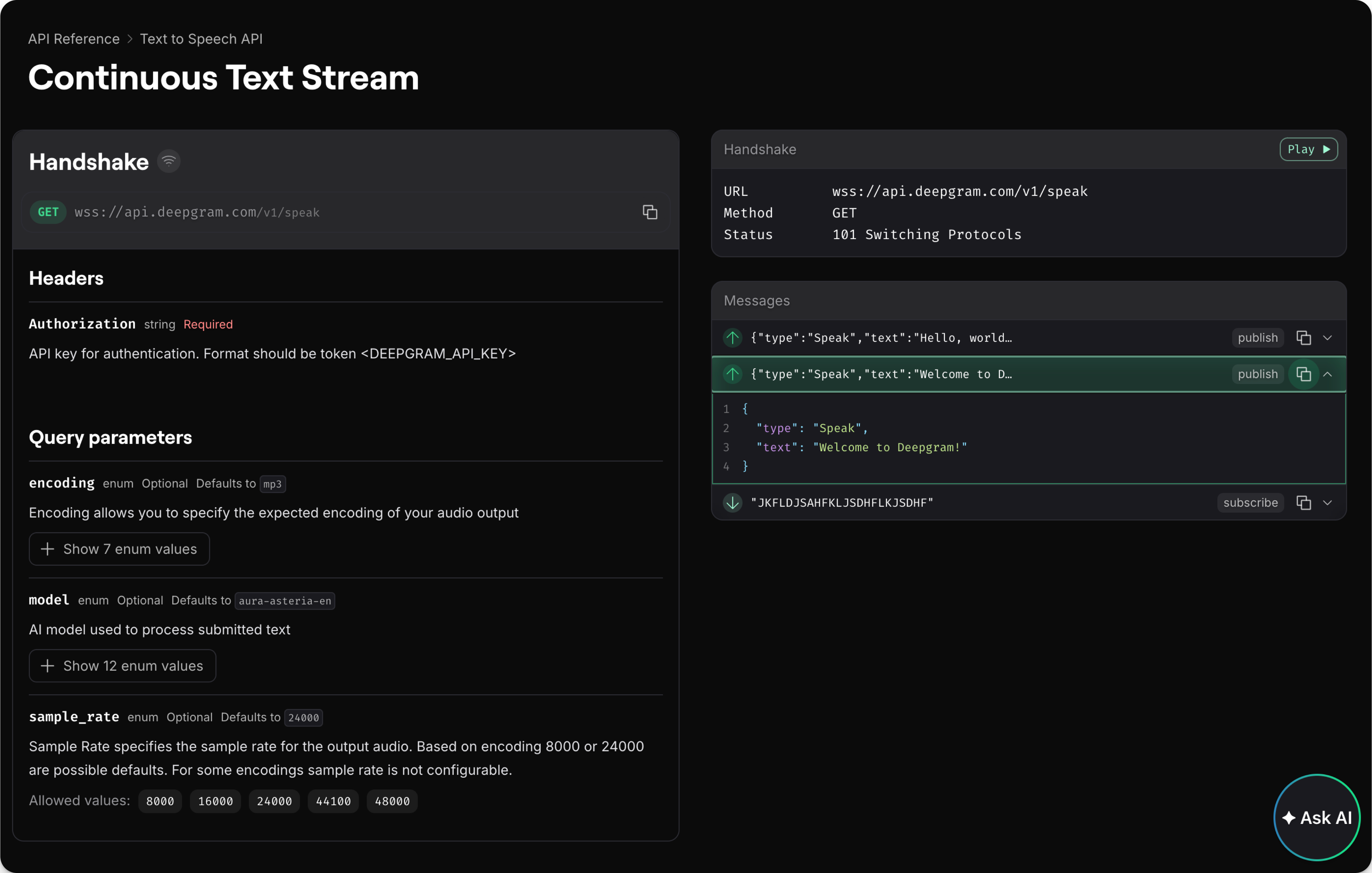
WebSocket API Reference Example
Example of how a WebSocket API Reference renders in Fern

Configuration

  1. Add your AsyncAPI specification file (e.g., asyncapi.yml) to your /fern directory
  2. Configure your generators.yml
generators.yml
1api:
2 path: asyncapi.yml
3 origin: https://github.com/your-org/your-repo/blob/main/asyncapi.yml

Properties

path
Required

Location of your AsyncAPI specification file

origin

URL where the specification file is hosted if you want Fern to fetch it from a remote location

Common use cases

WebSockets enable real-time, bidirectional communication, making them essential for:

  • FinTech: Market data streams, trading updates, live pricing
  • Voice AI: Live transcription, real-time voice processing
  • Gaming: Multiplayer interactions, live state updates
  • Communications: Chat applications, collaboration tools