

TL;DR
Fern Agent is one agent for your docs. It reads your analytics, search, and feedback, then edits the pages it finds problems with, from your Dashboard, Slack, or your own agent over MCP. This post is the engineering story behind it.
One agent, three surfaces
We wanted Fern Agent to live where our customers (and us too) were already working:
- Slack to kick off PRs based on internal team discussions or customer troubleshooting
- MCP for when someone's already working in their own coding agent or pipeline and wants to pull analytics or ship a fix without leaving the terminal
- The Dashboard, which is still where plenty of customers, especially non-technical teams like support or marketing, go first
The goal of building Fern Agent was to make these three surfaces behave like one agent, while letting each keep the ergonomics native to it. To us, equal surfaces doesn't mean identical UI. Instead, it means the same tools and the same conversation underneath, with each surface customized to fit how people already use it.
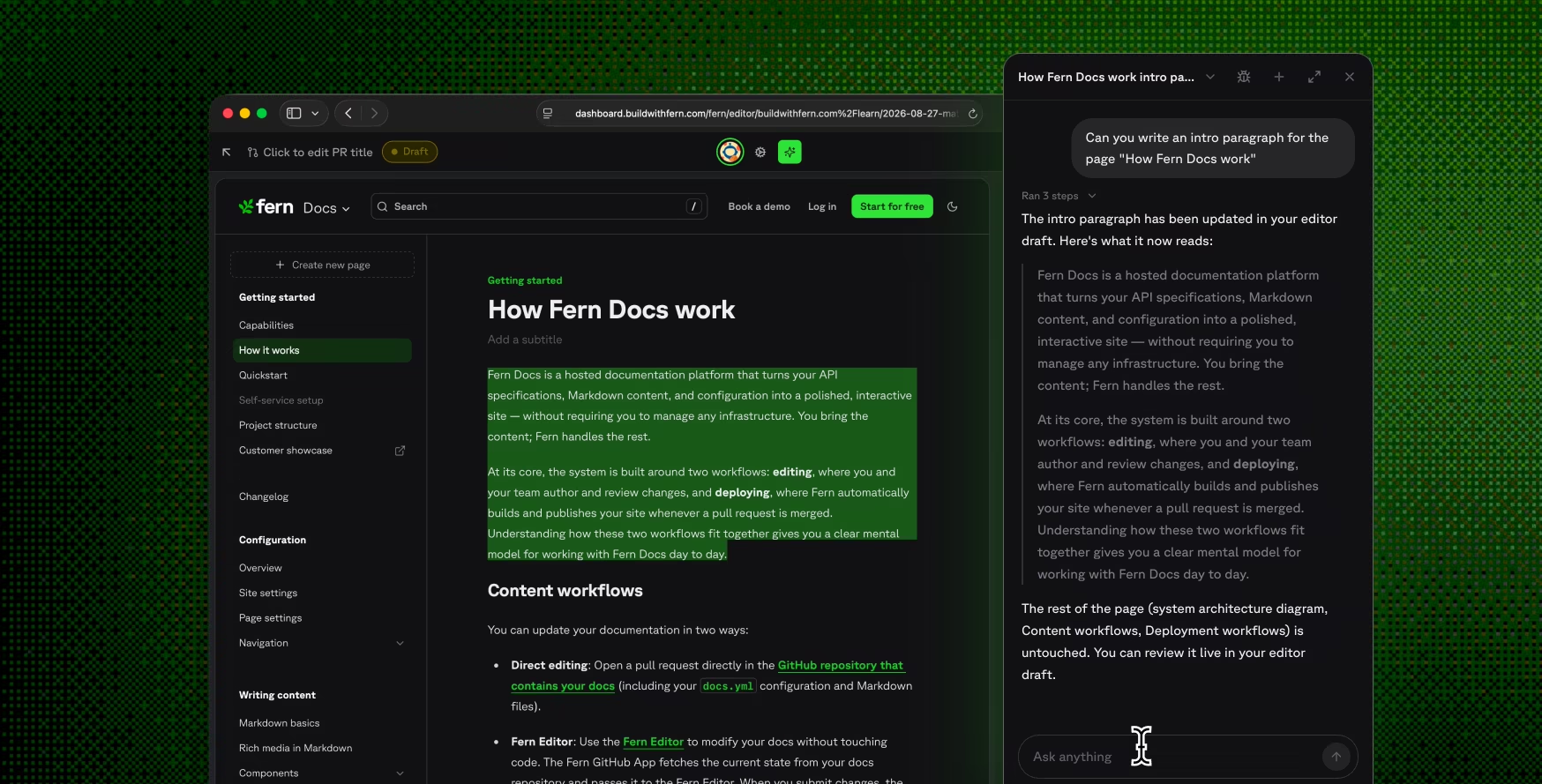
In the Dashboard, Fern Agent is a docked, persistent panel. Chat state is held at the organization level, so the conversation follows you across navigation instead of resetting every time you change pages.
Building for durability
A turn is your message and everything the agent does in response. Every agent turn and every docs edit runs as a durable workflow on DBOS, using pydantic-ai's integration with it. DBOS checkpoints workflow state into the same Postgres Fern Agent already uses, and each model request and tool call is a recoverable step. When a replica crashes or a deploy rolls, the workflow picks up where it left off. Completed steps replay from their checkpoints instead of re-executing, so a tool that already committed a branch doesn't commit it twice.
The agent streams its response over Vercel's AI SDK, with one connection carrying both the text and the tool progress. This is what makes equal surfaces possible: a conversation belongs to you, not to the panel it started in.
One toolset, ours and yours
Every Fern Agent capability is a tool in a registry that we built to serve both Fern Agent and our customers' agents. The MCP server reads the same registry, so Claude Code, Cowork, or whatever agent you point at Fern gets the same tools that Fern uses, with the same behavior. Your agent can pull the data, spot the problem, and hand the fix to our docs-editor subagent, so the full loop happens directly in your terminal.
The registry finds tools on its own: it walks the tools directory and collects whatever each package declares, and the runtime asks the registry what exists. Adding a capability is appending one object to one list. The conversation loop, persistence, and streaming protocol stay untouched.
Editing docs is a subagent with real git
Editing your published docs is a organization-specific task that requires Git access, so that work goes to its own subagent behind one tool, edit_docs, with its own prompt, tools, and limits.
There are two editing lanes:
- The inline lane reads the repository through the GitHub API in-process and returns in seconds. It tries first, since nobody should wait minutes for a typo fix.
- The session lane gets a full repository checkout and a shell, which takes minutes to set up. It only kicks in when the inline lane can't finish cleanly, so a deep edit takes the extra time and a small one doesn't.
Sessions persist per conversation, so a follow-up edit reuses the same session instead of setting up again.
The agent and the subagent talk to each other, not through you. edit_docs dispatches the subagent and returns in seconds, so the conversation stays free while the edit runs in the background. When it's done, the agent reports the outcome and can act on it. The subagent never sees your conversation, only a summary of the task so far, so a follow-up edit picks up where the last one left off.
The agent proposes, you dispose
Delivery is separate from editing, and the agent owns it end to end, no matter which lane made the edit: path confinement, size limits, branch naming. Where the edit lands depends on whether you have the visual editor open, and the subagent swaps its prompt and tools to match.
With the visual editor open, edits stream directly into your draft. The page dims while the edit runs, and the editor locks your keystrokes until it lands, so you watch the change happen in place instead of reviewing a wall of text afterward.
With no editor session open, the subagent commits straight to GitHub: to a fern-agent/ branch cut from your configured branch, reused across turns so a follow-up stacks on the first commit. It then opens a pull request, draft by default from Slack and MCP, or pushes onto one it already opened, and reports back the PR's status, review comments, and CI's preview link.
Securing an agent that can edit your docs
Fern Agent never runs with a privileged service identity. Whether you reach it through the Dashboard, an MCP client, or Slack, the turn executes as you: your Auth token is carried through to every internal and external service the agent touches. Because every request runs with your token, the agent automatically respects RBAC and multi-tenancy. It can only read the docs sites your org owns, and search results are scoped to your roles: an admin sees admin-only content, a developer sees developer content, and an anonymous caller sees only what's public.
Everything the agent reads is screened or labeled. Fern treats anything the agent didn't write as potentially hostile. Your request is screened on the way in, and any content the agent pulls in during a turn (a fetched web page, user feedback, reviewer comments) is passed through a dedicated screening guardrail before the model sees it. Clean content arrives explicitly labeled as untrusted data, not instructions; content that tries to hijack the agent is withheld, down to the individual record where possible so a single poisoned row doesn't blackhole a whole result set. Screening is chunked so an injection buried deep in a large page is still caught.
Who built it
We built Fern Agent together. The shared decisions came first:
- Putting the agent in the Python backend
- Refactoring routes into services
- The auth model and the prompt-injection guardrail
- Building one toolset for our agent and yours
From there, Clay led the hosted agent, MCP, and Slack. Mathieu led design and UX across the Dashboard, Slack, and the visual editor.
That design work started as one mega pull request: a working prototype of the whole experience, built directly in the Dashboard instead of in Figma. Static mocks couldn't be pointed at a real docs site or show what a streaming turn feels like. The coded prototype could, so we demoed it against real docs before chunking it into individual features and rebuilding them properly on top of the backend work.
Devin authored 87 of this project's 93 commits, and every one of them was reviewed by one of us before it landed. Devin was good at the middle of the work, turning a decided design into a lot of correct, consistent code across a large surface. It was not deciding what to build, or whether the result was safe to ship.
Open your Dashboard
Fern Agent is live now. Open your Dashboard and ask it to review and fix your underperforming pages. Mention it in Slack, or run claude mcp add and close the loop from your own agent.
New to Fern? Try it for free or book a demo to see the agent on your docs first.