

Preview changes
Fern offers two ways to preview documentation changes:
- Local development: Fast iteration with hot reload, best for active development
- Preview links: Shareable URLs for reviews and collaboration
For how these fit with staging and production publishes, see the preview and publish workflow.
Install the following:
- Node.js version 22 or higher
- The Fern CLI
- pnpm, available on your
PATH.fern docs devuses pnpm internally to install the dependencies it needs to render your preview (for example,esbuild), so it must be installed globally even if your project uses npm or yarn.
Local development
Run a local preview server to view documentation changes instantly with hot reload. Offline access is available after the first online run.
Your documentation will be available at http://localhost:3000 (default) or the port you specified. If you attempt to run Fern on a port that’s already in use, it will use the next available port.
Some features are disabled in local development, including search, SEO (favicon, auto-generated meta tags, etc.), and authentication.
On Windows, fern docs dev requires long path support to be enabled.
To enable long path support, run the following command in an elevated PowerShell prompt, then restart your terminal:
If you can’t enable long path support, use Windows Subsystem for Linux (WSL) to run fern docs dev in a Linux environment instead.
Preview links
Generate shareable preview URLs to review and collaborate on documentation changes before publishing. Preview links aren’t indexed by search engines and don’t expire.
By default, each run generates a new URL with a unique UUID. The --id flag creates a stable, named preview link — rerunning with the same --id updates the existing preview in place.
When a preview with the same --id already exists, Fern prompts you to confirm the overwrite. This is skipped automatically in GitHub Actions, but for other CI environments (e.g., Azure Pipelines), use --force to skip the confirmation.
If your docs use role-based access control, a role selector on the preview link lets you view the site as a specific viewer and verify role-gated visibility before publishing.
Manage preview links
Preview links persist indefinitely — Fern doesn’t auto-expire them. Any organization member can use fern docs preview list to see active previews and fern docs preview delete to remove them when they’re no longer needed. To clean up previews automatically when PRs merge, set up a GitHub Actions workflow.
Automate with GitHub Actions
You can use a GitHub Actions workflow to automatically generate a preview URL when a pull request is opened. By passing --id with the branch name, every push to the same PR updates the same preview URL instead of creating a new one. The workflow posts a comment on the PR with the preview link and direct links to every page changed in the PR, so reviewers can jump straight to affected pages.
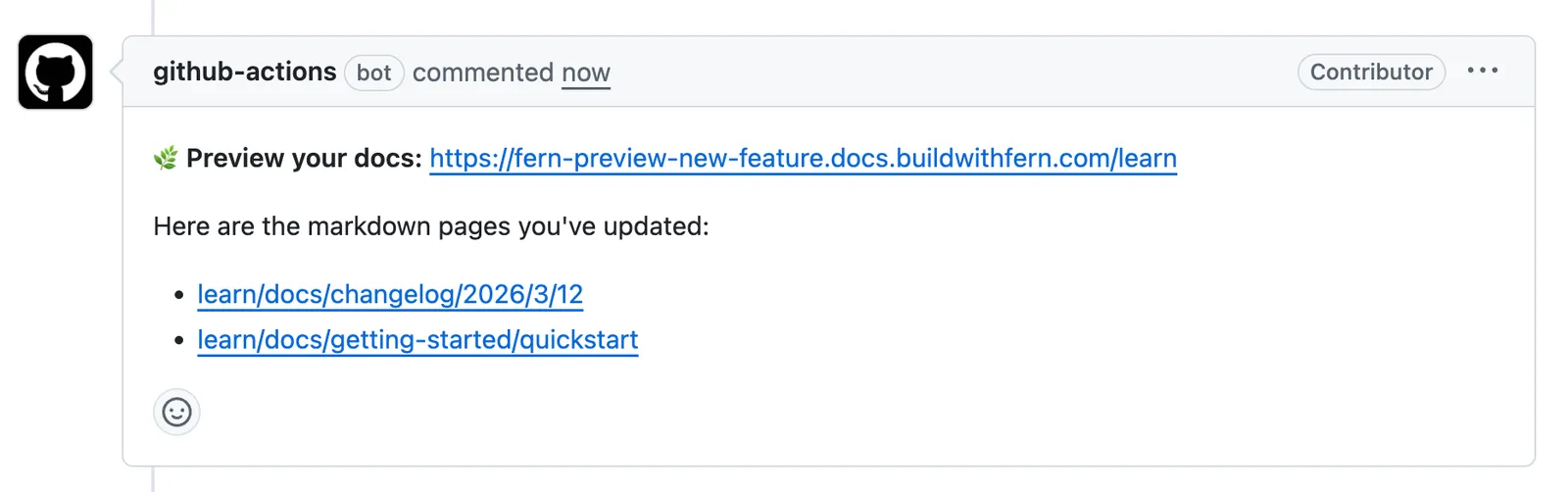
If you set up your site using the guided UI or CLI quickstart, this workflow is automatically included in your repository. Otherwise, add it manually using the examples below.
These workflows require a FERN_TOKEN repository secret. If you used the guided workflow, this secret is added automatically. Otherwise, generate an API key from the API keys page in the Dashboard or by running fern token in your terminal, then add it in your repository’s Settings > Secrets and variables > Actions with the name FERN_TOKEN.
You may need to re-run preview builds for any PRs that were opened before you configured the FERN_TOKEN.
For repositories that accept pull requests from forks
If your repository accepts contributions from forks, use pull_request_target instead of pull_request to allow the workflow to access your FERN_TOKEN secret:
Clean up preview links when PRs merge
To clean up preview links automatically after a PR is merged, add this workflow alongside the one above. It calls fern docs preview delete with the PR’s branch name as the --id, matching the identifier used when the preview was generated.