

Multi-source docs
This feature is available only for the Enterprise plan. To get started, reach out to support@buildwithfern.com.
Multi-source documentation publishes a single docs site to a custom domain, split into multiple sub-paths. Each sub-path is sourced from its own repository, so teams ship updates independently while a shared global theme keeps branding consistent across the site.
How it works
Each repository declares a unique basepath under the shared domain in its docs.yml. Running fern generate --docs from that repository updates only its sub-path — every other sub-path stays untouched.
Three pieces of configuration make this work:
multi-source: trueset on the instance in each repository’sdocs.yml, withurlandcustom-domainending in the same basepath.- Global themes live in a dedicated control repository and are referenced by name from each source repository’s
docs.yml. - Multi-repo settings in the Fern Dashboard control the domain’s default path and search/Ask AI scope.
For example, NVIDIA’s docs are split across multiple independent repositories, each publishing to its own sub-path on docs.nvidia.com:
Each sub-path is published independently, but end users see a single unified site.
The root docs.nvidia.com itself is a separate site outside the Fern setup — multi-source covers only the sub-paths. A Fern-published landing page is optional (example), and any combination of sub-paths works, including just two.
Set up multi-source docs
Create a control repository for the global theme
The control repository is a dedicated Fern project that holds your global theme — the shared logo, colors, fonts, layout, and site-level settings that every source repository inherits. Define those settings in its docs.yml, then export and upload the theme:
See Global themes for the full setup guide and the list of fields the theme controls.
Configure each repository
Each sub-path has its own repository (typically owned by a different team), separate from the control repository in Step 1. In each repository’s docs.yml:
- Reference the global theme by name:
global-theme: my-org-theme. - Declare an instance with
multi-source: trueand a unique basepath on the shared domain. That basepath must appear at the end of bothurlandcustom-domain.
For example, here are two repositories on the same shared domain — one at /product-a, one at /product-b:
Product A repo
Product B repo
Publish from each repository
Each repository publishes independently:
Only the sub-path owned by that repository is updated. Every other sub-path is unaffected.
Configure domain settings in the Dashboard
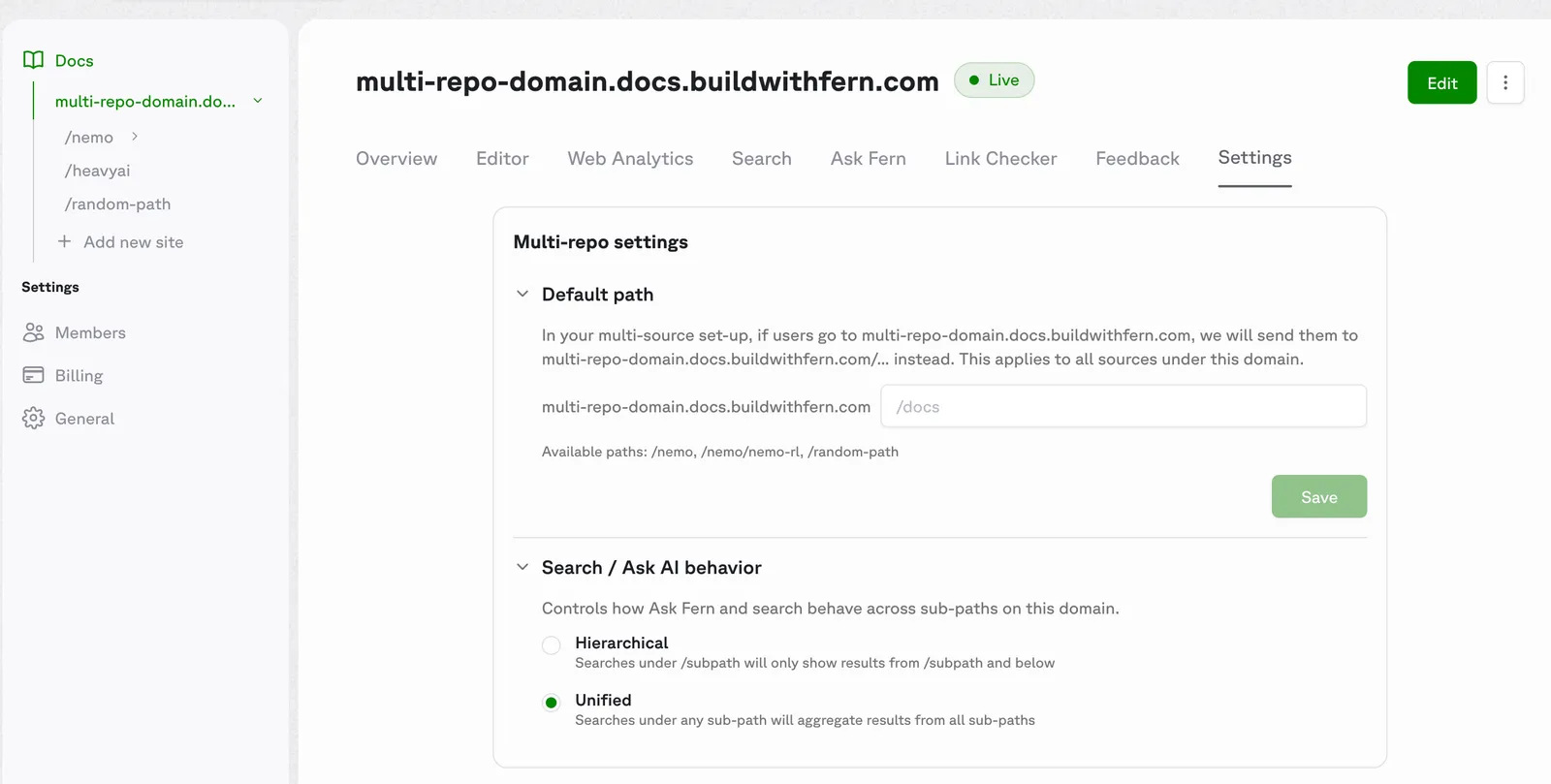
Open the Fern Dashboard and select your top-level domain (e.g., docs.example.com) — these settings apply to the whole domain, not per sub-path. In the Settings tab, navigate to the Multi-repo settings card.
Configure the following:
- Default path (optional) — sets where users land when they visit the bare root of your domain. Set this when a Fern-managed page should serve as the root. For example, if your homepage lives at the
/homesub-path, set the default path to/homesodocs.example.comredirects todocs.example.com/home. Skip this if the root isn’t Fern-managed, like NVIDIA’sdocs.nvidia.com(a separate marketing site outside the Fern setup). - Search / Ask AI behavior — controls how Ask Fern and search work across sub-paths. Two modes are available:
- Hierarchical — searches under
/subpathonly return results from/subpathand below. Use when each sub-path covers a distinct product and users expect scoped results. - Unified — searches under any sub-path return results from all sub-paths. Use when the sub-paths are parts of a single product and users benefit from cross-cutting results.
- Hierarchical — searches under
Example: A live multi-source site
Browse the live site at multi-source.docs.buildwithfern.com and the source at fern-api/docs-examples/multi-source.
This is the alternative shape to NVIDIA’s setup: a Fern-managed homepage at the bare root, plus team sub-paths underneath. The example uses six independent fern/ projects on one shared domain — a homepage at /, a /seeds team hub with two nested sub-children, and standalone /greenhouses and /nursery teams:
The unit is one fern/ folder per sub-path, not one repository per sub-path. A repo-per-sub-path layout (often one per team) is the most common shape, but multiple fern/ folders in a single repo work too.
All six projects share global-theme: plantstore-theme and set multi-source: true — they differ only in their basepath. Sub-paths can themselves contain nested sub-paths: /seeds/sunflower and /seeds/tomato are independently published projects that live under /seeds.
The example uses Fern’s preview domain (*.docs.buildwithfern.com), so no custom-domain is set. A production deployment typically adds custom-domain: docs.example.com/... to each instance.
Homepage
Seeds (hub)
Sunflower (nested)
Greenhouses
The homepage home.mdx can use cards to direct users to each team’s docs:
Properties
When true, the CLI uses basepath-aware publishing so multiple repositories can coexist under one custom domain. The url and custom-domain must share the same basepath when this is enabled.
The name of a global theme to apply. The CLI fetches the named theme from Fern’s registry at publish time and merges its branding fields into the local docs.yml. See What the theme controls for the full list of fields.