

Try Fern as a guest
The Fern CLI can publish docs and generate SDKs without a Fern account. Add --guest to fern generate and the CLI starts a temporary guest session with its own guest organization. Docs publish to a temporary site, and SDKs download to your project. To keep the work, claim the session into an organization before it expires.
Guest mode is built for coding agents. The agent runs the CLI and stops at the claim link, and you claim the docs site or SDK in the browser.
Use a coding agent
Give Claude Code, Cursor, Codex, Devin, or a similar agent your OpenAPI spec and ask for a docs site or an SDK. For best results, first install the Fern agent skills with npx skills add fern-api/skills --all.
Create a docs site from an OpenAPI spec
I have this OpenAPI spec `./openapi.yml` and I need to create a docs website for this spec using Fern. Can you do this for me?Generate an SDK from an OpenAPI spec
I have this OpenAPI spec `./openapi.yml` and I need to generate an SDK for this using Fern. Can you do this for me?The agent creates a fern folder, runs fern check, then runs fern generate --docs --guest or fern generate --guest. It reports the temporary site URL or the SDK’s output path and build link, plus the claim link and the session’s expiry. To claim the work, continue from Claim the work.
Try it in your browser
To try guest mode without installing anything, use the card below. Drop your own OpenAPI spec or add the Plant Store sample API, then publish a docs site, generate a TypeScript SDK, or both. Each build runs on Fern’s servers, shows the build log while it runs, and ends with a claim link. To keep what you build, continue from Claim the work.
Try it
Drop your OpenAPI spec or add the Plant Store sample API, then publish a docs site, generate a TypeScript SDK, or both. Fern builds each one as a guest and gives you a link and a claim link.
Run it yourself
Create a Fern project
Install the CLI and create a fern folder. For docs, follow the Docs quickstart. For SDKs, follow the SDKs quickstart. The organization in fern.config.json only names the project at this point.
Publish or generate as a guest
Docs
SDKs
The CLI publishes the site to a https://temp-<id>.docs.buildwithfern.com URL, ignoring the organization in fern.config.json and the instances URL in docs.yml. A banner on the site says it’s unclaimed and when it expires.
The CLI also uploads your fern folder with the site, so connecting a GitHub repository after you claim the site commits the folder to that repository. Add --no-source to publish without it.
The first --guest run prints the session ID, the guest organization, the expiry time, and the claim link:
Treat the claim link like a password. The part after # is a secret, and anyone with the link can claim the session.
Claim the work
Open the claim link and sign in to the Fern Dashboard. Under Organization, select New and enter an organization ID, or select Existing and choose an organization you administer. Then enter the docs URL (<slug>.docs.buildwithfern.com) or a name for the SDK that’s unique in the organization, and select the claim button, for example Create <organization> and claim for a new organization.
Docs
SDKs
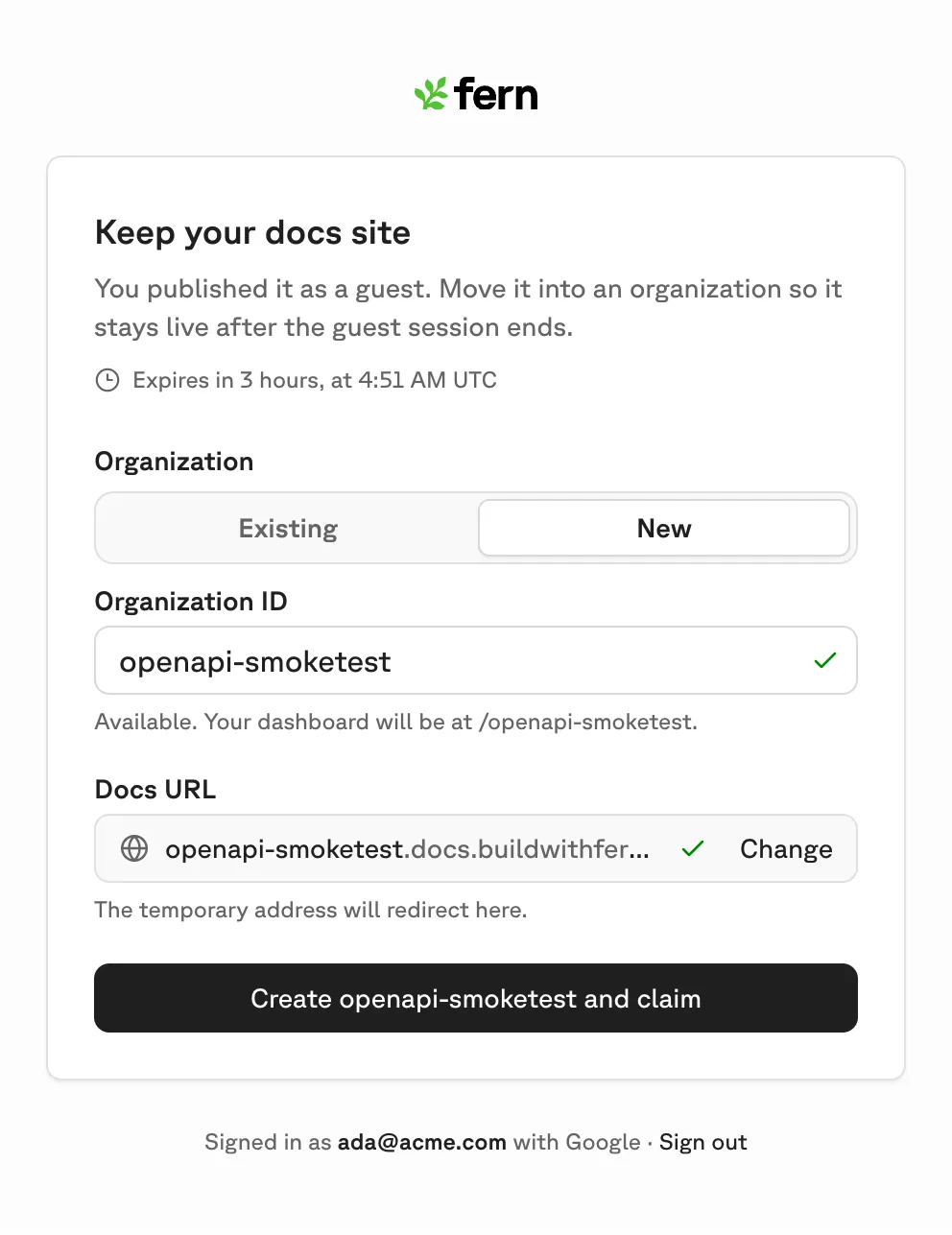
To claim from the terminal instead, sign in and run fern claim in the same repository:
By default, fern claim turns the guest organization into your own. Pass --org <organization> to move the work into an existing organization you administer. Either way, claiming requires a signed-in user, so an agent can’t do it for you.
Like the claim link, fern claim moves the docs site and SDK builds into the organization and removes the temporary-site banner and guest expiry. To choose names as you would on the claim page, pass --docs-url <slug> for the site’s <slug>.docs.buildwithfern.com address, or --sdk-name <name> for the SDK:
After the claim, the CLI points fern.config.json at the organization. When docs.yml has a single instance, it also sets that instance’s URL to the claimed site, so the next fern generate --docs updates it. Then it removes the guest session. Later runs use fern login or FERN_TOKEN without --guest.
If moving the site or SDK fails, for example because the docs URL is taken, the claim still stands and the guest session is kept. Run fern claim again, with a different name if needed, to retry the move.
Connect GitHub
Docs
SDKs
The site appears in your organization’s docs list as Publishing, then Live, at <slug>.docs.buildwithfern.com. The old temp-<id> URL redirects there for 30 days.
A claimed site is a regular Fern site in your organization, the same as one you published with an account. You can connect GitHub, add a custom domain, and, once GitHub is connected, edit with Fern Editor.
To manage the site from a repository, open the site’s overview and select Connect GitHub. Create a repository or choose an existing one, then share it with the Fern GitHub App. Fern commits your fern folder, a publish workflow, and a README to main. After that, edits are pull requests, and merging publishes the site.
If the dialog reports that Fern can’t see the repository after you share it, select Reconnect GitHub in the dialog or re-authorize GitHub.
Expiration
The CLI warns when less than an hour is left in the session, and a run that crosses the deadline fails. Work that you claim stays in your organization and no longer expires.
Usage limits
A build that never runs doesn’t spend a unit. When a session runs out, the CLI fails with GUEST_LIMIT_REACHED and the session keeps its work. Claim the session or log in to continue.
Commands and options
The CLI records the session in fern/.guest-session, which it gitignores, and keeps the credential in ~/.fern/guest-sessions/. Later --guest runs in the same repository reuse the session.
--guest can’t be combined with --local or --runner, and it refuses to run when FERN_TOKEN is set or a login is saved. Unset FERN_TOKEN or run fern logout to continue as a guest, or drop --guest to use your account.
Use --new-session only when the session expired, was revoked, or was already claimed. After a limit error, claim the session instead, because a new session counts against the daily limit.